
How to Convert More Leads When You're Short on Time

Want to convert more leads without spending hours on manual tasks? The key is to act fast, focus on high-value prospects, and use tools that automate repetitive processes. Here’s what you need to know:
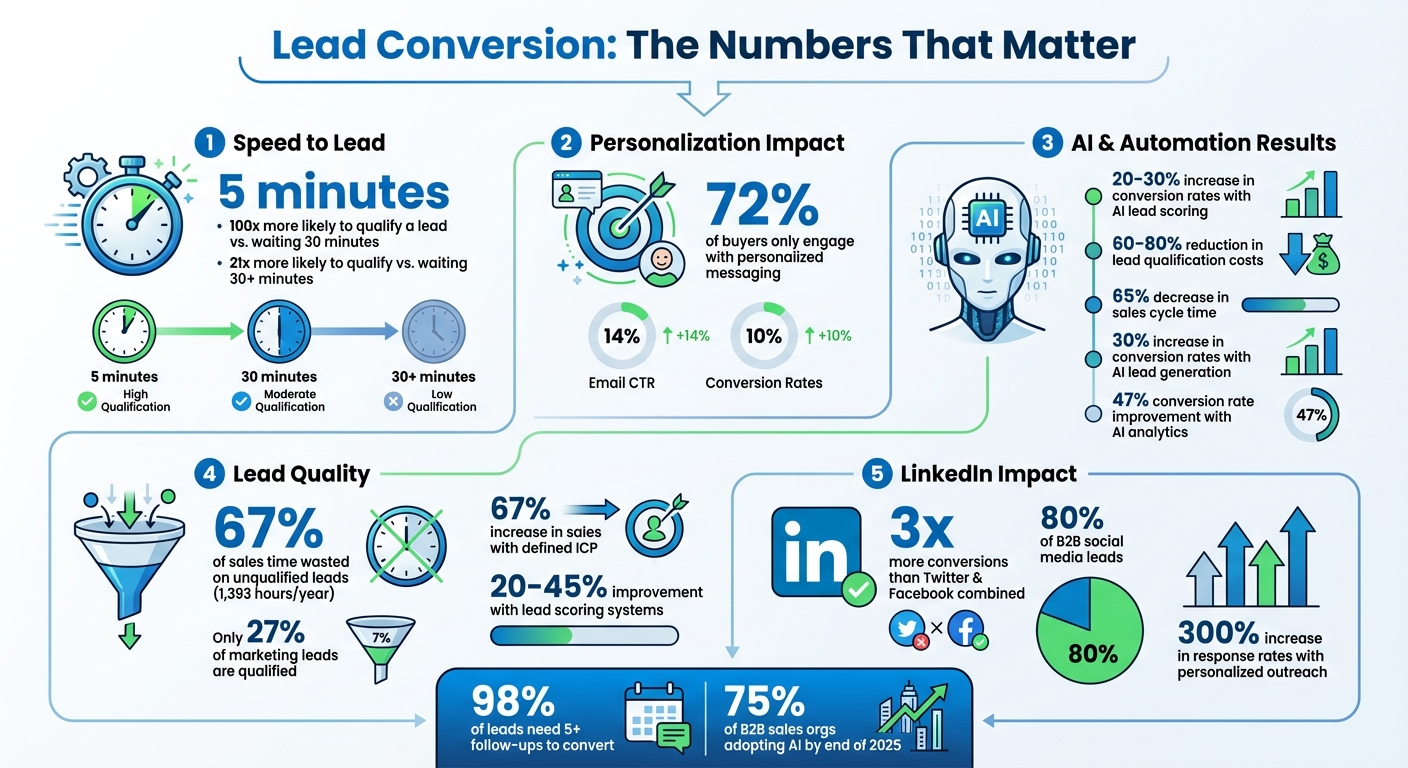
- Speed matters: Responding to a lead within five minutes makes you 100x more likely to qualify them compared to waiting 30 minutes.
- Focus on quality leads: Use frameworks like BANT or AI-powered scoring to prioritize prospects with real potential.
- Leverage automation: AI tools can handle lead capture, qualification, and follow-ups, freeing you to focus on closing deals.
- Personalization works: 72% of buyers engage only with personalized messaging. AI can help craft tailored outreach at scale.
- Track metrics: Monitor conversion rates, response times, and lead quality to refine your process.
With the right strategies and tools, you can save time and close more deals - even with a packed schedule.
Lead Conversion Statistics: Speed, Personalization, and AI Impact
Identify and Qualify High-Value Leads Quickly
Set Up Simple Qualification Criteria
Not all leads deserve the same level of attention. In fact, sales teams lose 67% of their time - roughly 1,393 hours each year - chasing leads that go nowhere [9][12]. The solution? Create a simple checklist to weed out unqualified leads before you invest time and resources.
A good starting point is using a proven framework. For straightforward sales, BANT (Budget, Authority, Need, Timeline) works well. If you're dealing with consultative selling that requires addressing deeper challenges, consider CHAMP (Challenges, Authority, Money, Prioritization) [11][12][16]. For complex B2B deals with multiple stakeholders, MEDDIC (Metrics, Economic Buyer, Decision Criteria, Decision Process, Identify Pain, Champion) provides a structured roadmap for navigating longer sales cycles [11][15].
Your qualification criteria should answer three key questions: Who is the lead? What service or product do they need? Where did they come from? [9]. Incorporate firmographic details like industry, company size, and revenue, along with demographic factors such as job title and decision-making authority [11][13][14]. Look for growth signals too - recent funding, new leadership hires, or active recruitment often indicate buying potential [11].
Don't forget to apply negative scoring for red flags. These might include personal email addresses, out-of-region contacts, or leads that have been inactive for an extended period [9][12]. As Kenny Powell, Sr. ADR at UserGems, explains:
"The first step is to have a solid understanding of your ICP. You need to know who buys from you, why they buy, and what foundation it takes for those who do buy to be successful." [15]
By defining what makes a lead valuable, you’ll create a streamlined process for evaluating prospects. This clarity ensures you’re focusing on leads with real potential.
Gather the Right Data Points
Once you’ve established your criteria, the next step is collecting the right data to score each lead effectively. Start with explicit data gathered from forms - like company name, role, budget range, and timeline. Then, supplement it with implicit data, such as user behavior (e.g., pages visited, downloads, email interactions) [10][13][14]. This combination reveals not just who the lead is, but how engaged they are.
To fill in any gaps, automate data enrichment. AI-powered tools can pull public information from platforms like LinkedIn and Crunchbase, adding details such as funding status, tech stack, and recent hires [11][12][15]. For example, PointClickCare saw a 400% increase in their chat pipeline - generating over $1M in revenue - by leveraging AI for data enrichment. Similarly, Formstack used machine-learning lead scoring to boost chat conversions by 420% [10].
Set up "breakpoint" triggers to alert your team when a lead hits a specific score or takes a high-intent action, like visiting your pricing page or downloading a case study [12]. This helps you focus on leads that are ready to move forward. Keep in mind that only 27% of leads sent by marketing to sales are typically qualified [13], so a strong data collection process is essential for separating serious buyers from casual browsers.
With a well-defined Ideal Customer Profile, businesses can see up to a 67% increase in sales. Additionally, lead scoring systems have been shown to improve conversion rates by 20% to 45% [17][12]. By gathering the right data upfront, you’re not just saving time - you’re setting up a strong foundation for the workflows and strategies that follow.
Automate Lead Capture and Pre-Qualification
Set Up Automated Lead Capture Tools
Did you know that responding to a lead within five minutes makes you 10 times more likely to connect? [22] That’s why automated lead capture tools are game-changers for businesses looking to engage prospects instantly.
AI chatbots and virtual receptionists can work 24/7, engaging potential leads, asking qualifying questions, collecting contact information, and even scheduling meetings - all while you focus on your clients. To keep your communication consistent, look for systems that combine email, LinkedIn, and SMS into a single workflow [18][21].
Instead of asking for extensive details upfront, capture just the email address. Let AI handle the heavy lifting by enriching profiles with data like company size, job title, and verified phone numbers from over 30 sources [18][20]. As Gemma Currier, Senior Vice President of Retail Sales Operations at Guild Mortgage, puts it:
"Keeping up with demand in this increasingly competitive landscape wouldn't be possible without technology. We want to give our loan officers the tools and the data that they need to advise customers and to execute, especially on lead conversion." [6]
Another must-have? Automated scheduling tools. These allow qualified leads to book consultations immediately after being screened, ensuring no opportunity slips through the cracks [18]. With 75% of B2B sales organizations expected to adopt AI-guided selling solutions by the end of 2025 [22], now is the time to act if you want to stay ahead.
Once you’ve captured leads, use AI to score and segment them for more targeted outreach.
Use AI to Score and Segment Leads
AI takes lead scoring to the next level by analyzing thousands of past conversions to predict which leads are most likely to convert. Instead of assigning arbitrary points for actions like downloading a guide, AI generates real-time probability scores (on a 0–100 scale) based on patterns you might not even notice - like the exact sequence of pages a prospect visits before making a purchase [23][24].
Businesses that use AI for lead scoring and targeting have seen conversion rates rise by 20–30%, while cutting lead qualification costs by 60–80% [23]. A great example? Grammarly. By implementing AI lead scoring to analyze user engagement and feature page visits, they achieved an 80% increase in premium lead conversions [25].
AI also excels at segmentation. It categorizes leads by readiness - like “ready to buy” versus “needs nurturing” - or by specific pain points. From there, it triggers tailored follow-ups automatically [26][27]. For instance, HES Fintech leveraged predictive modeling to analyze historical application data, boosting loan application volume by 40% by automating the scoring of loan completion probability [25].
To make the most of AI scoring, set clear thresholds for action. Leads with scores above 85 should go straight to sales outreach, while those scoring between 50 and 70 can enter nurturing sequences [24][25]. And here’s the best part: the system learns as it goes. If high-scoring leads don’t convert, it adjusts the weight of those traits automatically [23][24].
How Brandbase Simplifies Lead Capture

Brandbase takes the hassle out of lead capture and management by combining these tools into one easy-to-use platform. It offers custom landing pages designed to maximize conversions and deploys an AI assistant that engages with prospects around the clock. When a lead shows high intent, the AI skips the back-and-forth and routes them directly to your calendar for a meeting.
The Essential plan ($99/month) includes a custom AI assistant, lead capture forms, hosting, maintenance, analytics, and unlimited edits. The Pro plan ($499/month) steps it up with unlimited landing pages and AI-powered LinkedIn campaigns for personalized outreach. Both plans come with built-in analytics so you can track which sources bring in the best leads and adjust your strategy based on real data.
Use LinkedIn to Convert Leads Faster
Build a LinkedIn Profile That Converts
Think of your LinkedIn profile as more than just a resume - it's a landing page designed to convert visitors into leads. Too many professionals miss this opportunity by simply listing job titles and responsibilities rather than showcasing how they solve problems for their clients.
Start with your headline. Instead of a generic title like "Marketing Consultant at ABC Agency", use a formula that highlights your value, such as: "[Title] at [Company] | Helping [Niche] achieve [Result] via [Method]" [30]. As Eoin Clarke from Salesloop explains:
"Your headline is like a billboard. It needs to be attention-grabbing in a crowded space" [31].
Take Nick Verity, CEO of Cleverly, as an example. His LinkedIn profile emphasizes his achievements, such as helping over 10,000 clients generate $312 million in pipeline revenue and $51.2 million in closed deals. By December 2025, his profile boasted metrics like 224,700+ B2B leads generated for companies like Google and Amazon [28].
Your About section should speak directly to your audience's pain points, back up your claims with results, and end with a clear call to action. Most LinkedIn profiles miss the mark here, focusing too much on the individual rather than the client [28]. Instead, use your Experience section to share mini-case studies that highlight measurable outcomes. The Featured section can act as a "proof vault", showcasing client testimonials, screenshots, or even intro videos [28].
Don’t forget the basics: profiles with five or more skills get 17 times more views and are shared up to 33 times more often [30]. Use a high-quality headshot, create a custom banner image with a clear call-to-action, and clean up your URL to something like linkedin.com/in/yourname [29][30].
Once your profile is optimized, you’re ready to take the next step: using AI for outreach.
Use AI for Personalized Outreach Messages
Generic outreach messages are easy to ignore. AI tools, however, can help you craft personalized messages at scale by analyzing LinkedIn profiles for details like job titles, recent activities, company updates, and mutual connections. This approach can boost response rates by up to 300% compared to traditional methods [32].
For instance, in March 2025, Sarah Chen, a sales executive at a B2B SaaS company, used AI tools to personalize outreach for over 500 prospects each week. Her response rate jumped from 8% to 27%, a 400% improvement in efficiency [32]. Similarly, Alex Patel, a management consultant, saw a 300% increase in engagement by switching from text-based messages to AI-driven personalized videos [32].
AI doesn’t just save time; it enhances the quality of your interactions. Tools can even analyze replies and sentiment, ensuring your messages maintain a human tone while scaling your efforts [35][37]. As Yuma Heymans puts it:
"Today's successful LinkedIn outreach hinges on hyper-personalization, with AI algorithms analyzing vast amounts of user data" [32].
Data supports this approach: a HubSpot study found that personalized emails improve click-through rates by 14% and conversion rates by 10% [33].
Before sending connection requests, take a moment to engage with your prospects by liking and commenting on their posts for about a week [36]. Use timely events - like job changes, company announcements, or funding rounds - to make your outreach feel relevant [34]. And when following up, always provide fresh value, such as a case study or industry insight, instead of just "checking in" [34][36].
Run LinkedIn Campaigns with Brandbase
Once your profile and messaging are fine-tuned, automated LinkedIn campaigns can help you scale your efforts. LinkedIn is a powerhouse for B2B lead generation, driving three times more conversions than Twitter and Facebook combined and accounting for 80% of all B2B social media leads [36][38]. But manual outreach has its limits - automation lets you reach over 50 ideal customers daily while still keeping messages personal [38].
Brandbase’s Pro plan ($499/month + $499 setup fee) simplifies this process by automating LinkedIn campaigns. It handles everything from connection requests to follow-ups while keeping your tone authentic. The platform even integrates with LinkedIn Sales Navigator’s advanced filters, targeting prospects with 99% accuracy [35][37][38].
To stay within LinkedIn’s safety guidelines, Brandbase mimics human behavior by limiting activity to roughly 100 connection requests per week and 70 messages per day. It also uses randomized pauses and varied message lengths to avoid detection [35][38]. For even better results, you can combine LinkedIn outreach with automated email follow-ups, which can double your response rates [34].
As Vlastimil Vodička, CEO of LeadsPicker, says:
"Optimizing your LinkedIn profile is a must-do first step... you wouldn't spend money on ads to drive traffic to an unfinished or 'dead' website" [34].
Brandbase takes care of both: optimizing your profile and automating campaigns to drive consistent traffic to it. This seamless approach ensures you’re converting more leads in less time - all while maintaining the personal touch your prospects expect.
Automate Follow-Ups to Close Deals Faster
Set Up AI-Powered Follow-Up Systems
Did you know that only about 2% of sales leads convert after the first conversation? The other 98%? They need consistent follow-ups - often as many as five attempts before a deal is closed[42]. Relying on manual follow-ups can be slow and inconsistent, but AI-powered tools change the game. These systems automatically schedule and send follow-ups based on a prospect's behavior, like opening an email, clicking a link, or visiting a website[40].
Timing is everything. Responding to a lead within five minutes makes you 21 times more likely to qualify that lead than if you wait 30 minutes[43][44]. AI systems can respond in seconds, ensuring you engage prospects when their interest is at its peak. Sean O'Connor, Content Specialist at monday.com, puts it best:
"Speed beats perfection in lead response: AI responds to leads within seconds, not hours, capturing interest at its peak when conversion rates are highest." [43]
Instead of sticking to a rigid schedule, behavior-based triggers make follow-ups more effective. For instance, if someone visits your pricing page, your AI tool can immediately send an email offering a demo or addressing common questions[40][42]. Plus, AI can summarize long email threads or past meetings, so follow-up messages feel personal and relevant instead of generic.
AI tools also make multi-channel follow-ups seamless. Whether it’s email, LinkedIn, SMS, or phone calls, these tools ensure you’re reaching prospects on their preferred platforms[39][18][41]. For time-sensitive outreach, SMS stands out with open rates as high as 98%[43].
Take Demandbase, for example. In 2023, they implemented the AI SDR "Piper" from Qualified to manage live chat and follow-up tasks. According to Hannah Jordan, Director of Digital Marketing, this AI agent doubled the number of meetings booked with target accounts and saved the sales team 100 hours per month by automating lead qualification and follow-ups[44]. Results like these highlight how AI can revolutionize your follow-up strategy.
How Brandbase Improves Follow-Up Efficiency
Brandbase has taken AI-powered follow-ups to the next level. Their tools are tailored for professionals who need to manage their time effectively while keeping follow-ups personalized. Here’s what they offer:
- Essential Plan ($99/month + $499 setup fee): Includes a custom AI assistant that handles lead qualification and follow-ups automatically. The assistant analyzes prospect behavior - like downloading a case study or visiting a specific page - and sends messages that feel personal and relevant[40][41].
- Pro Plan ($499/month + $499 setup fee): Adds multi-channel automation, coordinating follow-ups across LinkedIn and email. This ensures you connect with prospects where they’re most active, without the hassle of manual tracking.
Brandbase’s AI assistant operates 24/7, covering about 50% of buyer conversations outside business hours. It answers questions, qualifies leads, and schedules meetings, freeing up your time to focus on closing deals. Companies using AI-driven lead generation have reported a 30% boost in conversion rates and a 65% reduction in sales cycle time[41].
The system even uses sentiment analysis to prioritize leads based on their responses, so you can focus on prospects who are most interested in moving forward. William Bowen, AI Specialist at Clerk Chat, sums it up:
"Only around 2% of your sales leads will actually convert after an initial conversation with your team. If you want to turn the majority of your leads into loyal, paying customers, you need to connect with them constantly." [42]
Manual vs. Automated Follow-Ups: A Comparison
| Follow-Up Method | Speed | Personalization | Time Investment | Consistency |
|---|---|---|---|---|
| Manual | Slow (depends on rep availability) | High, but hard to scale | Very High (hours of work) | Low (leads often missed) |
| AI-Assisted Drafts | Moderate (needs human review) | High (AI-generated, data-driven) | Low (review and send) | High (reminders ensure action) |
| Fully Automated | Instant (triggered by actions) | High (dynamic, tailored fields) | Minimal (set and forget) | Very High (24/7 execution) |
Manual follow-ups may offer a personal touch, but they’re time-consuming and prone to inconsistency. AI-assisted drafts strike a balance by creating personalized messages quickly while leaving room for human input. Fully automated sequences, on the other hand, handle everything from timing to execution, ensuring leads don’t slip through the cracks.
If you’re managing a high volume of leads, fully automated systems with behavior-based triggers are ideal. For high-value prospects requiring more tailored communication, AI-assisted drafts let you maintain a personal touch without draining your time. By choosing the right method, you can streamline follow-ups and focus on what matters most - closing deals.
sbb-itb-f7e72a6
Track and Improve Your Conversion Process
Key Metrics to Track
To refine your conversion process, start by tracking the Lead Conversion Rate (LCR) - the percentage of leads that turn into paying customers. You can calculate it as: (converted leads ÷ total leads) × 100. For SaaS companies, LCR typically falls between 20% and 30%, while enterprise deals tend to hover around 5% to 15% [2].
Another critical metric is Speed to Lead. Responding to a lead within five minutes makes you 8 times more likely to convert them compared to a delayed response. In fact, businesses that respond in under five minutes are 100 times more likely to connect and convert opportunities [3]. Alex Doan from Nextiva highlights the importance of quick responses:
"If you take too long to show up, it leaves your prospect hanging. If they go to a competitor, you still have an opportunity to win them back... however, if they simply lose interest, that's a loss for everyone." [3]
You should also monitor your Cost Per Lead (CPL) - calculated as your total marketing spend divided by the number of leads [4]. This helps pinpoint which marketing channels deliver the best ROI. Additionally, keep tabs on your Average Contract Value, which measures the total revenue tied to leads over a specific period, and your Conversion ROI, which compares the financial return from converted leads to acquisition costs [4]. Together, these metrics provide a foundation for deeper analysis.
Use Analytics to Find What Works
Once you’ve gathered your metrics, analytics can uncover ways to optimize each step of your sales funnel. Tools like AI-driven platforms can help identify bottlenecks, showing where leads tend to drop off [8]. Businesses using AI for lead generation have seen conversion rates climb by as much as 47% [46].
Pay close attention to traffic sources. For example, social media leads convert 13% better than the average from other channels [4]. If LinkedIn campaigns consistently outperform paid ads, it might make sense to reallocate your budget toward that platform [1].
You can also use sentiment analysis to evaluate the tone in email responses or chat interactions. This can provide insight into a prospect’s level of interest, helping you tweak your messaging or refine objection-handling strategies [6]. Companies that use AI-powered personalization report conversion rate boosts of up to 30% [45].
Adjust Your Process Based on Results
With your metrics and analytics in hand, focus on refining your process to improve conversion rates. If your numbers dip, figure out whether the issue stems from internal processes or external market changes. For instance, if the market is stable but conversions are down, it’s likely a process problem [4]. Use data to identify where leads are dropping out - whether it’s after the first call or due to unresponsive follow-ups - and adjust accordingly [4].
Fine-tune your qualification criteria by targeting industries or company sizes that show higher conversion rates [2]. Experiment with follow-up cadences by varying timing, messaging, and communication channels to see what drives better engagement [2][3]. Research shows that implementing a structured sales cadence can increase demo bookings by up to 37% [2].
Leverage your CRM to streamline workflows by integrating calls, texts, and emails into a single system. This reduces wasted time and ensures faster response rates [5]. And don’t forget: 72% of customers only engage with personalized messaging [4]. Use your performance data to tailor interactions, making your outreach more relevant and impactful. The key to success lies in continuously testing and adapting your approach based on real-world results. That’s what sets top-performing teams apart.
Conclusion
Review of Time-Saving Methods
Speed up lead conversion by automating repetitive tasks, focusing on high-value prospects, and acting with urgency. Start by using tools like predictive lead scoring and AI agents to pinpoint decision-makers and prioritize the top 10% of prospects most likely to convert [18][19][6][7]. Streamline your outreach by integrating multichannel automation - bringing email, LinkedIn, and voice outreach together into a single, cohesive workflow [18][41][21]. For around-the-clock engagement, deploy AI chatbots capable of handling up to 50% of buyer conversations that happen outside regular business hours [41].
The impact of these strategies is clear. Companies leveraging AI for lead generation have seen a 65% decrease in sales cycle time and a 30% increase in conversion rates [41]. Take Tommy Mello, CEO of A1 Garage Door Service, as an example. By implementing an AI-powered system that instantly follows up on every lead 24/7, his company generated an additional $2.3 million in annual revenue [47]. These results highlight the power of automation in transforming repetitive tasks into opportunities.
Integrating AI with your CRM can also simplify data management and reduce manual input [18][19][8]. Pay attention to high-intent signals - like frequent visits to your website or interactions with pricing pages - to trigger timely outreach [19][22]. AI tools can even analyze a prospect's LinkedIn profile or company website, helping you craft personalized messages in seconds [41]. This builds on earlier strategies of AI-driven personalization and rapid response. To stay effective, regularly evaluate AI performance and fine-tune your lead scoring process [8][22].
By adopting these methods, you can create a more efficient and effective lead conversion process.
Get Started with Brandbase
Ready to implement these strategies? Brandbase offers a seamless solution to enhance your workflow without losing your brand's voice. Combining advanced AI tools with personalized outreach, Brandbase brings these techniques to life. The platform ensures your messaging stays authentic by capturing your voice through initial brand interviews. From there, it uses AI assistants to handle lead qualification and run tailored LinkedIn campaigns.
Pricing starts at $99/month, and the Pro plan, at $499/month, includes unlimited landing pages, LinkedIn lead generation campaigns, and ongoing SEO content to keep your pipeline full. Brandbase makes it easy to streamline lead conversion and grow your business without sacrificing quality.
How To Turn Leads Into Customers Fast!
FAQs
How does AI help with lead scoring and segmentation?
AI takes lead scoring and segmentation to the next level by processing vast amounts of data - like customer behavior, demographics, and firmographics - in real time. It spots patterns that signal which leads are most likely to convert and keeps improving its predictions as it absorbs new data.
On top of that, AI helps craft precise customer segments, enabling you to deliver personalized messaging that resonates. The result? You save time while boosting your chances of turning potential leads into long-term, loyal customers.
What metrics should I track to measure lead conversion success?
To gauge how well your lead conversion efforts are performing, keep an eye on these key metrics:
- Lead conversion rate: This tells you what percentage of your leads are turning into paying customers - a direct measure of success.
- Response time: The quicker you respond to leads after they reach out, the better your chances of conversion.
- Pipeline velocity: This tracks how fast leads move through your sales funnel, giving insight into the efficiency of your process.
- Engagement rate: Measure how frequently leads interact with your outreach, whether it’s through emails, calls, or other methods.
- ROI from AI tools: Evaluate the return on investment from AI tools you’re using to streamline and optimize your lead conversion strategies.
By regularly tracking these metrics, you can pinpoint areas that need attention and refine your approach to improve lead conversion outcomes.
Why is personalization important for boosting lead engagement and conversions?
Personalization matters because it allows you to genuinely connect with leads by speaking directly to their specific interests, challenges, and objectives. When your communication feels tailored to their needs, it creates a sense of trust and fosters deeper engagement.
By offering content that’s relevant and customized, you’re more likely to grab their attention, boost response rates, and guide them toward taking action. It demonstrates to prospects that you truly understand them - an edge that can set you apart in a crowded marketplace.
Related Blog Posts

Blog title heading will go here
Blog title heading will go here