
Top 5 AI Tools for LinkedIn Thought Leadership Posts
Want to grow your LinkedIn presence without spending hours crafting posts? AI tools can cut your content creation time by up to 87%, helping you post consistently and connect with your audience faster. Here’s a quick look at five AI tools designed to make LinkedIn content creation easier and more effective:
- Taplio: Focused on LinkedIn, it analyzes trends, suggests post ideas, and helps maintain your tone. Starts at $39/month.
- Jasper: Great for maintaining a consistent brand voice across platforms. Starts at $49/month.
- Copy.ai: Offers templates and learns your writing style for polished posts. Free plan available; paid starts at $36/month.
- Anyword: Uses data insights to predict engagement and refine your posts. Starts at $49/month.
- Brandbase AI Assistant: Combines content creation with branding and lead generation. Plans start at $18/month with a $499 setup fee.
Quick Comparison:
| Tool | LinkedIn Features | Starting Price | Best For |
|---|---|---|---|
| Taplio | Post ideas, tone replication, analytics | $39/month | LinkedIn-focused content creators |
| Jasper | Brand voice, LinkedIn templates | $49/month | Professionals needing quick drafts |
| Copy.ai | Templates, tone adjustment | $36/month | Teams scaling personalized content |
| Anyword | Predictive scores, A/B testing | $49/month | Data-driven marketers |
| Brandbase | Branding, lead generation | $18/month (+$499 setup) | Comprehensive branding solutions |
Key takeaway: AI tools handle structure and ideas, so you can focus on sharing your expertise. Start with a free trial or entry plan to see which tool fits your workflow.
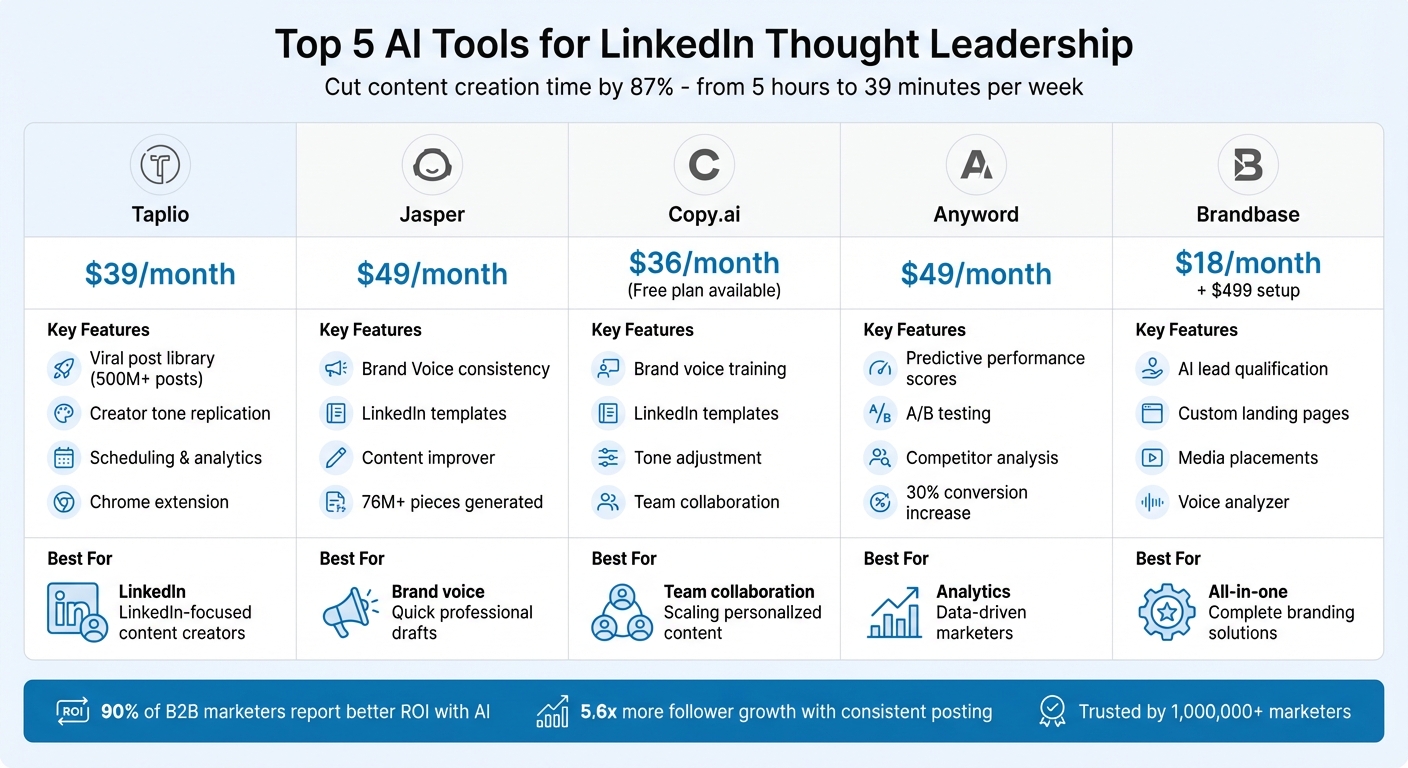
AI Tools for LinkedIn Content Creation: Feature and Pricing Comparison
The Ultimate AI LinkedIn Content Creation Tool Stack for 2026 (My entire content workflow)
1. Taplio
Taplio is crafted specifically for LinkedIn, offering an AI-powered writing assistant and scheduling tools tailored to this platform. Its AI is trained on a database of over 500 million LinkedIn posts [8], enabling it to generate content that aligns with what performs well on LinkedIn. By analyzing your profile and previous posts, it creates drafts that reflect your tone and preferred topics. Let’s dive into the features that make Taplio a valuable tool for LinkedIn users.
LinkedIn-Focused Features
Taplio comes packed with tools designed for LinkedIn success. Its viral post library, built from millions of LinkedIn posts [8], allows you to search by keyword to find top-performing content in your industry. A carousel generator transforms YouTube videos or article links into visually engaging LinkedIn slide decks. Plus, an AI-powered reply tool helps craft thoughtful responses to influential posts. With the Taplio X Chrome extension, you can access key metrics and top-performing content from any LinkedIn profile you visit, making competitor analysis a breeze.
Maintaining Your Brand Voice
Taplio’s ChatAssist ensures your drafts stay true to your personal style. You can train the AI to mimic your unique writing voice, making the output feel natural and authentic [9]. Additionally, its post formatter allows you to maintain a consistent look by customizing elements like bold text, italics, and emojis [10].
Smarter Content Scheduling and Optimization
Taplio uses insights from tens of thousands of posts to recommend the best times to publish. For example, data analysis of over 150,000 posts suggests peak engagement times, such as Tuesdays at 8:30 AM and Thursdays at 1:00 PM [10]. The advanced composer supports LinkedIn-specific features like @mentions, video uploads, and removing URL previews for cleaner, more polished posts. A Kanban-style content planner further simplifies your workflow, helping you stay organized.
The platform’s effectiveness is evident in results like those of Guillaume Moubeche, CEO of Lempire. Over six months in 2023, he used Taplio’s tools to reach over 10 million people on LinkedIn, generating more than $3 million in sales pipeline - without spending a dime on ads [8].
Taplio is trusted by over 6,200 LinkedIn professionals, including founders and marketers [7]. Pricing starts at $39 per month, with advanced AI features available in higher-tier plans. A 7-day free trial is also offered.
2. Jasper
Jasper builds on Taplio's LinkedIn-focused features by offering tools that help maintain a consistent brand voice across various content formats. While it’s not exclusively designed for LinkedIn, Jasper shines in creating content that aligns with your brand identity. By 2025, Jasper was responsible for generating over 76 million pieces of content [12], making it a go-to platform for professionals seeking high-quality content creation.
Brand Voice Consistency
Jasper's Brand Voice feature uses natural language processing (NLP) to analyze your existing content and mimic your professional tone. Its Brand IQ stores your marketing guidelines, ensuring every post stays on-brand [12]. You can upload style guides, top-performing posts, and customer data to train the AI to match your brand’s personality. This means Jasper doesn’t just churn out generic content - it creates posts that sound like they came directly from your team.
Kate Talbot, a Thought Leadership Coach, highlights Jasper’s ability to organize ideas, test different approaches, and keep creativity flowing during moments of writer’s block [11].
LinkedIn-Specific Features
Jasper includes a Personal LinkedIn Post template that helps you craft posts by specifying the problem you’re addressing, your audience, and your call to action. Its Chrome extension allows you to edit posts directly on LinkedIn or through scheduling platforms [12]. The Content Improver template polishes rough drafts, making them more engaging and polished, while Marketing IQ offers audience insights to ensure your posts resonate with the right professional circles [12].
Pricing starts at $49 per month per seat [5], positioning Jasper as a premium tool for delivering consistent, high-quality content across LinkedIn and other platforms [5].
Next, we’ll take a closer look at another AI tool that can elevate your LinkedIn presence.
3. Copy.ai
Copy.ai is a go-to tool for professionals aiming to make a stronger impact on LinkedIn. Its standout feature, Brand Voice training, analyzes your past posts to learn your unique tone. By uploading your top-performing LinkedIn posts, the AI can mimic your professional style, ensuring future content feels like an extension of your authentic voice. With its Brand Voice memory, the tool keeps your writing style consistent across all posts, which is especially handy for marketing teams juggling multiple personal brands or thought leaders. This feature ensures that your professional identity remains cohesive, no matter who’s creating the content.
LinkedIn-Specific Features
Copy.ai offers ready-to-use LinkedIn templates tailored for various types of posts. It also includes tone adjustment tools to help your content align with the platform’s professional standards. Plus, it integrates with scheduling tools via Zapier, making it easier to plan and post content.
Maintaining Brand Voice
In addition to templates, Copy.ai excels at maintaining a consistent brand voice. Its team collaboration tools allow for seamless sharing and feedback, making it easier for multiple stakeholders to review and refine posts before they go live.
Targeting Your Audience
Copy.ai leverages audience data to craft posts that resonate with your professional network. Its workflow builder can transform reports or blog content into LinkedIn-ready snippets, saving time and effort. This automation helps you stick to a regular posting schedule without having to start from scratch every time.
Pricing begins at $36 per month for the Pro plan, with a free plan available for basic needs [9]. Copy.ai is ideal for brands or teams aiming to produce high-volume, personalized content that reflects their unique voice while maintaining a professional tone.
sbb-itb-f7e72a6
4. Anyword
Anyword uses data-driven insights to help you fine-tune your LinkedIn posts. With its Predictive Performance Scores, you can evaluate different versions of your copy before publishing, ensuring you select the one most likely to engage your audience [13][14]. This takes the guesswork out of crafting thought leadership content, making sure your posts connect with your professional network.
LinkedIn-Specific Features
Anyword includes a LinkedIn Post Generator that creates professional headlines and descriptions tailored for LinkedIn [14]. Its Rewrite Existing tool helps refine your current posts for better results [14]. Additionally, the platform’s competitor analysis tools highlight high-performing topics, not only from your own posts but also from your competitors’ content [13]. This level of detail ensures your messaging remains sharp and aligned with your professional goals.
Brand Voice Consistency
Beyond optimizing content, Anyword ensures your unique voice shines through. By uploading your best-performing posts, you can train the platform to replicate your signature style [13]. It also applies automated brand rules to keep every post aligned with your professional identity. As Jessica Amaral, Demand Gen Manager, shares:
Anyword makes ad copy creation so much easier! I can create multiple personas and add their specific pain points to adjust the content directly to those personas [13].
Audience Targeting Capabilities
Thanks to its predictive performance tools, Anyword tailors content to suit the diverse needs of your audience. The Customer Personas feature allows you to create detailed profiles for specific LinkedIn segments, whether you’re addressing C-suite executives, mid-level managers, or industry experts [13][14]. Marketers have reported a 30% increase in conversion rates and a 20% boost in post engagement [13]. Some users have even seen email click-through rates improve from 2.5% to 8% with content optimized for specific audiences [13].
If you’re curious to try it out, Anyword offers a 7-day free trial, with premium plans available for ongoing access [14]. Trusted by over 1,000,000 marketers [13], it’s a dependable tool for professionals looking to enhance their LinkedIn strategy with data-driven insights.
5. Brandbase AI Assistant

Brandbase takes a step beyond just content creation by offering a complete digital branding solution designed to enhance your LinkedIn presence. What sets Brandbase apart is how it blends AI with a full-service brand-building approach. Through an in-depth interview process, it captures your personal voice and translates it into a digital strategy that includes custom landing pages, media placements, and an AI assistant to qualify leads.
LinkedIn-Specific Features
Brandbase is packed with tools tailored for LinkedIn users. The Brand Voice Analyzer studies your tone, style, and vocabulary by analyzing your blogs, social posts, and recordings. This helps create a voice profile that ensures your LinkedIn posts feel authentic. Meanwhile, the Competitive Content Intelligence tool dives into your competitors' strategies, uncovering key themes and positioning angles so you can refine your thought leadership approach.
Another standout is the Repurposing Engine, which takes your long-form content - like webinars, podcasts, or videos - and turns it into LinkedIn-ready posts and blogs. This lets you get more mileage out of your existing content. The Interactive Content Gap Analysis reviews your current materials to identify areas where your unique voice can shine even more.
Brand Voice Consistency
Thanks to the interview-based onboarding process, the AI assistant learns the nuances of your professional voice - your rhythm, vocabulary, and messaging style. This goes beyond simple keyword matching, ensuring that every LinkedIn post, landing page, or other content piece reflects your personal brand consistently across all platforms.
Audience Targeting Capabilities
Brandbase doesn’t stop at content creation. Its AI assistant also helps qualify leads and manages personalized LinkedIn outreach campaigns, ensuring your thought leadership reaches the right audience.
Here’s a quick look at the pricing options:
- Starter plan: $18/month with a $499 setup fee
- Essential plan: $99/month with a $499 setup fee (includes a custom AI assistant, hosting, and ongoing support)
- Pro plan: $499/month with a $499 setup fee (adds unlimited landing pages, LinkedIn lead generation campaigns, and six bi-monthly PR placements)
Tool Comparison Table
Here's a detailed comparison of tools designed to enhance your LinkedIn content strategy, covering their features, pricing, strengths, and limitations.
| Tool | LinkedIn-Specific Features | Pricing | Best Use Case | Key Strengths | Limitations |
|---|---|---|---|---|---|
| Taplio | Viral post library, creator tone replication, scheduling, CRM, analytics [9][3] | Starts at $39/month [9][3] | Founders and consultants aiming to build a strong LinkedIn presence [9] | Combines multiple features into one platform; trained on top LinkedIn posts; includes audience management tools [9] | Some issues with content detection; user interface can feel clunky [3] |
| Jasper | LinkedIn-specific templates, long-form assistant [4][5] | Starts at $49/month [3][5] | Professionals who need help drafting content quickly and effectively [11] | Great for organizing ideas and overcoming writer’s block [11] | Output may feel overly formal or generic; requires significant editing for a natural tone [11][3] |
| Copy.ai | Brand voice training, LinkedIn bio optimization, professional templates [6][3] | Free tier available; paid plans start at $49/month [3] | Teams or brands scaling personalized LinkedIn content [9] | Adapts to your writing style; ideal for repetitive workflows [9] | Output can feel generic without specific prompts; requires human review [2] |
| Anyword | Predictive engagement score, headline A/B testing [4] | Starts at $49/month [4] | Marketers focused on data-driven engagement strategies | Analytics-driven approach ensures content resonates with your audience [4] | N/A |
| Brandbase AI Assistant | AI-powered lead qualification, personalized LinkedIn outreach, authentic voice capture | Starter: $18/month + $499 setup; Essential: $99/month + $499 setup; Pro: $499/month + $499 setup | Professionals looking for a complete brand-building solution backed by AI | End-to-end branding solution; captures your authentic voice through interviews; integrates custom landing pages and media placements | High upfront setup cost |
These tools cater to a variety of needs, from individual professionals seeking quick drafting solutions to brands aiming for comprehensive LinkedIn strategies.
AI tools have significantly reduced content creation time by 87%, cutting it down from 5 hours to just 39 minutes per week [3]. If you're looking for a streamlined solution with built-in analytics, Taplio is a strong choice. For a more holistic approach to digital branding, Brandbase combines content creation with lead qualification and media integration.
Conclusion
Establishing thought leadership on LinkedIn doesn’t have to eat up hours of your week. With AI tools, you can slash content creation time by up to 87%, cutting what used to take five hours down to just 39 minutes a week [3]. That time savings allows you to stick to a consistent posting schedule, which is proven to drive 5.6x more follower growth [3].
Choosing the right tool boils down to your goals. For quick drafting and viral post ideas, Taplio is a solid pick at $39/month. If your team needs scalable, personalized content, Copy.ai starts at $49/month and offers flexibility. And for a complete brand-building solution - covering everything from content creation to lead qualification and media placements - Brandbase provides an end-to-end approach starting at $18/month, with a one-time $499 setup fee.
"The goal isn’t volume - it’s value. Keep your voice, your perspective and your personality front and center, and you’ll create content that not only performs but builds trust over time." - Content Matterz [1]
Here’s a key takeaway: 90% of B2B marketers report better ROI when they use AI strategically [6]. These tools are at their best when they act as your creative partner - handling the structure and research while you focus on injecting personal stories and insights that build genuine authority. Start small by testing a few tools, prioritize the feature you need most, and grow your LinkedIn presence step by step.
FAQs
How can AI tools help me maintain my unique writing style on LinkedIn?
AI tools can now mimic your distinct writing style by analyzing patterns from your previous LinkedIn posts. By examining aspects like tone, phrasing, and overall style from a sample of about 30 to 50 posts, these tools create a tailored style profile. The result? Drafts that closely reflect your personal voice.
But don’t worry - you’re still in the driver’s seat. Once the AI generates a draft, you can tweak and refine it to match your vision. Tools like Brandbase take it even further by conducting interviews to truly capture your voice, transforming those insights into polished LinkedIn posts that feel both genuine and professional.
How do Taplio and Jasper compare for creating LinkedIn content?
Taplio is built specifically for LinkedIn, combining AI-driven content creation with tools for scheduling, analytics, and lead generation. With access to a database of 500 million LinkedIn posts, it can generate updates, turn videos or links into carousel slides, and schedule posts - all within a single platform.
Jasper, by contrast, serves as a general-purpose AI writing assistant. It’s great at crafting high-quality LinkedIn posts, articles, and messages, but it doesn’t include LinkedIn-specific features like scheduling, carousel creation, or performance tracking. To manage and analyze content, users need to rely on additional tools.
The key difference? Taplio streamlines LinkedIn workflows with an all-in-one approach, while Jasper excels at versatile content creation for a variety of platforms.
How do AI tools help improve LinkedIn post engagement and performance?
AI tools excel at processing massive amounts of data, including the performance of past posts, audience engagement patterns, and current platform trends. By leveraging machine learning, these tools can pinpoint the most effective words, phrases, and visuals to use in your content. They even offer real-time suggestions to fine-tune tone, adjust length, and pick the right hashtags - all aimed at boosting likes, comments, and shares.
These tools don’t stop there. They keep an eye on audience behavior, helping refine your strategy over time. For instance, they can recommend the best times to post based on when your audience is most active, flag drafts that might underperform, and provide actionable suggestions for improvement. Many also include scheduling features to ensure your posts go live during peak engagement hours. Plus, they offer analytics to track key metrics like impressions, engagement rates, and follower growth.
When paired with platforms like Brandbase, these insights can align seamlessly with your personal style, amplifying the effectiveness of your LinkedIn thought leadership content.
Related Blog Posts

Blog title heading will go here
Blog title heading will go here