
10 LinkedIn Profile Tips for Business Coaches

Want to turn your LinkedIn profile into a client-generating machine? These 10 tips can help you stand out, attract high-value clients, and boost your coaching business. From crafting a keyword-rich headline to leveraging AI tools, this guide covers everything you need to know to optimize your profile for visibility and credibility. Here’s a quick overview of what you’ll learn:
- Headline: Use clear, keyword-focused language to capture attention and improve searchability.
- Photo and Banner: A professional headshot and custom banner can increase profile views by 14%.
- About Section: Speak directly to your ideal clients, addressing their challenges and how you can help.
- Experience Section: Highlight results with specific metrics and attach media like case studies or videos.
- Testimonials: Showcase client success stories to build trust.
- Keyword Optimization: Use targeted terms throughout your profile to improve discoverability.
- Skills and Endorsements: Focus on relevant skills and gather endorsements to strengthen your credibility.
- AI Tools: Save time by using AI for profile optimization, content creation, and visuals.
- Featured Section: Pin impactful media like case studies, testimonials, or booking links.
- Creator Mode: Enable this feature to increase visibility and grow your audience.
These actionable strategies will help you transform your LinkedIn profile into a powerful tool for scaling your coaching business. Let’s dive into the details.
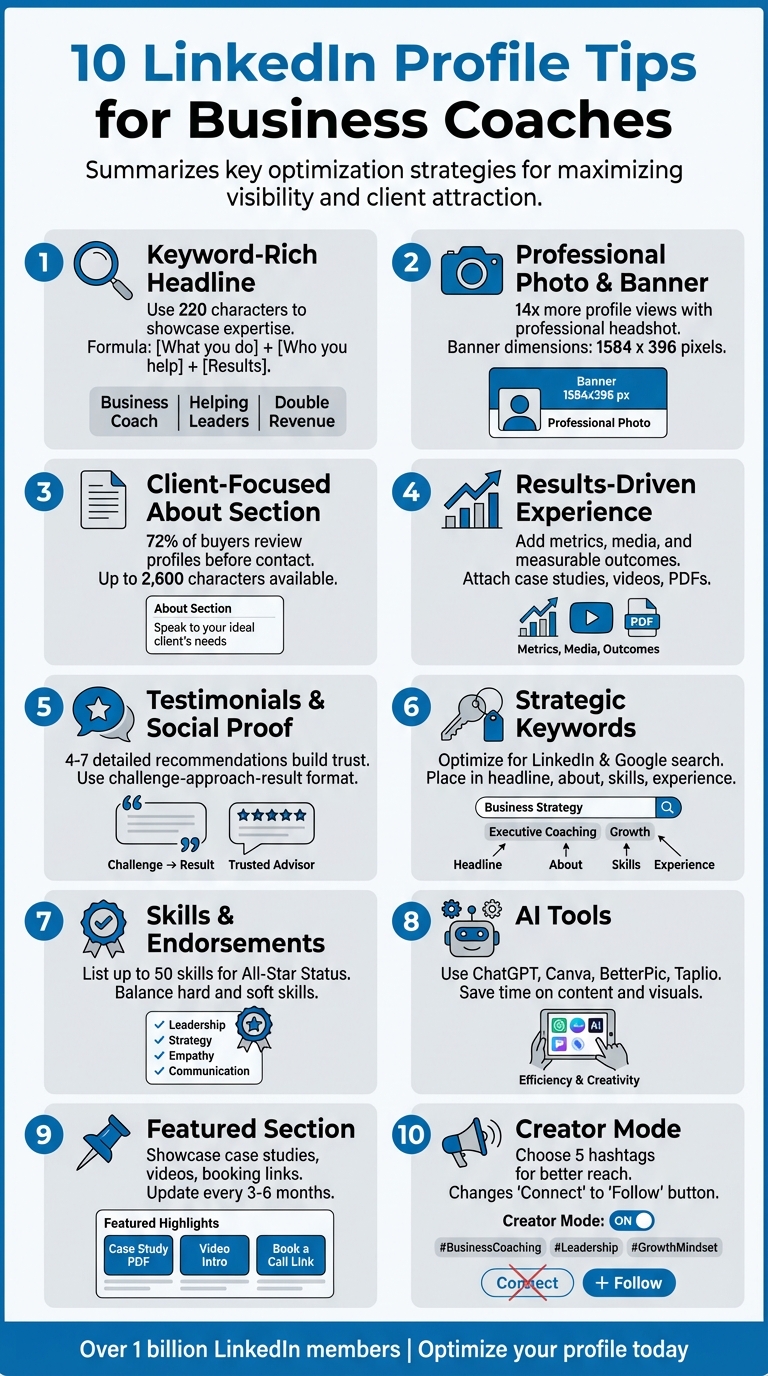
10 LinkedIn Profile Optimization Tips for Business Coaches
LinkedIn Mastery for Coaches: A Step-by-Step Guide to Boost Your Profile, Network, and Influence
1. Write a Clear, Keyword-Rich Headline
Your LinkedIn headline is one of the first things people notice about your profile. With just 220 characters to work with, it’s a concise introduction that shows up in searches, feeds, comments, and connection requests. Think of it as more than just a job title - it's your personal elevator pitch. Plus, the LinkedIn algorithm can amplify its reach when done right.
Profile Discoverability on LinkedIn
Keywords are the backbone of getting discovered. When someone searches for terms like "executive coach" or "leadership development", LinkedIn’s algorithm scans your headline first. Mohamed Natheem, SEO Analyst at RadicalStart, emphasizes:
"Profile optimization is not optional anymore" [4].
Your headline doesn’t just matter on LinkedIn. It also appears in Google search results when someone looks you up, making it a key element of your online presence.
Showcasing Expertise and Credibility
A strong headline isn’t just about keywords - it’s about showing potential clients why they should care. Skip the generic job titles and focus on the results you deliver. Taylor Ryan, CEO of Klint Marketing, explains:
"Think of your LinkedIn headline as like an email subject line" [4].
Here’s a simple formula to try: [What you do] + [Who you help] + [Results you deliver]. For example, "Business Coach for SaaS Founders | Scaling Startups to $1M ARR" makes it crystal clear who you are and what you bring to the table.
Avoid empty buzzwords like "innovative" or "highly motivated." Instead, focus on specifics: Who do you help? What problems do you solve? What outcomes can someone expect when they work with you? These details make your expertise shine.
Quick Tips for Business Coaches
Updating your headline is quick and impactful. Use long-tail keywords like "leadership coach for tech founders" instead of generic terms like "coach" to attract more precise searches. Mention your industry focus - whether it’s SaaS, FinTech, or manufacturing - to set yourself apart. And don’t forget to revisit and refresh your headline every 3–6 months to reflect your evolving services and goals.
2. Use a Professional Photo and Custom Banner
Client Acquisition Potential
Your profile photo and banner are like the front window of a store - they're the first impression potential clients get when they visit your LinkedIn page. Paulina Major from YouCanBookMe puts it best:
"Your LinkedIn profile is one of your most important small business marketing assets, even if you're not actively 'using' LinkedIn every day" [5].
A polished, professional appearance makes a big difference. Profiles with professional headshots get 14 times more profile views than those without [9]. And don’t overlook your banner - it’s valuable space that can showcase your coaching framework, highlight client results, or feature a tagline addressing the specific problems you solve.
Showcasing Expertise and Credibility
A high-quality photo does more than look good - it establishes trust. Make sure your face takes up about 60% of the frame, from the top of your shoulders to just above your head [9]. Use a current image that accurately represents how you look today; outdated photos can create awkward moments when meeting clients in person [4].
Research even suggests that an open, toothy smile boosts likability [9]. Dress in the kind of attire you’d wear when coaching, stick to solid colors, and aim for soft, natural lighting - near a window or outdoors on an overcast day works well [9].
Ease of Implementation for Business Coaches
Getting a professional-looking headshot doesn’t have to break the bank. You can use your smartphone and a friend to snap a great photo [9]. For those who prefer professional sessions, expect to pay between $200 and $400 [9]. If you're experimenting with AI tools, Canva provides two free profile shots daily, or up to 100 per day for $7.99/month [8].
For your 1584 x 396 banner, Canva also offers free templates [10]. Include your logo, a clear tagline, or even a call to action like "Book a free consultation." Be sure to preview it on mobile - your profile picture might overlap parts of the banner depending on the device [1]. Refresh your photo and banner every three to six months to keep your profile aligned with your evolving coaching brand [5]. Keeping your visuals current ensures your profile continues to resonate with potential clients.
3. Write an About Section That Speaks to Clients
Client Acquisition Potential
Your About section plays a crucial role in whether potential clients choose to engage with you. According to research, 72% of buyers review LinkedIn profiles before making contact [11]. This section isn’t the place for a dry, resume-style rundown of your career history - it’s your chance to make a lasting first impression. As Salina Yeung, CEO of [IN]Academy, emphasizes:
"If your 'About' section only shares information about you, then you are not maximizing the potential to capture your prospect's attention" [2].
A well-crafted About section should do four key things: identify your ideal client, highlight their challenges, explain how you address those challenges, and provide clear contact details [2]. For instance, instead of a vague statement like "I help businesses grow", you could write something more specific, such as, "I help mid-sized tech companies overcome revenue plateaus by implementing strategic sales frameworks that have increased conversion rates by 45% on average." This kind of detail not only draws in potential clients but also improves your profile's search performance.
Profile Discoverability on LinkedIn
A strong About section doesn’t just engage readers - it also boosts your discoverability on LinkedIn. Like your headline, this section should be optimized for search visibility. It’s an excellent opportunity to incorporate keywords that align with your industry, such as "executive coach", "leadership development", or "business growth consultant" [2]. These keywords can enhance your visibility in LinkedIn's search results and even on Google [5].
With up to 2,600 characters available [11], you have plenty of room to craft a compelling narrative. Focus on hooking readers in the first two lines - this is critical because most people won’t click "See more" unless those opening lines grab their attention [4][5]. Writing in the first person helps you sound more approachable, while including contact details ensures that even those outside your network can easily reach out [5].
Ease of Implementation for Business Coaches
Creating a standout About section doesn’t have to be overwhelming. Start by answering three simple questions: Who do I help? What problems do they face? How do I solve those problems? Stick to short paragraphs to make your section easy to read, avoiding dense blocks of text [4]. Tools like ChatGPT can be useful for polishing your tone and clarity [5].
Jane Deehan, an award-winning B2B marketer and former LinkedIn employee, offers this advice:
"Your 'About' section is your chance to tell your own story – so don't just use it to list your skills or the job titles you've had. Try to bring to life why those skills matter – and the difference they can make to the people you work with" [12].
4. Add Results and Media to Your Experience Section
Showcasing Expertise and Credibility
Think of your Experience section as your personal highlight reel - this is where you showcase the real-world impact of your work. For business coaches, transforming this section from a simple rundown of past jobs into a results-focused narrative can make all the difference. Use specific metrics to quantify your achievements, like: "Increased client conversion rates by 45%" or "Boosted leadership team productivity by 30% in six months" [3][5].
To make your profile even more compelling, attach media to your roles. LinkedIn allows you to upload links, PDFs, videos, and images directly to your job entries. This is your chance to give potential clients visual proof of your expertise [5]. Examples could include webinar recordings, client case study PDFs, frameworks, or articles you've authored. As Paulina Major from YouCanBookMe emphasizes:
"Many people don't realize you can add media to your job entries. Make sure to include links to portfolio pieces, articles, client case studies, or testimonials" [5].
Profile Discoverability on LinkedIn
Beyond showcasing your expertise, your Experience section plays a key role in making your profile more discoverable. By weaving in industry-specific keywords - like "executive coach", "leadership development", or "business strategist" - into your job descriptions, you can improve your visibility in LinkedIn's search results [4][5]. Given LinkedIn's massive user base of over 1 billion members, profiles with complete and keyword-rich information are much more likely to rank higher [4][5].
Practical Steps for Business Coaches
Updating your Experience section doesn’t have to be overwhelming. Start with your most recent or relevant coaching roles and focus on listing your accomplishments. Use bullet points to make your results easy to skim, especially for busy prospects [4]. Karol Nowacki, Acquisition Manager at Tidio, advises:
"Focus on describing the achievements and results of your work. For example, you can describe how you increased the company's website traffic or implemented a necessary improvement to make your work more effective" [4].
Replace vague language with clear, measurable outcomes [3][4]. Then, enhance each role by attaching at least one piece of media - like a testimonial video, a published article, or a case study. This strategic approach not only builds credibility but also helps convert profile views into client inquiries. To keep things fresh, revisit and update this section every three to six months with your latest successes [5].
5. Display AI-Generated Content and Client Testimonials
Showcasing Expertise and Credibility
Think of your LinkedIn profile as your online storefront - it’s where potential clients form their first impressions. To establish trust quickly, showcasing real results is key [1]. With 90% of LinkedIn profile viewers typically not taking further action [13], combining client testimonials with AI-generated content can reinforce the value of your coaching methods before prospects even reach out.
When gathering testimonials, use a clear "challenge, approach, result" format. This structure helps potential clients visualize tangible outcomes. Instead of generic statements like "amazing coach", encourage clients to share specific achievements, such as: "Improved team productivity by 30% in three months" or "Increased quarterly revenue by $50,000 after adopting the leadership framework" [13]. Mohamed Natheem from RadicalStart highlights the importance of this approach:
"Recommendations create a sense of trust and credibility" [4].
Aim to include four to seven detailed recommendations on your profile. These testimonials not only validate your expertise but also build a foundation for using LinkedIn’s Featured section to further connect with potential clients.
Client Acquisition Potential
The Featured section of your LinkedIn profile, located just below the About section, is a powerful tool for turning profile views into leads. Use this space to pin engaging content like AI-generated resources, case study PDFs, or testimonial videos. Videos, in particular, can be highly effective - LinkedIn videos generate five times more comments than other types of posts [3]. A short video showcasing a client success story can make a strong impression.
AI can also help you create interactive lead magnets, such as assessments or guides, that provide prospects with valuable insights into your coaching methods. These tools not only showcase your expertise but also work around the clock, capturing visitor information while demonstrating your methodology in action [13]. As Paulina Major from YouCanBookMe advises:
"AI can help craft the story, but it's your actual work that will win clients over. Include real numbers, client outcomes, or quotes from happy customers to back up the copy" [5].
Ease of Implementation for Business Coaches
Getting started with these strategies is straightforward and amplifies the credibility established by your testimonials. Reach out to past clients and request recommendations that highlight measurable results [1]. Use AI tools to refine content ideas and polish testimonials. Upload at least three pieces of social proof - such as a testimonial video, case study, or article - to your Featured section [5]. For maximum impact, refresh this section every three to six months [5].
sbb-itb-f7e72a6
6. Add Targeted Keywords Throughout Your Profile
Profile Discoverability on LinkedIn
Think of LinkedIn as a search engine. To show up in searches from potential clients, your profile needs the right keywords. These keywords act as a bridge between your services and what people are searching for. For example, if someone types in "executive coach" or "leadership development", LinkedIn looks for profiles with those exact terms in areas like your headline, About section, or Skills list [4].
Your profile can also pop up in Google search results when someone searches your name, making keyword placement just as important outside of LinkedIn [5]. Mohamed Natheem, SEO Analyst at RadicalStart, puts it simply:
"Profile optimization is not optional anymore" [4].
The trick? Use specific and relevant terms instead of vague descriptors like "passionate" or "self-starter." These are the phrases clients and recruiters are actually typing into the search bar [4]. From there, make sure you weave these keywords naturally throughout your profile.
How Business Coaches Can Get Started
A great way to identify keywords is by using the niche + outcome formula. This means combining your specific coaching focus with the results you deliver. For instance, "executive coach" paired with "scale revenue" is a powerful combo [1]. Sit down and brainstorm the terms your ideal clients might use when searching for someone like you [14]. Writing consultant Jacqueline Fisch offers this advice:
"Clarity over cleverness. As a coach or consultant, those are the actual terms people search for - so if this is your role, use this title" [14].
AI tools like ChatGPT can help you generate keyword lists tailored to your audience and services [1][5]. Another smart move? Check out competitor profiles in your niche. This can help you spot commonly used terms and find ways to differentiate yourself [14]. Don’t forget to include synonyms like "mentor", "facilitator", or "advisor" to widen your reach [1]. Once you’ve got your keywords, place them thoughtfully in your headline, About section, Experience descriptions, and Skills list [2][4]. Doing this not only boosts your profile’s visibility but also reinforces your expertise.
Highlighting Expertise and Building Credibility
Strategic keyword use isn’t just about search results - it’s also about showing your authority. Swap out generic titles for more precise ones like "Executive Career Coach" or "Leadership Development Specialist" [5][1]. Including industry-specific terms and phrases that reflect your audience’s goals signals that you truly understand their needs. For example, if you work with SaaS companies, healthcare professionals, or Fortune 500 executives, mention those industries to attract the right clients [1][14].
To keep your profile fresh and relevant, revisit and update your keywords every three to six months. This ensures your profile reflects your latest services and achievements, keeping you ahead of the game [5][1].
7. Build Authority with Skills and Endorsements
Showcasing Expertise and Credibility
Think of your skills section as more than just a checklist - it’s a way to showcase your expertise and establish credibility. When potential clients see endorsements for skills like Leadership Development or Strategic Planning, it reassures them that you’re the real deal. It’s like having a crowd of people vouch for your abilities, making you a safer bet to hire.
LinkedIn allows you to list up to 50 skills, but don’t just fill this section for the sake of it. A thoughtfully curated skills list can help you achieve "All-Star Status", which increases your profile’s visibility in searches [4]. But remember, quality beats quantity. Daniel Veiga, Founder of Danny Veiga Marketing, emphasizes:
"The key thing is using hard, functional skills rather than soft skills when identifying your most impressive accomplishments, as they're what recruiters will search or look for first." [4]
A balanced approach works best. Include hard skills like Sales or Data Analysis, which recruiters actively search for, alongside soft skills like Leadership or Communication. For business coaches, this could mean listing specific skills such as Strategic Planning, Mindset Coaching, and Leadership Development, paired with softer abilities like Active Listening or Conflict Resolution.
Profile Discoverability on LinkedIn
Your skills section isn’t just about impressing visitors - it’s also a powerful tool for boosting your profile’s visibility. Skills act as keywords that LinkedIn uses to match you with relevant searches. For example, if someone searches for "executive career coach" or "leadership development", LinkedIn scans your skills to decide if your profile fits the bill.
To stand out even more, consider taking LinkedIn’s skill assessments. Earning Verified Skills badges adds an extra layer of credibility, showing potential clients and recruiters that you’ve been objectively tested. Another tip? Use LinkedIn’s "People Also Viewed" feature to see which skills are trending in your niche and adjust your list accordingly.
Practical Steps for Business Coaches
To make the most of your skills and endorsements, start with a quick audit of your list. Remove outdated or irrelevant skills and focus on 5–10 core areas that align with your coaching services. Then, reach out to clients and colleagues for targeted endorsements in these areas.
As Gaetano DiNardi suggests, keeping this section fresh is key. Update it regularly with new certifications or achievements, and set a quarterly reminder to review and refine your skills. This small effort can go a long way in maintaining your credibility and staying relevant [3].
8. Use AI Tools to Customize Your Profile
Making It Simple for Business Coaches
AI tools can act like your personal assistant, helping you craft a polished LinkedIn profile without the expense of hiring a professional. Instead of struggling to create the perfect headline or write an engaging About section, tools like ChatGPT or Coachvox AI can generate drafts in just minutes. All you need to do is provide a quick description of your services, target audience, and the outcomes you deliver. For instance, you could use this prompt with ChatGPT: "Here's what I do: [description]. Who I help: [audience]. Results: [results]. Suggest 3 headlines" [5]. In seconds, you’ll have multiple options to refine and make your own.
When it comes to visuals, AI tools make customization just as easy. Canva offers free LinkedIn banner templates that are simple to edit, even if you have no design experience. If you’re short on time for a professional photoshoot, BetterPic uses AI to create high-quality headshots. Even technical details, like assessing your profile picture, are now automated - Snappr can evaluate your photo for professionalism by analyzing factors such as facial alignment, smile intensity, and shadows on your jawline [7]. Want to turn your blog posts or videos into eye-catching LinkedIn carousels? Taplio can handle that in minutes, helping you present your content in a way that grabs attention [15]. These tools can save you time while consistently improving your profile’s appeal and engagement.
Building Credibility and Showcasing Expertise
One of the biggest advantages of AI is how it helps you consistently showcase your expertise. Tools like Taplio and AuthoredUp can generate post ideas and even full drafts, making it easier to maintain a steady posting schedule. This is important because LinkedIn rewards active users who post regularly [15]. Sharing valuable insights and updates not only keeps your network engaged but also positions you as a knowledgeable and reliable professional in your field.
That said, it’s essential to review and tweak AI-generated content to ensure it reflects your personal style and voice. Pair these posts with specific metrics, real-world results, and client testimonials to add authenticity and strengthen your credibility.
Making Your Profile Easier to Find
AI tools also excel at optimizing your profile for searchability, which is key to attracting potential clients. Tools like ChatGPT and Taplio can help identify high-traffic, niche-specific keywords - terms like "leadership development" or "fractional CMO" - and integrate them naturally into your profile. This is crucial, as 72% of modern buyers research a sales professional’s LinkedIn profile before reaching out [11].
Even small technical tweaks can make a difference. For example, renaming your profile photo or banner file to include your name and relevant keywords (e.g., "Sarah-Johnson-Executive-Coach-NYC.jpg") can improve your visibility in search engine results [11]. Additionally, tools like Podawaa use AI to analyze your posts and match them with audiences most likely to engage, helping you expand your reach [15]. And don’t forget about hashtags - LinkedIn posts with at least one hashtag see 29.59% higher impressions than those without [11]. AI tools that suggest the best hashtags for your content can help boost your discoverability even further.
9. Set Up a Featured Section with Brandbase Content

Highlight Your Expertise and Build Trust
The Featured section, positioned just below your About section, is a powerful yet often overlooked part of your LinkedIn profile. Think of it as a showcase for your best work - a space designed to highlight your expertise and credibility, turning casual visitors into potential clients. Essentially, it acts like a mini sales page, spotlighting your achievements and thought leadership.
Use this space to include compelling media that demonstrates your skills and results. For instance, you can add videos of webinars you’ve hosted, recordings of speaking engagements, professional certifications, or case studies with measurable outcomes. A strong example? Share a case study showing how you helped a client boost their revenue by 45%. This not only reinforces your credibility but also keeps visitors engaged and interested in what you have to offer.
Turn Viewers into Clients
The Featured section isn’t just about showing off your work - it’s a tool to generate leads. By including a direct booking link, you make it easy for prospects to schedule discovery calls without the hassle of back-and-forth messaging. You can also offer downloadable resources, like coaching guides or frameworks, to collect email addresses and nurture leads further down the line.
How to Get Started as a Business Coach
Setting up your Featured section is simple. Just click "Add profile section" and select "Featured." From there, pin your most impactful Brandbase-created assets, such as a custom landing page, an AI assistant link, or articles you’ve published through media outlets. To keep things fresh and relevant, update this section every 3–6 months with your latest offers, achievements, or success stories. It’s a quick adjustment that can make a big difference in how effectively your profile works for you.
10. Turn On Creator Mode and Open to Work
These final adjustments can help boost your profile's visibility and credibility on LinkedIn, making it easier for potential clients to find and connect with you.
Make Your Profile Easier to Discover
Beyond optimizing your content and visuals, enabling Creator Mode can significantly improve how LinkedIn promotes your profile. This feature lets you choose up to five hashtags (like #BusinessCoaching or #Leadership), helping LinkedIn categorize your expertise and showcase your content to the right audience [4]. Plus, your profile button changes from "Connect" to "Follow", making it simpler for people to stay updated with your posts [16].
Take Samantha North, for example. Between 2022 and 2024, she grew her LinkedIn following to over 22,000 in just 18 months by turning on Creator Mode and fully optimizing her profile [16]. Similarly, Gaetano DiNardi, a consultant, built an audience of 45,000 followers over six years by posting weekly with Creator Mode enabled. This not only brought him consulting opportunities but also boosted his income through inbound leads [3].
Attract Clients with "Open to Work"
The "Open to Work" feature isn’t just for job seekers - it’s also a powerful tool for business coaches. By customizing this setting, you can signal your availability for consulting gigs, partnerships, and other business opportunities. You can even display the green #OpenToWork frame for maximum visibility or restrict it to recruiters if you prefer a more targeted approach [4]. This feature helps establish your professional presence and attracts the right kind of attention.
Simple Steps to Activate These Features
Activating these tools is quick and easy. To enable Creator Mode, head to the Resources section of your profile, click "Creator mode: Off", select up to five relevant topics, and turn it on [4]. For the "Open to Work" setting, click the "Open to" button below your profile photo, specify your availability, and choose who can see it [3]. Once enabled, monitor your analytics to fine-tune your approach [4].
These small but impactful tweaks can help you stand out and connect with the right audience.
Conclusion
Your LinkedIn profile is much more than a digital resume - it's your around-the-clock storefront, showcasing your expertise and attracting the clients you want. With over 1 billion members and 69 million companies on the platform [5], LinkedIn offers unparalleled opportunity, but the competition is fierce. The difference between a profile that generates leads and one that gets ignored lies in how effectively you apply optimization strategies.
By implementing these strategies, you create a profile that builds trust and draws in the right audience. Pavle Radeka, Director of SEO at CommonMind, sums it up perfectly:
"At the end of the day, LinkedIn is one of the few places where you can meticulously craft your image, so why not be smart about it?" [4]
From your profile photo to the Featured section, every detail contributes to your credibility and appeal.
Take it from real-life examples: Sarah T., an executive coach, gained three high-value clients in just one month after revamping her profile. Meanwhile, James M., a business coach, saw his LinkedIn engagement double by refining his messaging and targeting his ideal audience [6]. These results prove that consistent effort pays off.
Modern tools make the process easier, helping you produce polished content that enhances your LinkedIn presence. As Mohamed Natheem, SEO Analyst at RadicalStart, emphasizes:
"Profile optimization is not optional anymore" [4]
Coaches who take this seriously seize opportunities their competitors miss.
Start small - try one or two actionable tips - and make it a habit to revisit your profile every three to six months. Keep it aligned with your evolving services and market trends [5]. When done right, your LinkedIn profile becomes a powerful investment, turning casual views into discovery calls and connections into lasting client relationships.
FAQs
How can AI tools help improve my LinkedIn profile as a business coach?
AI tools have the potential to turn your LinkedIn profile into a magnet for clients while showcasing your expertise in a polished and professional way. For example, tools like ChatGPT can help you craft an eye-catching headline, write a compelling summary, and highlight your achievements in a way that speaks directly to your ideal clients. All you need to do is share details about your niche, target audience, and key accomplishments, and the AI can generate content tailored to your specific goals.
But it doesn’t stop at writing. AI can also recommend relevant industry keywords to boost your profile's visibility, suggest featured content like videos or presentations to highlight your coaching style, and even help you personalize connection requests or outreach messages. These capabilities not only save you time but also enhance your profile’s appeal, making it easier for the right clients to discover and connect with you - an essential step in growing your coaching business in the U.S. market.
How can I effectively use keywords to optimize my LinkedIn profile?
To make your LinkedIn profile stand out, start by pinpointing the keywords your ideal clients are likely to search for - think terms like "executive coach" or "business growth consultant." Incorporate these phrases naturally into key areas such as your headline, About section, and job descriptions. This helps boost your profile's visibility in LinkedIn's search results.
Prioritize placing the most important keywords in the first 200 characters of your headline and summary. This is prime real estate for grabbing attention. However, avoid cramming your profile with repetitive terms - it’s crucial to maintain a balance between being keyword-rich and sounding professional.
Keep your profile fresh by regularly updating it with relevant keywords that reflect current industry trends. This ensures you stay visible and appealing to potential clients as the market evolves.
What are the benefits of enabling Creator Mode on LinkedIn for business coaches?
Enabling Creator Mode on LinkedIn shifts your profile’s focus to showcasing your expertise and attracting the right audience. Once activated, the primary button on your profile changes from "Connect" to "Follow", and your follower count becomes prominently visible - highlighting that you actively share insights. You can also feature up to five hashtags tied to your niche, like #LeadershipCoaching or #BusinessGrowth, making it easier for your target audience to discover your content.
Creator Mode offers additional perks, such as access to content performance metrics, so you can see which posts resonate most with your followers. Plus, connection requests automatically convert into followers while pending, ensuring your updates reach more people with no extra effort. These features help you establish yourself as a go-to expert, broaden your audience, and turn profile views into potential client opportunities.
Related Blog Posts

Blog title heading will go here
Blog title heading will go here