
How AI Chatbots Qualify Leads Before Sales Calls
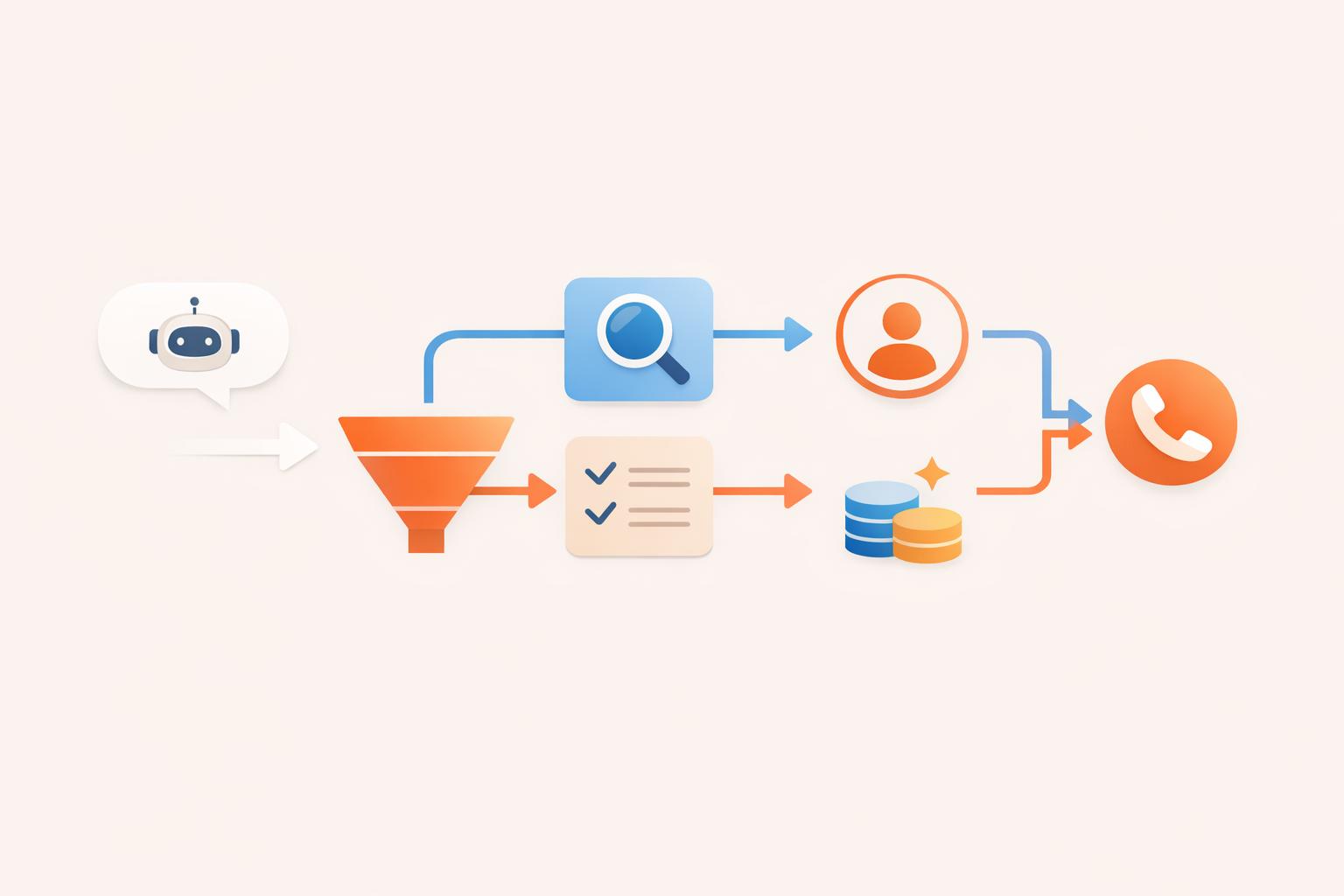
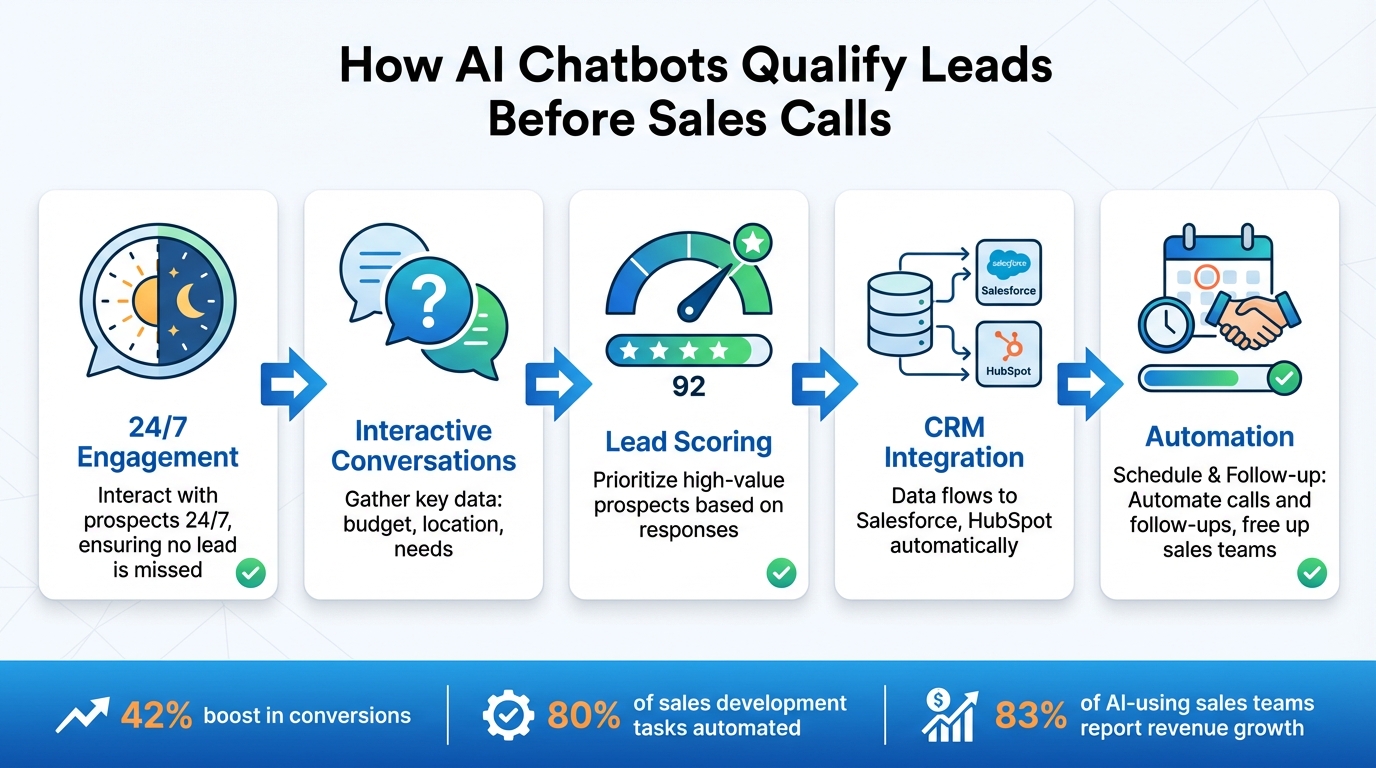
AI chatbots are transforming how businesses qualify leads, saving time and improving efficiency. Here's how they work:
- Around-the-Clock Engagement: Chatbots interact with prospects 24/7, ensuring no lead is missed, even after hours.
- Interactive Conversations: Unlike static forms, chatbots ask dynamic questions to gather key data like budget, location, and needs.
- Lead Scoring: They assign scores based on responses, prioritizing high-value prospects.
- CRM Integration: Data syncs directly to tools like Salesforce or HubSpot, streamlining follow-ups.
- Automation: Tasks like scheduling calls and follow-ups are handled automatically, freeing up sales teams to focus on closing deals.
Businesses using AI chatbots report up to a 42% boost in conversions and automate 80% of sales development tasks. With features like conditional logic and real-time handoffs to sales reps, chatbots ensure qualified leads are routed efficiently while maintaining a consistent process. Whether you're a coach, consultant, or real estate agent, these tools simplify lead qualification and maximize sales opportunities.
5-Step AI Chatbot Lead Qualification Process
How To Automate Lead Qualification With ChatGPT (OpenAI Assistants Tutorial)
How to Set Up an AI Chatbot for Lead Qualification
Getting an AI chatbot up and running for lead qualification involves two main steps: picking the right platform and customizing it to fit your business needs. The chatbot should gather lead data seamlessly and work in harmony with your existing sales tools.
How to Choose an AI Chatbot Platform
The platform you choose plays a huge role in how well your chatbot can qualify leads. Start by checking its ability to integrate with your CRM - such as Salesforce, HubSpot, or Zoho - and marketing tools. This ensures data flows automatically, saving you from tedious manual entry. Opt for platforms that support multi-channel deployment, allowing your chatbot to engage with prospects on your website, WhatsApp, Facebook Messenger, and Instagram.
Look for features like lead scoring and conditional logic. These tools let your chatbot assign scores to prospect responses (e.g., budget or timeline) and adjust the conversation flow based on their answers. Advanced Natural Language Processing (NLP) is also key, helping the bot understand varied phrasing and even detect sentiment. For high-value prospects, the platform should allow for real-time handoffs to your sales team.
Here are some must-have features:
| Feature | Why It Matters |
|---|---|
| CRM Integration | Ensures smooth data flow and instant lead routing to sales |
| Multi-Channel Support | Engages prospects across all platforms they use |
| Lead Scoring | Automatically prioritizes leads with higher intent |
| NLP Capabilities | Handles complex conversations and understands varied phrasing |
| No-Code Builder | Simplifies setup and updates without needing developers |
For example, RapidMiner’s MarlaBot qualified over 4,000 leads, contributing to 25% of its sales pipeline [1]. Similarly, MongoDB’s Drift chatbot boosted net new leads by 70% and doubled messaging responses [5].
If you're considering pricing, Brandbase offers two plans tailored for lead qualification: Essential at $99/month and Pro at $499/month. Both include custom AI assistants that integrate with landing pages and forms. There’s also a one-time $499 setup fee, but these plans give you everything you need to launch without starting from scratch.
"A lead qualification chatbot is an automated conversational assistant designed to identify, engage, and qualify leads in real time... gathering data, scoring leads, and routing high-quality prospects straight to sales." - Raquel Magalhães, Editorial Writer, Landbot [4]
How to Configure the Chatbot for Your Business
Once you’ve picked a platform, the next step is tailoring the chatbot to suit your business. Start by defining your Ideal Customer Profile (ICP). Identify the key traits of your target prospects - like budget, authority, pain points, and timeline. This profile shapes the questions your chatbot asks and helps it score leads effectively.
Make sure the chatbot reflects your brand identity. Customize its tone, colors, logo, and greeting to align with your business. For example, a consultant or coach might opt for a warm, conversational tone, while a B2B software company may prefer a polished but approachable style. Avoid using overly technical language or jargon - keeping things simple helps build trust.
Integrate the chatbot with your CRM. Use native integrations or webhooks to ensure lead records are updated in real time, even if only partial data is collected. Implement real-time data validation to verify business email addresses and phone numbers as they’re entered, filtering out fake or invalid information.
Set up automated lead routing based on scores. High-scoring leads should trigger instant alerts to sales reps via Slack or email, while lower-scoring leads can be added to nurture campaigns. Enable a "Human Takeover" feature for hot leads that need immediate attention during business hours, and use a fallback option like a Calendly link for after-hours inquiries.
Finally, test your chatbot configuration with internal teams or a small group of prospects. This helps you identify any flaws in logic or data syncing before the bot goes live, ensuring a smoother experience for your leads.
How to Write Lead Qualification Questions
The questions your AI chatbot asks are critical in determining whether a lead is worth pursuing. The BANT framework - Budget, Authority, Need, and Timeline - provides a solid foundation for crafting these questions. But instead of treating BANT as a rigid checklist, think of it as a guide for creating conversational, natural interactions that reveal a prospect's readiness to buy.
"BANT isn't a to-do list of questions to check off; it's a guide for conversation." - Maddy Martin, SVP of Growth, Smith.ai [6]
The secret lies in asking open-ended questions that prompt detailed responses rather than simple yes or no answers. For example, instead of asking, "Do you have a budget?" you could ask, "How much do you expect to spend to solve this issue?" This approach not only collects richer data for your CRM but also helps your chatbot build a stronger connection with prospects. It's worth noting that while 81% of people abandon long, static web forms, conversational interfaces tend to have much higher completion rates [8].
How to Design Questions That Identify Key Lead Attributes
Each part of the BANT framework focuses on a specific lead attribute, helping you prioritize effectively. Here's how to design questions that align with each element:
- Budget Questions: These help determine if the prospect has the financial resources needed. Instead of being direct, ask something like, "What is your typical price range for this type of tool?" or "Have you considered a budget for this purchase?" This keeps the conversation natural while uncovering financial fit [6][7].
- Authority Questions: These identify who holds decision-making power. Questions like "Who else is involved in the decision-making process?" or "What is your role in the approval process?" can clarify whether you're speaking to the right person or if others need to be looped in [6][1].
- Need Questions: These focus on understanding the prospect's challenges. Ask, "What happens if you don't address this problem?" or "Can you explain the biggest challenge you're facing right now?" Such questions not only uncover pain points but also highlight the urgency of solving them [6][7].
- Timeline Questions: These gauge how quickly the prospect plans to act. Try asking, "When do you plan to make a decision?" or "Are there any deadlines or milestones driving this purchase?" This helps your sales team prioritize follow-ups accordingly [6][7].
| BANT Criterion | Chatbot Question Example | Goal of the Question |
|---|---|---|
| Budget | "What is your typical price range for this type of tool?" | Determine financial fit [7] |
| Authority | "Who else is involved in the decision-making process?" | Identify stakeholders [6] |
| Need | "What happens if you don't address this problem?" | Assess pain and urgency [6] |
| Timeline | "When do you plan to make a decision?" | Prioritize follow-up speed [6] |
By using these tailored questions, your chatbot can effectively assess and qualify leads, setting the stage for meaningful follow-ups.
How to Use Conditional Logic for Dynamic Conversations
Once you've crafted strong qualification questions, the next step is to integrate conditional logic to make conversations more dynamic. Conditional logic allows your chatbot to adapt its responses based on the lead's answers, creating a more personalized experience.
For example, if a lead mentions they lack a budget, the chatbot can redirect them to educational resources instead of scheduling a sales call. On the other hand, if a lead indicates a high budget, the bot can follow up with questions about decision-making authority or timelines [8][4].
Conditional logic also enables deeper exploration of specific topics. If a prospect mentions a particular pain point, the bot can ask more targeted follow-up questions rather than switching to unrelated topics. Additionally, it can validate data in real time - for instance, if a prospect provides a personal email like @gmail.com, the bot can prompt them to share a business email before proceeding [4].
Another powerful feature is dynamic lead scoring, which updates in real time as the chatbot collects responses. Each answer contributes to a lead's score. For example, a "High" budget might add 10 points, while a "Low" budget adds 2. Based on the total score, the chatbot can decide whether to escalate the lead to a live agent or guide them to a scheduling tool [4][1].
"A lead qualification chatbot is an automated conversational assistant designed to identify, engage, and qualify leads in real time... asking tailored questions, gathering data, scoring leads, and routing high-quality prospects straight to sales." - Raquel Magalhães, Editorial Writer, Landbot [4]
Finally, don't forget to plan for fallback scenarios. For instance, if a qualified lead reaches out after business hours, the bot can trigger an automated scheduling option to ensure no opportunities are missed [4]. By combining thoughtful questions with conditional logic, your chatbot becomes a powerful tool for identifying and engaging high-quality leads.
sbb-itb-f7e72a6
How to Build Conversational Flows and Automate Sales Handoffs
Creating a conversational flow that feels natural and leads qualified prospects to a sales handoff requires a thoughtful approach. Start with a warm welcome message that sets expectations, like: "I'll ask a few quick questions to connect you with the right person on our team." This friendly tone puts users at ease while introducing the process. From there, gather basic contact details, such as their name and email, to keep things simple.
The real magic happens when you use conditional logic and branching to guide the conversation. For instance, if a lead mentions they don’t have a budget, the chatbot can direct them to educational content instead of pushing for a sales call. On the flip side, if someone indicates a high budget and urgency, the bot can immediately trigger options like scheduling a call or notifying a sales rep. This approach ensures your sales team focuses their energy on the most promising leads. To keep prospects engaged, write scripts that feel natural and conversational.
How to Write Natural Conversation Scripts
The tone of your chatbot’s script can make or break the interaction. Aim for language that feels casual and conversational. For example, instead of saying, "Please provide your company name," try asking, "What's the name of your company?" This subtle shift helps the exchange feel more like a chat than a formal questionnaire. Modern chatbots, powered by Natural Language Processing (NLP), can understand intent even when users phrase things differently, so you don’t need to script every possible variation.
Another tip is to validate data without disrupting the flow. For example, if someone enters a personal email address, the bot could respond with: "I noticed that's a personal email. Could you share your work email instead?" This keeps the conversation moving while ensuring your sales team gets accurate and useful information. You can also simplify the process with progressive profiling - start with one or two basic questions and only dive deeper if the lead shows genuine interest. This approach helps avoid overwhelming prospects, especially since 81% of users abandon long, static forms [8].
How to Automate Lead Scoring and Handoffs
Automating lead scoring allows your chatbot to evaluate prospects in real time by assigning numerical values to their responses. For example, if a lead identifies as "Enterprise", you might add +20 points, whereas "Startup" might add +5. By the end of the chat, the bot calculates a total score and categorizes the lead as "hot", "warm", or "cold." Based on this score, the bot can decide the next steps - whether it’s scheduling a call, sending a nurture email, or alerting a sales rep through tools like Slack.
For high-scoring leads, the handoff process should be smooth and immediate. Integrate tools like Calendly or Cal.com so that qualified prospects can book meetings directly within the chat. If a live agent is available, use a "Human Takeover" feature to transition the chat seamlessly, ensuring the sales rep has access to the full conversation history. For leads engaging outside of business hours, the bot can offer a scheduling link as a fallback option.
To ensure nothing gets lost, sync all lead data - including scores, chat transcripts, and contact details - directly to your CRM using native integrations or webhooks. Platforms like HubSpot, Salesforce, and Pipedrive can automatically capture this information, giving your sales team everything they need to personalize follow-ups and close deals faster. If you’re searching for a complete solution, Brandbase offers managed services that include AI-powered lead qualification, custom landing pages, and LinkedIn outreach, handling both setup and ongoing optimization for you.
How to Test and Optimize Your AI Chatbot
Once you've tailored your chatbot to fit your business needs, the next step is testing and refining it. This ensures it qualifies the right leads and minimizes the risk of losing potential prospects. Start by running your conversational flows with a small group of users or current customers. This approach helps uncover bugs and gather feedback [2]. Real-world testing often highlights issues like confusing questions or gaps in logic that might not be evident during internal reviews.
It’s also a good idea to adopt a "human-in-the-loop" process, where your team periodically reviews how the bot qualifies leads [3]. By analyzing both qualified and unqualified leads, you can ensure the chatbot’s logic aligns with your Ideal Customer Profile (ICP). For instance, if the bot mistakenly rejects leads that meet your budget and authority criteria, you’ll need to adjust its scoring system. Additionally, A/B testing can help you compare different conversation flows, question phrasing, or response styles to determine which approach delivers the best results [5]. MongoDB used this method with their Drift chatbot and achieved a 70% increase in net new leads, along with a doubling of total messaging responses [5]. Incorporating human oversight and structured testing ensures the bot’s logic is sound and effective.
How to Test Conversational Flows for Accuracy
Testing conversational flows is essential to confirm smooth, natural interactions and effective transitions toward handoffs. Recruit a small group of testers to interact with the chatbot as if they were genuine prospects. Pay close attention to moments where they hesitate, abandon the chat, or provide unexpected responses. These behaviors can point to areas where your bot’s logic may need adjustments or where questions might be unclear or overly intrusive.
Don’t forget to verify your technical integrations, especially webhooks that sync data with your CRM. Conduct request tests to ensure they return successful status codes (like 200) [4]. If your bot gathers lead information but fails to send it to platforms like Salesforce or HubSpot, your sales team won’t have the data they need for follow-ups. For complex flows, consider organizing conversation blocks into reusable modules or "bricks" to keep things clear and manageable during testing [4].
How to Analyze Metrics to Measure Performance
Tracking the right metrics is key to understanding how well your chatbot performs. Focus on metrics like conversion rate (the percentage of visitors who turn into qualified leads), response time (how quickly the bot engages users), and lead-to-meeting ratio (the number of qualified leads that book sales calls) [9]. Keep in mind that even a short delay - like a 10-minute lag in responding to a lead - can significantly hurt conversion rates [1].
| Metric | What It Measures | Why It Matters |
|---|---|---|
| Qualification Rate | Percentage of leads meeting your criteria | Shows how effectively the bot filters leads |
| Completion Rate | Users who finish the entire chat flow | Identifies drop-off points and measures flow effectiveness |
| Response Time | Speed of initial engagement | Faster responses typically improve conversions |
| Lead-to-Meeting Ratio | Qualified leads who schedule a call | Directly impacts sales outcomes |
Analyzing these metrics can help you identify areas that need improvement. Tools like Brandbase can track these stats and even pinpoint which marketing channels drive the highest-quality traffic to your chatbot. According to Salesforce, 83% of sales teams using AI reported revenue growth last year, compared to 66% of teams that didn’t [3].
How to Iterate for Continuous Improvement
Your chatbot isn’t a one-and-done tool - it requires ongoing refinement. Use the data you gather to improve your questions, conversational logic, and scoring criteria while staying aligned with your original lead qualification goals. If you notice a high drop-off rate at a specific question, try simplifying its wording or breaking it into smaller steps. And if your sales team finds that qualified leads aren’t ready to buy, you may need to adjust scoring thresholds or add questions to probe for details like budget and timeline.
Feedback is crucial. Gather input from both users and your sales team. Sales reps can provide valuable insights into whether the leads passed along by the bot match your ICP or if they’re unqualified. Use this feedback to fine-tune the bot’s logic, enabling it to better identify pain points or budget constraints based on initial responses. RapidMiner’s AI chatbot, "MarlaBot", is a great example - it qualified over 4,000 leads and contributed to 25% of their total sales pipeline by continuously iterating based on performance data [1]. Regularly updating the bot’s knowledge base also ensures it delivers accurate answers to complex B2B queries, keeping prospects engaged and guiding them toward meaningful sales conversations [9].
Conclusion
AI chatbots transform the often time-consuming process of lead qualification into a streamlined, 24/7 operation. By leveraging frameworks like BANT and employing intelligent lead scoring, you can ensure your sales team prioritizes high-intent prospects. In fact, AI-driven qualification has been shown to improve lead quality by up to 300% while automating 80% of SDR tasks [1][10].
Think of your chatbot as a dynamic tool that benefits from regular testing, data analysis, and input from your sales team. These efforts help identify areas where prospects might drop off or where the qualification process could use fine-tuning. Even small tweaks - like clarifying a tricky question or adjusting scoring criteria - can lead to noticeable improvements in conversion rates. This ongoing optimization is essential for scaling your lead qualification efforts effectively.
For businesses aiming to expand their outreach without increasing headcount, Brandbase offers tailored AI assistants designed specifically for lead qualification. These solutions integrate seamlessly with your CRM and can be customized to align with your ideal customer profile, ensuring you capture and qualify leads while staying true to your brand’s voice. With 83% of sales teams using AI reporting revenue growth, compared to just 66% of those who don't, the competitive edge is undeniable [3].
FAQs
How can AI chatbots qualify leads to improve sales performance?
AI chatbots make lead qualification faster and smarter by evaluating critical data points such as demographics, user behavior, and engagement patterns in real time. This means sales teams can dedicate their energy to pursuing high-potential prospects, saving time that would otherwise be wasted on unqualified leads.
With automated lead scoring, these chatbots can slash response times by as much as 90% and boost conversion rates anywhere from 25% to 300%. The result? More efficient workflows and targeted sales efforts that help teams close deals quicker and with greater precision.
What factors should I consider when choosing an AI chatbot for lead qualification?
When choosing an AI chatbot for lead qualification, focus on features that simplify your sales process and provide useful insights. A good chatbot should be able to ask specific questions - like those about budget, timeline, or decision-making authority - and organize the answers into a clear format for your sales team. It’s also important that it offers real-time lead scoring and routing, so high-value prospects are prioritized and connected to the right team member.
Scalability matters too. Go for a chatbot that can handle increasing traffic without slowing down and operates 24/7 across multiple channels, including web, mobile, and messaging apps. Integration capabilities are equally important - your chatbot should work seamlessly with your CRM and marketing tools to ensure smooth data sharing. Additionally, having strong analytics and reporting features will allow you to monitor conversion rates and fine-tune your strategy over time.
Security and compliance shouldn’t be overlooked. Make sure the platform adheres to privacy laws like GDPR and CCPA, provides enterprise-level security, and offers transparent pricing in U.S. dollars. For a well-rounded solution, Brandbase delivers an AI assistant that matches your brand’s tone, integrates with your CRM, and grows alongside your business.
How do I make sure my chatbot represents my brand effectively?
To make sure your chatbot truly represents your brand, start by clearly defining your brand’s voice and tone. Decide if it should sound friendly, professional, or authoritative, and weave that personality into every aspect of the chatbot’s design. Use language, phrasing, and style that align with your brand in all interactions.
Leverage your existing content - like website copy, FAQs, and previous customer interactions - to train the chatbot. This helps it pick up on the specific details and subtleties of your brand. Go a step further by customizing its appearance with your brand’s colors, logo, and even a unique avatar, creating a unified and recognizable experience. Don’t forget to regularly test and tweak the chatbot’s responses based on user feedback to keep its performance consistent and trustworthy.
By treating your chatbot as an integral part of your brand, you can deliver a seamless, engaging experience that not only reflects your identity but also effectively connects with potential customers before they even reach a sales call.
Related Blog Posts

Blog title heading will go here
Blog title heading will go here