

The Hidden Time Tax: Why Coaches Lose 10+ Hours Per Week on Repetitive Questions

Coaches lose over 10 hours every week answering repetitive questions, managing schedules, and handling admin tasks. This time drain impacts productivity, revenue, and mental energy, leaving less room for high-value coaching and growth.
Key insights:
- 40–60% of work hours go to admin tasks like answering FAQs, scheduling, and chasing payments.
- On average, 5 hours per week are spent answering repetitive questions like “What’s included in your program?”
- Financial impact: If you charge $300/hour, lost admin time could cost $350,000 annually in missed opportunities.
- Burnout risk: Constant task-switching and interruptions (e.g., emails) hurt focus and energy.
How to reclaim your time:
- Automate FAQs: AI tools can handle common client questions 24/7.
- Streamline scheduling: Use tools like Calendly to reduce back-and-forth emails.
- Leverage AI for content: Automate repetitive tasks like drafting emails or creating posts.
- Track your time: Identify where hours are being wasted and prioritize automation.
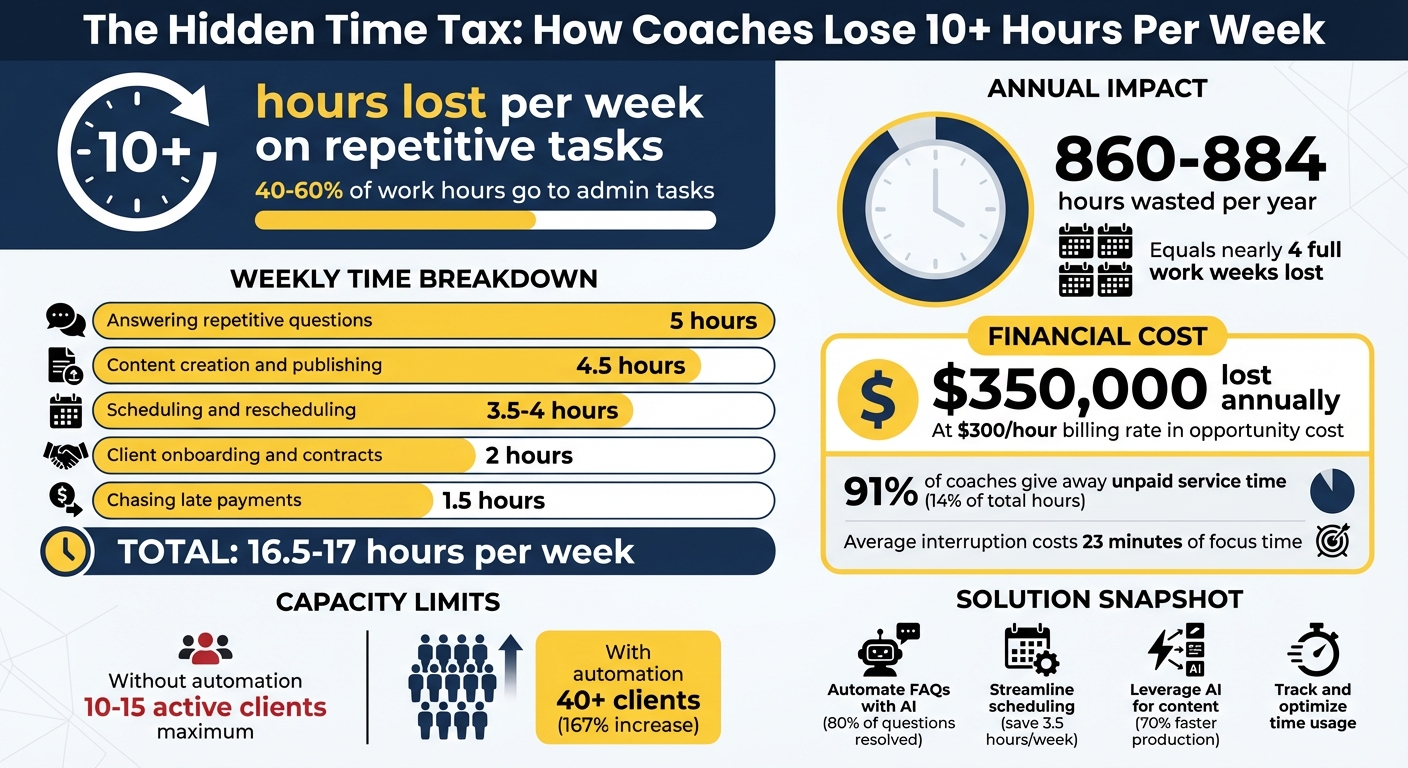
How Coaches Lose 10+ Hours Weekly: Time and Money Breakdown
The Problem: Why Repetitive Questions Cost More Than You Think
The Most Common Questions Coaches Answer Repeatedly
Every week, it’s the same questions: “What’s your pricing?” “How do I book my next session?” “Where’s the meeting link?” “When will I get my report?”
Many coaches still rely on what’s often called the "traditional model" - juggling Excel spreadsheets for tracking, email for assessments, and Word documents for reports [4]. This scattered approach leaves information spread across inboxes, sticky notes, and files. The result? You’re constantly re-sending details because clients can’t find what they need [4].
Scheduling adds another layer of frustration. You propose times via email, clarify time zones, and finally send the meeting link - just to lock in one appointment. On average, coaches spend 3.5 hours weekly managing scheduling and rescheduling, 5 hours per week answering repetitive client questions, and 2 hours per new client handling contracts and invoices manually [6].
| Task Category | Time Lost Weekly | Example |
|---|---|---|
| Answering Repetitive Questions | 5 hours | “What’s included?” “How do I access the portal?” |
| Scheduling/Rescheduling | 3.5 hours | Email back-and-forth to confirm meeting times |
| Contract/Invoice Management | 2 hours per client | Processing contracts and invoices |
| Chasing Late Payments | 1.5 hours | Follow-up emails for overdue invoices |
These inefficiencies don’t just waste time - they hold back your business. Without a better system, scaling becomes a struggle.
The Real Costs: Lost Revenue, Burnout, and Missed Growth
Repetitive tasks aren’t just annoying - they’re expensive in more ways than one.
Interruptions like “Where’s the meeting link?” don’t just cost a few seconds. Studies show it takes 23 minutes on average to regain focus after an interruption [3]. Multiply that by several interruptions a day, and the lost time adds up fast.
Financially, the impact is huge. Small business owners lose about 1.5 hours daily to repetitive tasks - that’s around 140 hours per year that could be automated [6]. For many coaches, manual processes cap their capacity at 10–15 active clients before administrative tasks become overwhelming [4].
And then there’s the emotional toll. Shifting between “coach mode” (deep, strategic work) and “admin mode” (handling FAQs) creates mental fatigue [4]. Add to that the pressure of meeting client expectations for near-instant responses, and you’re checking emails late at night or on weekends. Burnout quickly follows [7].
"The real problem isn't just the time - it's the momentum loss." - Memorres [4]
Delays in responding to simple requests or delivering reports can turn clients away. Prospects may move on to competitors who respond faster [7]. This isn’t just a time issue - it’s about losing clients, revenue, and the chance to grow your business.
sbb-itb-f7e72a6
The Numbers: Measuring the Time and Money You're Losing
How Much Time Coaches Lose Each Week
Coaches spend a staggering 40%–60% of their time on administrative tasks instead of actual coaching work [4]. Even more eye-opening, 85% of business coaches dedicate less than half of their time to paid coaching activities [8].
What does this look like in practice? Here's how the hours break down each week:
- Answering repetitive questions: 5 hours
- Content creation and publishing: 4.5 hours
- Scheduling and rescheduling: 3.5–4 hours
- Client onboarding and contracts: 2 hours
- Chasing late payments: 1.5 hours
Altogether, that adds up to 16.5–17 hours per week spent on tasks that could be automated [6][8].
Over the course of a year, this means coaches are wasting around 860–884 hours on these repetitive tasks [6]. As Luisa Zhou, Founder of LuisaZhou.com, points out:
"The average coach wastes 140 hours every year on tasks that could be automated. That's nearly four full work weeks of your life gone - forever" [6].
It doesn’t stop there. Workers also lose about 33% of their time searching for information [3]. And every interruption - like a quick question - costs more than just the time to answer. It takes an additional 23 minutes to fully regain focus [3].
These time drains are not just frustrating - they have a direct financial impact.
Converting Lost Time into Lost Dollars
The connection between time and money is clear: lost time equals lost revenue. Let’s break it down. If you charge $300 per hour and spend 40% of your 40-hour work week on administrative tasks, the missed opportunity costs are massive.
"If you bill at $300/hour and spend 40% of your 40-hour week on admin tasks, you're losing approx $350,000 annually in opportunity cost." - Memorres [4]
Even at lower rates, the financial impact adds up. For instance, a single 5-minute repetitive question costs about $3 in lost productivity if you’re earning an average hourly rate of $36 [3]. For professionals earning $120,000 per year, frequent interruptions from repetitive questions can lead to over $30,000 annually in lost productivity [3].
Another hidden cost is what’s known as "knowledge leakage." A staggering 91% of business coaches admit to giving away unpaid service time, which accounts for roughly 14% of their total working hours. That’s about one-third of their paid coaching time [8]. Carolyn Elder, Head of Content at Profi, highlights this issue:
"A staggering 91% of business coaches surveyed literally gave away unpaid service time" [8].
Then there’s the issue of limited capacity. Without automation, most coaches can only manage 10–15 active client teams at a time. But with automation, that number can increase by over 167%, enabling coaches to serve 40+ teams [4]. This isn’t just about saving time - it’s about unlocking significant revenue growth.
Top Automations I Use To Run My 7-Figure Online Coaching Business
Solutions: How to Save Time and Work More Efficiently
Streamlining your workday doesn’t have to be a daunting task. By automating repetitive client interactions, you can free up valuable time for more meaningful work. Modern AI tools make this easier than ever, seamlessly integrating with your existing workflows. Let’s dive into how you can make these solutions work for you.
Using AI Assistants to Answer Questions Automatically
AI assistants act like a 24/7 support team, ready to handle common client inquiries. Thanks to natural language processing (NLP), they can interpret questions accurately and respond in a way that feels personalized [9]. Unlike basic chatbots, these AI tools can be trained on your specific coaching methods and past interactions, making their responses sound like they’re coming directly from you [9].
The key is to let AI handle the routine stuff - like FAQs - while you step in for more complex or emotionally sensitive queries. As ThinkOwl puts it:
"AI assistants and AI agents complement human agents rather than replacing them. In the ever-evolving customer service landscape, AI's accuracy and a human agent's problem-solving capability can deliver high-quality support even in complex scenarios." - ThinkOwl [9]
Start small by using AI to draft responses to common emails or messages. You can review and tweak these drafts to ensure they match your tone before sending [6]. AI can also automate tasks like updating your CRM, scheduling calls, or sending onboarding materials - all without you lifting a finger [10].
Pairing this with an automated FAQ system can take your efficiency to the next level.
Creating an Automated FAQ System
An automated FAQ system is like having a virtual receptionist that never takes a day off. By using generative AI chatbots, you can instantly resolve over 80% of repetitive client questions [12]. This not only saves you time but also reduces interruptions, allowing you to focus on deeper, more impactful work.
The secret lies in using Retrieval-Augmented Generation (RAG), which ensures the AI pulls answers directly from your verified coaching materials rather than making unsupported claims [11][13]. To set up your system, start by identifying the most common questions clients ask [6]. Then, compile your existing resources - like PDFs, help documents, and email threads - into a centralized knowledge base [11].
Sarah Chudleigh from Botpress sums it up perfectly:
"The best FAQ chatbots know what the heck they're talking about. Any FAQ bot that provides accurate, up-to-date, and on-brand information is about as good as you can get." - Sarah Chudleigh, Botpress [11]
Keep things simple by limiting your FAQ system to around 20 main topics and 100 questions. This ensures accuracy and makes updates manageable [11]. Deploy the chatbot on platforms your clients already use, such as your website, WhatsApp, or a branded help center. You can even add qualifying questions like "What’s your ideal timeline?" to filter leads and reduce no-shows [6]. Regularly review the chatbot’s conversation logs to spot new recurring questions and update your knowledge base as needed.
The payoff? Repetitive support tasks can cost around $10 per interaction when you factor in salary and overhead [10]. Automating these tasks can cut your workload by 25% while boosting client satisfaction by up to 40% [12].
Automating Content Creation to Scale Your Business
Content creation often feels like a never-ending task, but AI can dramatically speed up the process - reducing production time by up to 70% [7]. Shifting from constant social media posting to AI-optimized SEO content allows you to create evergreen materials that continue generating leads with minimal upkeep [6].
Start by repurposing existing content. For example, turn a blog post or recorded coaching session into social media snippets, newsletters, or other formats with the help of AI [7]. This approach not only streamlines content production but also frees up time for higher-value coaching activities. Tools like Otter.ai, Fathom, and Fireflies can record your sessions and automatically generate summaries, action items, or even blog drafts [7][15].
Kenneth Pangan, a writer and marketer, explains the value of this approach:
"The goal is to automate the tedious, repetitive parts of the job so that you and your team can focus your energy on what really matters: strategy, creativity, and building a genuine connection with your audience." - Kenneth Pangan [14]
For best results, batch your AI-generated content outlines and drafts monthly, then schedule them for automatic distribution [6]. You can also improve the quality of AI outputs by providing specific instructions, like telling the AI to "Act as a business strategist for service companies" [7].
A basic automation setup - including tools like Calendly, Google Drive, and ChatGPT - can cost as little as $20 per month. This small investment can eliminate up to 80% of your administrative tasks and help you reclaim over 10 hours of work each week [6].
How to Get Started: A Step-by-Step Guide
Kick things off by understanding how you currently spend your time and automating repetitive tasks.
Track How You're Spending Your Time Now
Before diving into automation, you need a clear picture of where your time goes. Spend a week logging every task using a tracking tool [6]. Note when each task starts and ends, and rate how draining it is on a scale of 1 to 5 [6].
Once you’ve gathered this data, use the Superpower Matrix to sort your tasks into four categories [1]:
- Superpowers: Tasks you’re great at and enjoy doing.
- Danger Zone: Tasks you do well but dislike.
- AI-Assistance: Tasks that are challenging but tolerable.
- Automation Station: Tasks you find difficult and dislike.
The goal? Spend 60% of your time on your Superpowers and automate as much as possible from the Automation Station category [1].
Also, take a look at recurring interruptions. Review your recent emails or messages to identify patterns. Did you know that every interruption can cost you about 23 minutes of focus? Even a quick five-minute distraction could cost around $3 in lost productivity if you earn $36 per hour. Over time, these interruptions could add up to thousands of dollars per month [3].
Once you’ve mapped out where your time goes, you’ll be ready to pick the right tools to streamline repetitive tasks.
Select the Right Tools for Your Business
With your time-tracking insights in hand, choose tools that fit seamlessly into your existing systems. For example, a basic automation setup might include Calendly for scheduling, Google Drive for file storage, and ChatGPT for drafting emails. This kind of setup could cost as little as $20 per month and eliminate up to 80% of manual tasks [6].
For more advanced needs, consider tools like Zapier, which connects your CRM, email system, and scheduling software. Plans start at $20–$30 per month [2][17]. If your work involves sensitive data, prioritize tools with certifications like SOC 2, ISO, or GDPR compliance to ensure proper security [7][16].
Start small - test one tool to tackle your biggest time-drain for 30 days. Once you see results, you can expand your automation efforts [2][7].
Measure Results and Make Adjustments
After implementing automation, track your progress to ensure you’re using your reclaimed time effectively. Compare how long tasks took before and after automation, aiming to keep administrative work under 20% of your total hours [1].
For tools like chatbots or FAQs, review analytics monthly. Pay attention to metrics like total chats, common keywords, and fallback messages [5]. If clients frequently ask questions your system can’t handle, update your knowledge base [5]. Similarly, if your booking forms show high no-show rates, tweak your qualifying questions [6].
It’s also important to regularly review your automated systems. Are they still aligned with your business goals? As Luisa Zhou, a business coach, explains:
"Automation doesn't mean replacing your coaching. It means eliminating the repetitive tasks that prevent you from being fully present with your clients." [6]
Keep an eye on metrics like the ratio of admin-to-coaching time, lead quality, content performance, and client engagement [2][6]. If you notice a dip in engagement, consider adding a personal touch - like a direct check-in - to complement your automated messages [2].
Conclusion: Take Back Your Time and Grow Your Business
Repetitive questions and tasks aren't just frustrating - they're eating away at your time and revenue. For a coach charging $150 per hour, this can add up to an annual loss of $195,000 to $273,000 [18]. That’s a staggering amount that could be reinvested into growing your business.
Instead of working longer hours, the key lies in working smarter. Automation and AI-driven tools offer a way to reclaim your time. For instance, one leadership coach managed to save 2,196 hours in just five months while scaling from 15 to over 40 teams - all without burning out [4]. Tools like AI assistants, automated FAQs, and content automation can take over repetitive tasks, freeing you to focus on the work that truly matters.
Brandbase makes automation straightforward with features like AI assistants, 24/7 landing pages, and content automation tools. Their Essential plan is priced at $99 per month, with a one-time $499 setup fee.
"It's not about working harder. It's about working on what only you can do – and letting technology handle the rest." - Ranjana Thanvi, Founder and Strategist of Memorres [4]
The first step is simple: track how you spend your time and choose one automation tool to implement. After 30 days, measure the impact and see the difference for yourself.
Reclaiming your time isn’t just about boosting productivity - it’s about unlocking the potential to grow your business while focusing on what you do best. Don’t let the hidden time tax hold you back any longer.
FAQs
How can AI tools help coaches save time on repetitive tasks?
AI tools are a game-changer for coaches, especially when it comes to cutting down on time spent on repetitive tasks. Take AI-powered chatbots, for instance - they can handle routine client inquiries like booking sessions or resetting passwords. These bots provide quick, accurate responses, minimizing interruptions and freeing up coaches to concentrate on more impactful work.
Beyond that, AI can simplify workflows by automating tasks such as drafting personalized emails, creating coaching materials, and analyzing session notes to uncover actionable insights. This not only saves time but also improves the client experience by offering faster, more personalized support. By weaving AI into their daily operations, coaches can reclaim precious hours and dedicate their energy to scaling their business.
How can coaches save time by automating scheduling and answering FAQs?
Coaches can reclaim valuable hours each week by leveraging AI-powered tools and automation systems to handle routine tasks like scheduling and answering common client questions. For instance, AI chatbots are great for managing FAQs. They deliver instant, accurate responses and can even be tailored to match your coaching tone and style, saving you from repeatedly answering the same inquiries.
When it comes to scheduling, automated tools can take care of appointment bookings, send reminders, and even manage follow-ups. This not only simplifies communication but also eliminates the need for hours of administrative effort. Pair these tools with automation for processes like client onboarding and payment handling, and you could free up 10–15 hours per week to focus on what truly matters - delivering value to your clients.
How does spending time on repetitive tasks affect a coach's income?
Spending excessive time on repetitive administrative tasks can take a serious toll on a coach's income. Why? Because it eats into the hours that could be spent on activities that directly generate revenue, like client sessions or scaling your business. This is what’s known as opportunity cost - time spent on admin work is time you’re not earning or growing.
Let’s break it down: say you charge $150 per hour. If you’re losing 10 hours a week to administrative work, that’s $1,500 in potential earnings gone every week. Over the course of a year, that adds up to over $75,000! By using tools like automation and AI, you can streamline these tasks, reclaim your time, and focus on what truly drives your business forward.
Related Blog Posts

Blog title heading will go here
Blog title heading will go here