

The 10-Minute Setup That Saves Coaches 40 Hours Per Month

Coaches lose up to 40–60% of their time on admin tasks, costing them hundreds of thousands annually. But with a 10-minute setup using Brandbase, you can automate repetitive work and reclaim 40 hours every month. Here's what you'll achieve:
- Save time: Automate scheduling, follow-ups, lead qualification, and content creation.
- Boost efficiency: Reduce admin hours by 75%, freeing up time for coaching.
- Increase revenue: AI tools help streamline tasks, allowing you to manage more clients without burning out.
Brandbase offers two plans tailored to your needs, starting at $99/month. With features like an AI assistant, LinkedIn campaigns, and automated content creation, you'll spend less time on admin and more on growing your coaching practice. Ready to save time? Let’s dive into the details.
5 Automations Every Coaching Business Needs in 2025
sbb-itb-f7e72a6
Step 1: Get Ready for Setup
Before diving into your 10-minute setup, take a moment to prepare. A little planning upfront will help the AI align with your coaching style and connect smoothly with your existing tools.
Choose Your Brandbase Plan
Brandbase offers two plans, each tailored to how you find and engage with clients:
- Essential Plan ($99/month + $499 setup fee): Includes a custom AI assistant, lead qualification, hosting, maintenance, unlimited edits, and one media placement every six months. This plan is ideal if your clients primarily come from inbound website traffic or referrals.
- Pro Plan ($499/month + $499 setup fee): Offers everything in the Essential Plan, plus unlimited landing pages, LinkedIn outreach campaigns, six media placements every two months, and nine SEO blog posts per month. If LinkedIn is a key channel for client acquisition, this plan provides the tools to maximize its potential.
Fun fact: Coaching programs that use AI automation see a 25% revenue increase and a 70% reduction in administrative tasks [6].
Once you've picked your plan, you're ready to personalize your AI assistant.
Complete Your Voice Interview
The voice interview is where the magic happens. This step ensures your AI assistant mirrors your coaching style. You'll share your coaching philosophy, signature frameworks, and any relevant materials like methodology documents, FAQs, or transcripts from past sessions.
By training the AI with these resources, it becomes a virtual version of you - ready to answer questions, qualify leads, and engage prospects around the clock.
Luisa Zhou, Business Coach, puts it perfectly: "Automation doesn't mean replacing your coaching. It means eliminating the repetitive tasks that prevent you from being fully present with your clients" [5].
With your AI assistant now aligned to your voice, it’s time to dive into the Brandbase dashboard.
Access Your Brandbase Dashboard
After completing the voice interview, log into your Brandbase dashboard. This is your control center for managing automation. Start by linking your Calendly account to simplify scheduling. This integration alone can save you up to 40 hours each month by cutting out back-and-forth emails.
Double-check that all integrations are functioning correctly. Your dashboard will show which tools are synced and ready, ensuring your setup runs smoothly and delivers on its promise of saving time and effort.
Step 2: Set Up Lead Qualification and Scheduling
With your dashboard ready to go, enabling AI-powered scheduling can drastically cut down on time-consuming administrative work. Did you know the average professional spends about 4.8 hours each week just coordinating meetings? [11] Your AI assistant takes over this task instantly, working around the clock.
Turn On the AI Assistant
To get started, head to the "Assistant" section in your Brandbase dashboard and choose "Configure Assistant" [7][8]. Here’s what you’ll need to do:
- Enter your primary email address.
- Sync your calendar.
- Set your time zone.
- Connect your video conferencing tool, whether it’s Zoom or Microsoft Teams [7].
You can also configure your assistant to act as a gatekeeper by requiring pre-qualification before scheduling meetings. For instance, you might set it to ask questions like, "What steps have you already taken to address this issue?" or "What’s your budget for coaching?" [9][10]. Only leads that meet your criteria will receive booking options.
The system is built to understand natural language, so you don’t need to worry about coding. Just use simple instructions like, "Available Monday–Friday, 9:00 AM–5:00 PM" [8]. You can also set it to follow up with unresponsive leads once every 24 hours, for up to three attempts [8].
Once you’ve configured everything, it’s time to test the setup.
Test Your Lead Capture Forms
Before going live, run a test entry through your website form using a secondary email address. Ensure the form sends a notification to your account and copies the AI assistant’s email (e.g., assistant@brandbasehq.com). Watch as the assistant processes the test submission and asks any pre-qualification questions you’ve set up [9].
Double-check that the automated calendar invite includes the correct video conferencing link and that the tone aligns with your brand [8][9].
Step 3: Set Up Follow-Ups and Client Messages
Once your scheduling system is up and running, it's time to automate follow-up messages to keep clients engaged without adding extra work to your plate. Automating these tasks can save you a ton of time - research shows the average coach loses 140 hours a year on repetitive tasks that could easily be automated [5]. A big chunk of that time is spent rewriting the same emails. By pairing automated scheduling with personalized follow-up sequences, you can engage prospects effortlessly, day or night. The next step? Building sequences that nurture leads effectively.
Create Automated Follow-Up Sequences
Head to the "Sequences" tab and design follow-up paths tailored to different lead actions. For instance, someone downloading a free guide needs a different message than someone inquiring about pricing [14].
Start with 2–4 distinct sequences. Here’s an example of a simple plan:
- Day 0: Send a thank-you email.
- Day 2: Trigger a personalized follow-up based on the lead’s interest.
- Day 5: Share a relevant case study or resource.
- Day 7: Add a personal touch, like a voice memo or LinkedIn message.
- Day 10: Send a final call-to-action [14].
The secret sauce? Deep personalization. Go beyond just using their first name - merge fields like {{Industry}} or {{Pain Point}} can make your messages feel tailored to each recipient [14][16].
This approach works. One campaign using this strategy saw a 73% open rate, 18 booked calls, and 9 closed clients in just 30 days [14].
"Automation isn't the enemy of human connection - poorly executed automation is." - Brandsbyday [14]
By keeping your tone personal and thoughtful, you can automate without losing the human touch. Once your follow-up paths are ready, the next step is ensuring your system works around the clock.
Enable 24/7 Availability
Go to the "Assistant Settings" section and toggle on "Always Available Mode." This feature allows your AI assistant to respond to client inquiries at any time, day or night [3][13]. You can also set up behavior-based triggers to respond instantly when someone takes a high-intent action, like visiting your pricing page or clicking on a service link [14]. This immediate engagement grabs their attention while they’re still interested, freeing you from constantly checking your inbox.
Businesses using AI-powered sequences like this have reported a 15-20% jump in reply rates [13].
Don’t forget to review and update your message templates every few months. Adjust them to reflect common client questions or any updates to your services [15]. This ensures your system stays fresh and relevant.
Step 4: Start LinkedIn Outreach Campaigns
With your system running non-stop, it’s time to extend your automation efforts to LinkedIn. This step helps you grow your network and bring in more clients while your automated follow-up sequences continue nurturing leads. Businesses using LinkedIn automation tools often report a 35% boost in response rates [19]. The key? Target the right audience and let the system handle the heavy lifting. Done correctly, top campaigns can achieve response rates of up to 30%, compared to the average cold outreach rate of just 10.3% [20]. Here’s how to get started.
Set Your Target Audience
Head to the "LinkedIn Campaigns" section in your Brandbase dashboard. Start by defining your Ideal Client Profile (ICP). Use filters like job titles, industries, company sizes, and locations [19][20]. The more precise your targeting, the better your results. For instance, if you coach tech startup founders, focus on titles like "Founder" or "CEO" at companies with 10–50 employees in the software sector [17][18].
Take advantage of the data enrichment feature to confirm contact details and gather insights like recent profile updates or shared posts. This step ensures your outreach feels timely and relevant. In fact, 73% of decision-makers are more likely to respond to messages that feel personal [20]. Spending a little extra time refining your list can make a big difference. Once your target audience is fine-tuned, you’re ready to launch your campaign.
Launch and Track Your Campaigns
With your audience set, create a multi-step sequence. Start with a connection request, follow up with a personalized message 3–5 days later, and then send a final follow-up [20][21]. Instead of diving straight into a sales pitch, open with a qualifying question that aligns with their goals. For example: "Are you currently exploring ways to scale your coaching practice without adding more hours to your schedule?"
"Every human being on earth is the most important human being on earth, as far as he or she is concerned... They will give their love, their affection, their respect, and their business to the person who fills this need." - Earl Nightingale, Author [21]
After launching, keep an eye on your campaign’s performance using the analytics dashboard. Monitor metrics like connection acceptance rates (aim for 40–50%) and reply rates (target 20–30%) [18]. If your acceptance rate is low, adjust your audience filters. If replies are lacking, experiment with different messaging approaches [20]. To maintain a good sender reputation, regularly withdraw ignored connection requests [20]. With the average LinkedIn invitation acceptance rate sitting at 37%, staying above this benchmark is a good sign that your campaign is on track [20].
Step 5: Automate Content Creation and Media Placement
Once you've built your network through LinkedIn outreach, it’s time to strengthen your authority by automating content creation and media placements. Coaches often dedicate over four hours to crafting a single post [22], yet 82% of marketers managed to ramp up content production in 2024 despite tight budgets [23]. Automation is the key to saving time while maintaining your personal style. Tools like Brandbase make this process seamless, letting you generate SEO-friendly blog posts and secure media placements without spending endless hours writing.
Activate SEO Blog Posts
In the "Content" section of your Brandbase dashboard, you can activate automated blog creation designed to reflect your unique tone using your established voice profile. Start by selecting 3–5 target keywords that align with your coaching niche, such as "executive leadership coaching" or "career transition strategies." Brandbase’s keyword research tool will even suggest long-tail keywords and related content clusters to help you build topical authority [22].
Once keywords are selected, hit "Generate" to create a 1,500–3,000-word SEO-optimized draft complete with schema markup and proper headings [22][23]. A quick personal touch - like adding anecdotes or refining specific sections - ensures the content feels authentic to your voice. Upload 3–5 of your best-performing articles to train the AI further [4], then publish posts complete with automated internal links and meta descriptions.
"Automation doesn't just save time - it can actually make your content better." - Jeff Joyce, Author, BrandWell [22]
With your blog content ready and scheduled, you can focus on reaching a broader audience through media placements.
Automate Media Placements
Navigate to the "Media Placements" tab to activate PR automation. Simply input key details about your coaching practice, and the system will generate a press release draft along with tailored email pitches [24]. Make sure to review and verify all details to maintain your credibility. Consistent, authoritative content has been shown to increase leads by 67% [3] and can double your brand’s perceived value [3].
For Pro plan users, six media placements are included every two months, while Essential plan users receive one placement every six months. Each placement enhances your authority, positioning you as a trusted voice in your industry and extending your reach far beyond your immediate network.
Step 6: Test and Monitor Your System
Now that your automation is live, it’s time to test and monitor it to ensure it’s running smoothly and saving you time. Regular testing and monitoring are essential to consistently reclaim those 40 hours a month. For example, between June 2024 and November 2024, an executive leadership coach saved 2,196 hours by automating 366 assessments without manual tracking [1]. Achieving results like this requires consistent oversight and fine-tuning.
Check AI Interaction Records
Start by reviewing your AI logs in the Brandbase dashboard. Look for missed questions, awkward phrasing, or any automations that didn’t work as expected. The "Interaction Records" tab is particularly useful for identifying patterns - if multiple leads are asking the same unanswered question, update your AI assistant’s knowledge base so it can provide answers automatically next time [12].
After testing, check your destination apps. For instance, if you’ve set up automated scheduling, verify that appointments appear in your calendar with the correct times and details [25][27]. Similarly, for lead capture forms, ensure that new entries are reaching your CRM as intended. Spotting and fixing errors early can save you countless hours down the line.
Once you’re confident everything is running as it should, shift your focus to maintaining the system over time.
Plan Regular Maintenance
Set aside time for monthly reviews to update any workflows that aren’t performing well, fix broken links, and adjust automations that feel too robotic [3]. Conduct quarterly audits to refresh SEO content that may have become outdated or underwhelming [5].
To stay proactive, set up automated alerts for missed sessions or drops in engagement, keeping your focus on coaching [26]. Automated email sequences, for example, can generate 320% more revenue per email compared to manual campaigns [3], but only if they’re regularly maintained. A quick monthly check can ensure your system keeps delivering results without constant hands-on effort.
Time Savings Breakdown
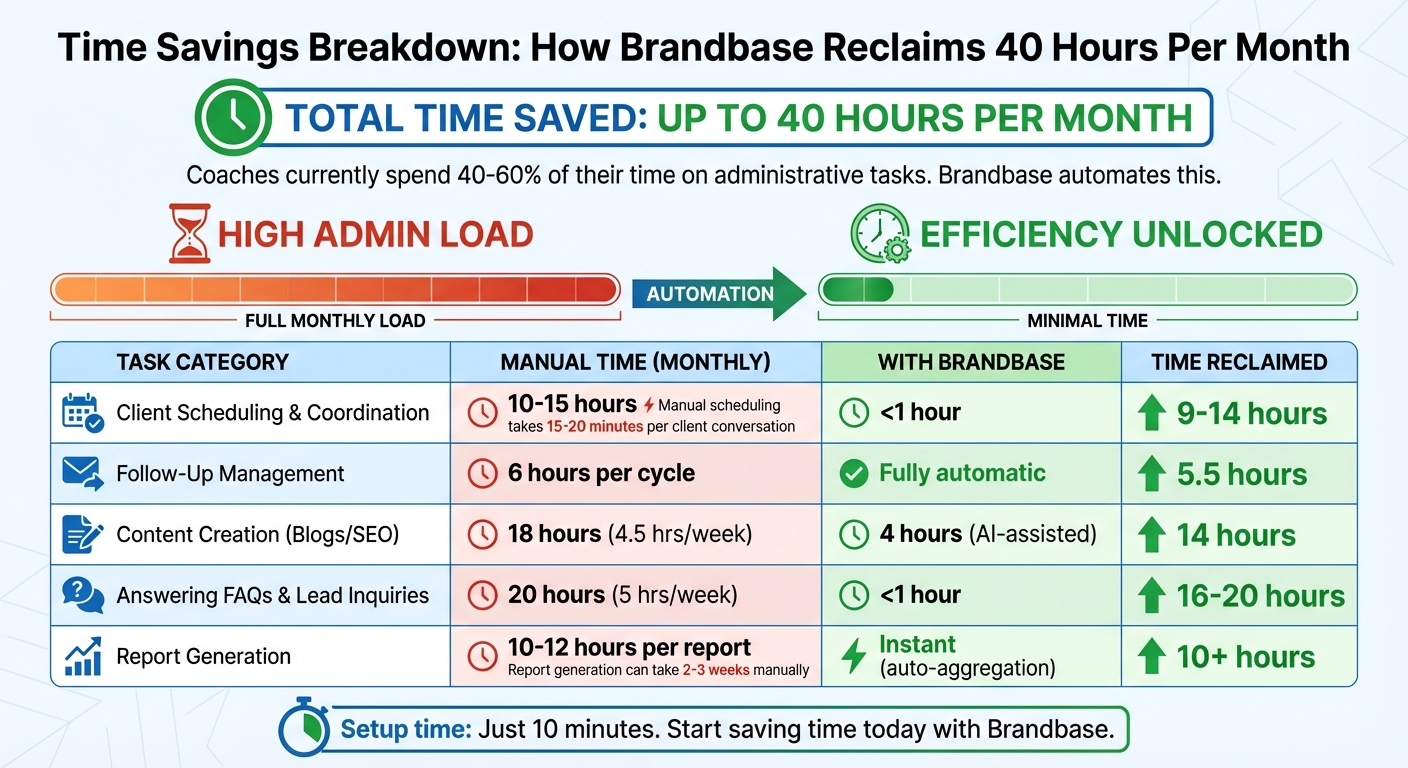
Time Savings Breakdown: Manual vs Automated Coaching Tasks
Here's how Brandbase automation reclaims up to 40 hours each month, freeing up more time for quality coaching sessions. This breakdown connects the dots between streamlined processes and tangible time savings.
| Task Category | Manual Time (Monthly) | With Brandbase Automation | Time Reclaimed |
|---|---|---|---|
| Client Scheduling & Coordination | 10–15 hours [1] | Less than 1 hour | 9–14 hours |
| Follow-Up Management | 6 hours per cycle [1] | Fully automatic | 5.5 hours |
| Content Creation (Blogs/SEO) | 18 hours (4.5 hrs/week) [5] | 4 hours (AI-assisted) | 14 hours |
| Answering FAQs & Lead Inquiries | 20 hours (5 hrs/week) [5] | Less than 1 hour | 16–20 hours |
| Report Generation | 10–12 hours per report [1] | Instant (auto-aggregation) | 10+ hours |
Manual scheduling alone eats up 15–20 minutes per client conversation [1], and generating reports can stretch over 2–3 weeks [1]. Multiply that by dozens of clients, and you're looking at 45 hours of work that could be handled automatically. With Brandbase, clients schedule themselves using self-service links, while the AI assistant handles lead qualification seamlessly.
"Industry research shows that coaches spend 40-60% of their time on administrative tasks instead of transforming their clients." - Memorres [1]
In addition to saving time, automation ensures reports are generated instantly, delivering insights when they matter most. This not only enhances client satisfaction but also drives better outcomes. With a simple 10-minute setup, Brandbase eliminates these bottlenecks, allowing you to focus on what truly matters: coaching and growing your practice.
Conclusion
The six-step setup outlined earlier takes just 10 minutes to implement but can save you up to 40 hours every month - time you can redirect toward coaching. By automating tasks like scheduling, follow-ups, content creation, and lead qualification, Brandbase eliminates the administrative weight that often slows coaches down.
As Coachvox explains, "The coaching industry is splitting into two groups: those who embrace AI tools to amplify their impact, and those who stick to traditional methods while watching their competitive advantage erode" [2]. Considering that coaches typically spend 40% to 60% of their time on administrative work instead of actual coaching [1], automation isn't just helpful - it’s essential for staying ahead and avoiding burnout.
Brandbase takes care of the repetitive tasks so you can focus on what you do best. Your AI assistant works 24/7 to qualify leads, your calendar adjusts itself, and your content is automatically created - providing instant responses and real-time reports.
Ready to make the shift? Get started with Brandbase today: pick your plan, complete your voice interview, and let the system handle scheduling, follow-ups, content creation, and lead qualification. That way, you can dedicate your energy to coaching.
FAQs
What do I need before the 10-minute setup?
Before diving into the 10-minute setup, make sure you have the following ready:
- Access to tools: This includes AI and automation platforms like OpenAI, Slack, or Notion.
- Your client management data: Gather information on your current workflows, such as scheduling, follow-ups, and other client interactions.
- A clear plan for automation: Identify specific tasks you want to streamline, like client onboarding or content creation.
While not mandatory, having some familiarity with these tools - or being open to learning - can make the process much smoother.
How does the AI qualify leads before booking?
The AI evaluates leads by reviewing call transcripts or lead details to see if they align with set criteria, like specific scoring metrics or parameters. Once assessed, the results are automatically logged into a spreadsheet or CRM, making it simple to track and follow up.
How do I keep automation sounding like me?
To make automation feel like an extension of your own voice, it's essential to customize AI responses to match your tone and style. Look for platforms that let you tailor responses and add a personal touch to prompts. Take time to regularly review the AI's output, fine-tuning the language to ensure it stays true to how you communicate. This way, your automated interactions will feel natural, genuine, and consistent with your unique way of connecting with others.
Related Blog Posts

Blog title heading will go here
Blog title heading will go here