
From 60-Hour Weeks to 40: How One Coach Automated Client Support
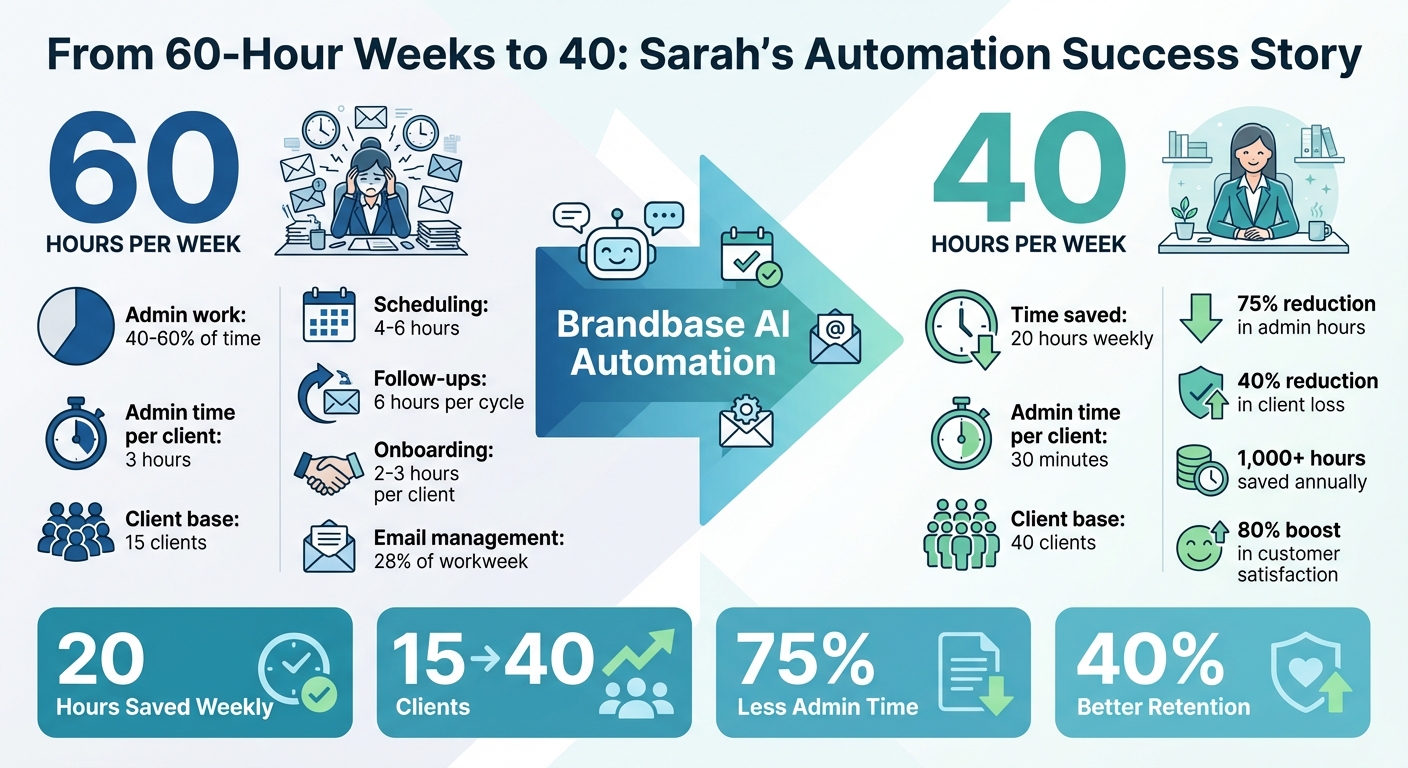
Sarah, a business coach, cut her workweek from 60 hours to 40 by automating repetitive tasks like scheduling, client communication, and follow-ups. Before automation, she spent 40–60% of her time on admin work, leaving little room for coaching. After adopting AI tools like Brandbase, she:
- Saved 20 hours weekly by automating scheduling, onboarding, payments, and follow-ups.
- Reduced admin time per client from 3 hours to just 30 minutes.
- Improved client satisfaction and retention with instant responses and structured workflows.
- Grew her client base from 15 to 40 while maintaining a 40-hour workweek.
This shift allowed Sarah to focus on coaching, strengthen client relationships, and scale her business without sacrificing work-life balance.
How Business Coach Sarah Cut Weekly Hours from 60 to 40 with Automation
5 Automations Every Coaching Business Needs in 2025
sbb-itb-f7e72a6
The 60-Hour Workweek: Manual Client Support Problems
Before automation, Sarah juggled her coaching responsibilities with a mountain of administrative tasks. Each new client brought hours of extra work - chasing down intake forms, responding to repetitive emails, and managing details across various platforms. This inefficiency made onboarding, scheduling, and follow-ups a logistical nightmare.
The numbers paint a clear picture. Sarah lost about 16 hours each week to tasks like scheduling emails, sending payment reminders, and following up with clients. These administrative duties sometimes ate up 40–60% of her time, pulling her away from actual coaching. The constant shift from high-energy coaching sessions to managing her inbox also came with a steep mental cost, as context switching drained her focus and productivity [6].
Manual Onboarding and Lead Qualification
Onboarding was a time sink that often cost Sarah 2–3 hours per client. Each new inquiry required a personalized response outlining her services, pricing, and availability. Once a client expressed interest, Sarah manually sent intake forms, waited for responses, and followed up when forms were incomplete. She also spent considerable time answering the same questions about her coaching approach, session structure, and payment terms. Without automation, potential clients sometimes slipped through the cracks as her busy schedule delayed responses, leading many to lose interest and move on [7].
Scheduling Problems
Scheduling was another headache, consuming 4–6 hours each week [1]. Coordinating appointments involved endless email exchanges to find a mutually convenient time, often complicated by time zone differences. These back-and-forth interactions occasionally led to calls being scheduled at inconvenient hours. Worse, every scheduling interruption broke Sarah's focus, making it harder for her to stay fully engaged during client sessions.
Support Overload and Follow-Ups
In between coaching sessions, Sarah faced a steady stream of minor client requests - worksheets, recommendations, or rescheduling. While each request seemed small, they collectively added up to hours of distraction. Follow-ups were particularly demanding. After every session, Sarah manually sent recap emails, outlined action items, and issued reminders, a process that took about 6 hours per follow-up cycle [6]. Delays were common, with follow-up emails sometimes going out 2–3 weeks late, which hurt client engagement. As the Business Coach VAs Team put it, "Clients don't see progress. They feel out of touch. The admin gets messy. These are management issues, not coaching issues" [8].
| Task Category | Weekly Time Cost | What It Looked Like |
|---|---|---|
| Scheduling | 4–6 hours | Multiple emails and time zone confusion [1] |
| Onboarding | 2–3 hours per client | Chasing forms, answering FAQs, manual lead qualification [7] |
| Follow-Ups | 6 hours per cycle | Manual reminders, progress tracking, delayed responses [6] |
| Email Management | 28% of workweek | Constant interruptions and context switching [1] |
How Brandbase Automation Enabled a 40-Hour Workweek
In just two weeks, Brandbase's automation tools gave Sarah back 20 hours of her week, allowing her to focus on coaching instead of drowning in administrative tasks[5]. Brandbase's AI Assistant worked around the clock, capturing leads, qualifying prospects before they hit her calendar, and managing client communications automatically. By integrating scheduling tools, it eliminated the endless back-and-forth emails that used to eat up 4 to 6 hours every week[5]. Automated reminders further reduced no-show rates. From onboarding to client support, Sarah streamlined her operations with Brandbase's targeted automation tools.
Automating Onboarding with Brandbase AI Assistant
Sarah wanted an efficient onboarding process, and Brandbase delivered. The AI Assistant ensured that client inquiries were addressed instantly, even when Sarah wasn’t available[9][2]. Using conversational forms, it qualified leads by asking key intake questions to gauge client needs and readiness before scheduling discovery calls[4].
Once a lead expressed interest, the system sent out welcome emails, program overviews, and resource links without delay. It also synced with Sarah’s CRM, logging client information and triggering follow-up workflows. This automation stopped potential leads from slipping through the cracks, freeing Sarah to focus on her coaching.
Automated Scheduling and Reminders
With onboarding sorted, Sarah shifted her attention to fixing her scheduling headaches. By integrating Brandbase with Calendly, she let clients handle their own appointments through self-service scheduling, cutting out the back-and-forth emails entirely[5]. The system synced with her calendar and CRM, logging appointments and initiating follow-ups automatically.
Sarah also implemented multi-stage reminders that sent notifications 24 hours and 1 hour before sessions[10]. These reminders helped clients stay on track and show up prepared. As Cal.com notes:
"Automated email and SMS reminders help clients remember appointments and arrive prepared, reducing costly no-shows." – Cal.com[10]
Manual scheduling tasks were reduced to just 15 minutes of oversight[5]. By defining meeting types - like 30-minute discovery calls or 60-minute coaching sessions - and adding buffer times, Sarah gained better control over her day without constant interruptions.
24/7 Chatbots for Client Support
Sarah took her efficiency up another notch by deploying Brandbase’s Pro plan AI chatbot to handle routine client questions. The chatbot provided instant responses to common queries, sparing Sarah from having to address every minor issue[12]. This was a game-changer, especially since 74% of customers prefer using chatbots for simple questions over waiting for human assistance[12].
The chatbot went beyond FAQs by learning Sarah’s coaching materials and providing tailored answers. For more complex issues, it escalated conversations to Sarah seamlessly. It also captured leads, scheduled appointments through Calendly, and tracked client progress, leading to an 80% boost in customer satisfaction[12].
Automated Outreach and Follow-Ups
Finally, Sarah transformed her outreach efforts with Brandbase’s automated LinkedIn and email tools. The system handled email sequences to nurture new subscribers and re-engage inactive clients - all without Sarah lifting a finger[5].
The automation personalized outreach across email, LinkedIn, and SMS based on client engagement signals. This approach, rather than a rigid schedule, made communications feel more relevant and timely. Other users of similar tools have reported a 15–20% increase in reply rates[11], and Sarah saw similar gains in her client engagement.
Results: Time Savings and Business Growth
After introducing AI automation, Sarah saw immediate improvements in both her workload and overall business performance.
20 Hours Saved Each Week
By automating five key systems - scheduling, payments, email sequences, and onboarding - Sarah reduced her weekly work hours from 60 to 40 [3][5]. For example, automating client scheduling alone saved her 4–6 hours each week by eliminating the need for back-and-forth emails. Similarly, automated welcome sequences and follow-ups reclaimed another 4–6 hours, while streamlining onboarding shaved off 3–4 hours weekly. Payments and invoicing automation contributed an additional 2–3 hours of savings by managing recurring billing seamlessly [3][5].
In just two weeks of implementing "Priority 1" tasks (scheduling, payments, and reminders), Sarah had already saved 10–15 hours per week [5]. By the end of the first month, she was consistently saving 20 hours weekly - equivalent to reclaiming 1,000–1,300 hours annually. This wasn't just about reducing work hours; it was about eliminating the administrative bottlenecks that had been eating up nearly 30% of her time [3].
Better Client Retention and Engagement
Beyond saving time, automation also helped Sarah strengthen her relationships with clients. Using Brandbase to implement a structured, automated onboarding process, she reduced client loss by 40% within the first 90 days [8]. The system provided a clear and predictable flow, making it easier for clients to stay on track without feeling overwhelmed [13]. Automated tracking also gave clients a visible sense of their progress, which boosted their commitment and encouraged referrals [13].
Daily touchpoints became another game-changer. Instead of relying on weekly check-ins, Sarah's automated system offered consistent, daily communication, creating faster feedback loops and keeping clients engaged [13]. Additionally, her 24/7 AI chatbot handled a significant number of client queries, which not only improved loyalty but also freed Sarah to focus on more meaningful, high-value interactions. As the Business Coach VAs Team explains:
"Automation is not about cutting the personal touch. It is about cutting admin friction... which stops you from showing up fully for clients." [3]
With these systems in place, Sarah was able to shift her focus to growth strategies backed by solid data.
Scaling with Data-Driven Insights
With more time and stronger client relationships, Sarah used analytics to scale her business efficiently. Brandbase's dashboards offered real-time insights, eliminating the need for manual tracking and email updates by providing a clear view of client progress at any moment [6]. Automated lead qualification helped her prioritize high-value prospects, ensuring her 40-hour workweek was spent effectively [14]. Meanwhile, performance metrics identified the small percentage of cases that required her direct attention [3][5].
The impact was striking. Sarah cut her administrative workload from 96 hours a month to just 24 - a 75% reduction [6]. This efficiency allowed her to increase her client base from 15 to over 40 while maintaining her 40-hour workweek [6]. By leveraging data-driven insights, Sarah transitioned from constantly putting out fires to proactively growing her business. Automation wasn’t about replacing the human element - it was about preserving the time and energy needed to deliver it [3].
Conclusion
By automating tasks like scheduling, onboarding, payments, and client support with Brandbase, Sarah managed to reclaim 20 hours each week. This shift reduced her workweek from 60 hours to 40, allowed her to grow her client base from 15 to over 40, and improved client retention through consistent, high-quality onboarding experiences[6].
To put it in numbers, Sarah cut her administrative hours by 75%, enabling her to focus on delivering high-value coaching instead of juggling emails and routine tasks[6]. As Ranjana Thanvi, Founder of Memorres, aptly states:
"It's not about working harder. It's about working on what only you can do – and letting technology handle the rest"[6].
Automation doesn’t take away the personal touch in coaching - it ensures you have the bandwidth to provide it[3]. By eliminating tasks like sending calendar invites or chasing payment reminders, you can dedicate your energy to the clients who need your expertise the most. For Sarah, the 1,000+ hours saved annually became time she could reinvest in growing her business, developing her skills, or simply enjoying life beyond work. Her journey highlights how AI-powered automation can reshape a business, shifting the focus from tedious administration to meaningful coaching.
This transformation not only improved Sarah’s workflow but also underscored how automation can be a game-changer for professional success.
If you’re spending 40–60% of your time on tasks that don’t require your unique skills, you’re likely leaving both revenue and work–life balance untapped[6]. Tools like Brandbase’s AI Assistant, automated scheduling, and 24/7 chatbot support can handle up to 90% of routine client interactions. This gives you the freedom to focus on the transformative work that only you can deliver[3].
Take back your time. See how Brandbase's automation can help you prioritize impactful coaching.
FAQs
What should I automate first to cut my work hours fast?
Automating your client onboarding process is a game-changer when it comes to cutting down your work hours. It can free up 10–15 hours each week by simplifying tasks like sending welcome emails, gathering client information, and scheduling initial sessions. By letting automation handle these repetitive tasks, you not only save time but also create a seamless experience for your clients. This gives you more room to focus on what truly matters - delivering impactful coaching sessions.
How do I keep coaching client support personal with automation?
To maintain a personal touch in client support while incorporating automation, focus on tools that complement human interaction rather than replace it. Use automation for repetitive tasks like onboarding, scheduling, and follow-ups. This frees up time for more meaningful, one-on-one interactions. Combine automation with human oversight - like virtual assistants - to address complex or nuanced situations. This approach keeps operations efficient while ensuring clients feel genuinely valued and supported.
What tools does Brandbase need to connect with to work best?
Brandbase shines when paired with tools that streamline automation and improve client support. For instance, AI platforms can enable personalized communication, while workflow automation tools handle tasks like scheduling and onboarding. CRMs are also essential for efficiently managing client relationships. Adding email marketing platforms, scheduling tools, and virtual assistant services to the mix can simplify operations even more, freeing up time for service professionals to concentrate on their most impactful work.
Related Blog Posts

Blog title heading will go here
Blog title heading will go here