
How to Build Your Coaching Business Website: Complete 2026 Guide

In 2026, your coaching website is your most powerful tool for attracting and converting clients. It’s not just about having an online presence - it’s about creating a platform that builds trust, showcases your expertise, and drives action. With 75% of people judging credibility based on design and SEO leads converting at 14.6%, having a professional, well-optimized website is non-negotiable. Here’s a quick breakdown of how to get started:
- Define Your Niche: Be specific about who you help and the transformation you provide. Clear messaging attracts the right audience.
- Plan Core Pages: Focus on a homepage, about page, services page, and contact page. Each should guide visitors toward booking a discovery call.
- Use Tools Like Brandbase: Build and manage your site with ease using platforms tailored for coaches, starting at $18/month.
- Optimize for Mobile and Speed: With 61% of traffic coming from mobile, ensure your site loads quickly and works perfectly on all devices.
- Add Lead Capture & Booking Features: Use forms and scheduling tools to turn visitors into clients effortlessly.
This guide walks you through each step, from choosing your niche to launching a high-performing site. Your website isn’t just a digital placeholder - it’s your 24/7 marketing engine.
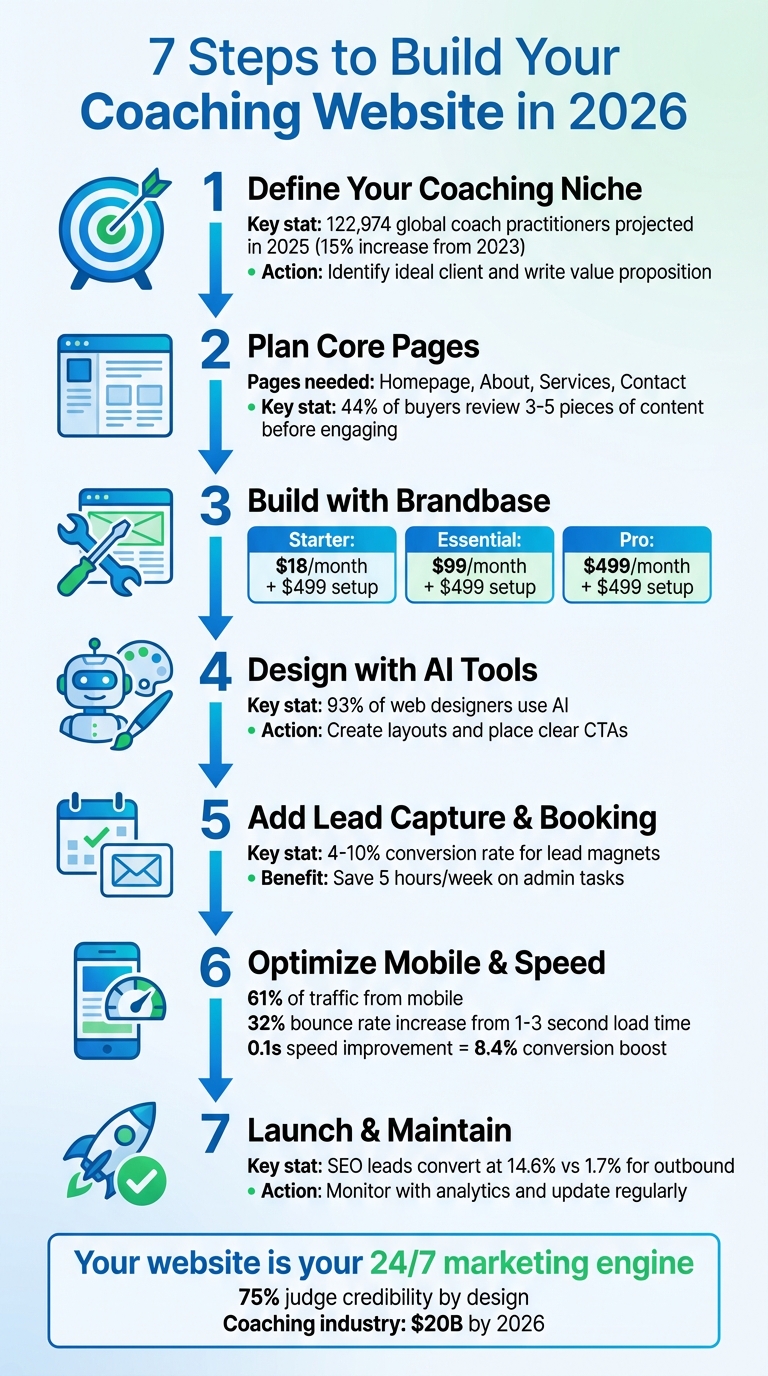
7-Step Process to Build a Coaching Website in 2026
Website Essentials: Building Your First Coaching Website Ep 101
Step 1: Define Your Coaching Niche and Target Audience
Decide who you want to help and the specific transformation you can offer. This clarity impacts everything - from your homepage headline to how you describe your services.
With 122,974 global coach practitioners projected in 2025 - a 15% increase from 2023[9] - it’s more important than ever to stand out. Generic statements like "I help people reach their potential" won’t attract anyone because potential clients can’t connect with such vague messaging[2]. Now compare that to: "I help overwhelmed executives develop work-life balance." That kind of specificity immediately tells someone if you’re the right fit for them.
Identify Your Ideal Client
Start by reflecting on your own professional experience to find areas where you’ve delivered real results. For instance, if you spent 15 years in corporate finance, financial coaching for professionals might be a natural fit. Or, if you’ve guided remote teams through productivity challenges, remote work coaching could be your niche[7][9].
Next, dig deeper into your ideal client’s world. Go beyond basic demographics like age or income and focus on their values, struggles, and daily challenges. What keeps them up at night? This emotional understanding creates a stronger connection[10][11]. To gather insights, try these approaches:
- Conduct quick 10-minute interviews with current or potential clients. People are often happy to share their thoughts[11].
- Use brief surveys to uncover their biggest challenges[11][12].
- Analyze social media comments and emails to pick up on the exact phrases your audience uses. Incorporate this language directly into your website[11][12].
Emerging niches are also worth exploring. By 2026, areas like AI coaching (helping businesses integrate AI tools), longevity coaching (healthy aging strategies), and sleep coaching (improving sleep as a health cornerstone) are gaining momentum[7]. Consider this: the career coaching industry is already valued at $15.4 billion and growing at 4.7% annually, while 84% of U.S. consumers now prioritize wellness[7].
"When you define what kind of coach you are and who you serve best, you transform your practice from a general service to a focused solution." – Pallavi Godbole, Simply.Coach[9]
Before committing to a niche, test it out. Offer pilot programs, host free workshops, or schedule discovery calls to see how your target audience responds[9][2]. This step ensures you’re building your services around a niche that resonates with paying clients.
Defining your niche sharpens your focus and sets the stage for crafting a compelling value proposition tailored to your audience’s needs.
Write Your Value Proposition
Once you’ve identified your ideal client, it’s time to clearly communicate the transformation you offer with a concise value proposition. A strong value proposition explains what you do, who you help, and the outcome they’ll achieve. Avoid listing features like "8 one-hour sessions with email support" - that’s just a commodity. Instead, highlight the results: "Transform your career in 90 days" or "Find clarity and confidence with expert guidance"[3][4].
Focus on benefits, not features. Use the exact words your clients use to describe their struggles and aspirations. If they say, "I feel stuck in my career", don’t rephrase it as "seeking professional advancement." Speak their language to make your value proposition personal and relatable[3][5].
"The way to stand out is to really niche down and get specific on the problem you solve." – Nicole Michler, Founder, Phase 20[5]
A well-crafted value proposition also allows you to charge based on value rather than time. For example, executive coaches often charge $10,000–$50,000+ per package, while generalist life coaches typically charge $2,000–$8,000[7]. The difference? Specificity. When clients understand the clear transformation you deliver, they see it as an investment in results - not just paying for hours of coaching[2][8].
Step 2: Plan the Core Pages for Your Coaching Website
Once you've nailed down your niche and value proposition, it's time to make sure every page on your website reflects your coaching brand. Focus on creating four key pages that establish credibility and encourage visitors to book discovery calls. Keep your navigation simple - stick to just four or five essential pages to avoid overwhelming potential clients. Here's how these core pages can turn visitors into paying clients.
Homepage: Make a Memorable First Impression
Think of your homepage as your virtual handshake - it’s your chance to grab attention right away. Use a bold, benefit-focused headline that speaks directly to your target audience. Avoid generic welcomes like "Welcome to My Site." Instead, try something specific like "Leadership Coaching for Overwhelmed Executives" or "Transform Your Career in 90 Days."
Add a professional headshot to build trust, and place a strong call-to-action (like "Book Your Free Discovery Call") prominently above the fold. Skip the stock images - real, authentic photos of you in action are far more effective.
Want to boost conversions? Add a short video introduction. Studies show that having a video on your homepage can increase conversion rates by up to 80% [4]. Once your homepage grabs attention, guide visitors to your About page to build a deeper connection.
About Page: Share Your Story and Build Trust
Your About page should answer the question, "Is this the right coach for me?" Share your story, but frame it around your clients' needs and how you’ve helped people like them overcome challenges.
Highlight your credentials - certifications, years of experience, and success stories - to show that you’re both qualified and relatable. Wrap up with a secondary call-to-action, like "Ready to start your transformation? Let’s talk", to naturally lead visitors toward your Services page.
Services Page: Showcase What You Offer
This is where you outline your coaching packages, but instead of listing features, focus on the results clients can expect. For example, instead of saying "8 one-hour sessions with email support", emphasize outcomes like "90-day executive leadership program to reduce overwhelm."
Be upfront about pricing or starting rates (e.g., "Packages starting at $3,000"). This transparency helps build trust and qualifies leads who are serious about investing in their growth. Testimonials are key here - especially video testimonials, as websites with video content are 53 times more likely to appear on Google’s first page [5]. Make sure it’s easy for prospects to take the next step and contact you.
Contact Page: Make Reaching Out Effortless
Your Contact page should be simple and straightforward. Include a form asking for basic details like name, email, phone, and a message. Add your professional email address and, if you’re comfortable, a phone number to further establish credibility.
To make scheduling a breeze, integrate a booking calendar tool like Calendly. This eliminates the back-and-forth of email scheduling. Consider adding a friendly note, like "Expect an email within 24 hours to schedule your free 30-minute discovery call", to set clear expectations for follow-up.
Step 3: Build Your Website with Brandbase
Now that you've mapped out your core pages in Step 2, it's time to bring your vision to life with a website built using Brandbase. Whether you're tech-savvy or a complete beginner, Brandbase makes it easy to create a professional online presence. They offer three pricing tiers tailored to coaches at different stages of their business journey.
Keep in mind, all plans have a one-time setup fee of $499, and monthly costs vary depending on the plan. Let’s break down the options to find the best fit for your needs.
Brandbase Starter Plan: Establish Your Online Presence
The Starter Plan, priced at $18/month, is perfect for coaches looking to create a simple online presence without ongoing management. This plan includes a professionally designed landing page, which is transferred to your Webflow account - giving you full ownership of your site.
However, this plan doesn’t include hosting, maintenance, or support after the initial setup. It’s ideal for those who are comfortable managing their own updates or just need a basic digital footprint.
Brandbase Essential Plan: Full-Service Website Management
For $99/month, the Essential Plan offers a comprehensive management solution. This includes hosting, maintenance, analytics, and unlimited edits, so you can easily adapt your site as your business grows.
You’ll also get access to a custom AI assistant that works 24/7 to qualify leads, as well as contact and lead capture forms to help grow your email list. To boost your credibility, the plan includes one PR placement every six months, allowing you to feature "As Seen In" logos on your homepage. Considering that 44% of buyers review three to five pieces of content before engaging with a vendor [15], this plan turns your website into a powerful client acquisition tool.
Brandbase Pro Plan: Advanced Features for Growth
The Pro Plan, priced at $499/month, is designed for coaches ready to scale their business. It includes everything from the Essential Plan, plus unlimited landing pages for promoting various coaching programs or lead magnets. You’ll also benefit from LinkedIn lead generation campaigns to directly connect with your ideal clients and six PR placements every two months to establish authority quickly.
Additionally, this plan delivers nine SEO-optimized blog posts each month. Given that SEO leads have a close rate of 14.6%, compared to just 1.7% for outbound leads [1], this content strategy can turn your website into a steady stream of qualified prospects. The Pro Plan is perfect for established coaches aiming to transform their site into a growth-driving powerhouse.
Step 4: Design Your Website Layout with AI Tools
Once you've chosen your Brandbase plan, it's time to create a website layout that makes a strong impression and drives action. Thanks to AI tools, you can design a professional-looking site without any prior experience. These tools handle everything from selecting color schemes to arranging key elements, ensuring your site not only looks great but also guides visitors toward booking a call or signing up for your services.
Use AI to Create Professional Designs
AI tools can craft your entire website layout in just a few minutes. By answering a few targeted questions about your coaching niche, audience, and business goals, the AI generates a complete design - complete with polished layouts, tailored images, and copy specific to your industry. It's no wonder that 93% of web designers now use AI, with half relying on it specifically for website creation [16].
These tools often feature drag-and-drop interfaces, making it easy to fine-tune elements like color schemes, fonts, and spacing to align with your brand. AI also ensures visual harmony by balancing contrast and highlighting key features like your value proposition or booking button [16][17].
"Think about the flow of the content and the story that you want to tell your users. What is the first thing they see? What is the second? What is the main call to action (CTA) that you need on your website?" - Dafna Rabin, Templates Design Team Lead, Wix [19]
Additionally, AI optimizes your layout for mobile users by adjusting button sizes, font weights, and other elements for smooth navigation on smartphones. This AI-powered approach ensures your site is visually appealing, user-friendly, and aligned with your conversion goals.
Place Clear Calls-to-Action Throughout Your Site
Even the most visually stunning website won't deliver results if visitors don't know what to do next. That's where clear calls-to-action (CTAs) come into play. These should be strategically placed in high-visibility areas like the hero section, the end of service descriptions, and the footer.
Use concise, action-driven language that emphasizes the value you provide. Instead of generic phrases like "Submit" or "Learn More", opt for specific, engaging alternatives like "Book Your Discovery Call" or "Start Your 90-Day Transformation." Pair these CTAs with high-contrast buttons to ensure they grab attention and encourage action.
To further boost effectiveness, consider placing testimonials or success stories near your CTAs. Since 72% of consumers say positive reviews increase their trust [18], this social proof can be the extra push someone needs to take the next step. AI layout tools make it simple to position these elements strategically, creating a natural flow that guides visitors from interest to commitment. Ultimately, the goal remains clear: turning visitors into loyal clients.
sbb-itb-f7e72a6
Step 5: Add Lead Capture and Booking Features
Your website might look great, but without a way for visitors to connect with you, it's missing a critical component. Adding lead capture forms and booking tools can turn casual visitors into potential clients by making it simple to share contact details or schedule a session instantly.
Set Up Lead Capture Forms
Place lead capture forms on key pages of your site, ensuring each one has a clear call-to-action. A visible prompt on every page encourages engagement.
To increase sign-ups, offer something worthwhile in return for contact information. Freebies like guides, checklists, or even a complimentary 30-minute discovery call can work wonders. Instead of a generic message like "Sign up for my newsletter", go for a headline that emphasizes benefits, such as "Gain Clarity and Confidence With Expert Guidance." For professional services, landing page conversion rates for lead magnet opt-ins typically fall between 4% and 10% [1].
You might also want to include intake forms that ask a few key questions before scheduling a discovery call. This helps qualify leads and saves time for both you and your prospective clients. Make sure your forms are integrated with your email marketing software so lead magnets are delivered automatically, and follow-up emails can start right away. And since many visitors will access your site on their phones, design your forms to be mobile-friendly, with large buttons and minimal required fields.
Once you've captured leads, make the process of booking appointments seamless by using integrated scheduling tools.
Integrate Online Scheduling Tools
Online scheduling tools make it easy to display real-time availability, allowing clients to book with just one click. This eliminates the hassle of back-and-forth emails and can save businesses up to 5 hours per week on administrative tasks [20].
Set up appointment types with fixed durations and pricing, such as a 30-minute discovery call or a 60-minute session. To avoid burnout and give yourself time to prepare, consider adding a 15–30 minute buffer between appointments. Sync your scheduling tool with your main calendar - whether it's Google, Outlook, or iCloud - to ensure your availability is accurate and to prevent double-bookings.
Features like automated reminders and deposit collection can significantly reduce no-shows and cancellations. In fact, 89% of businesses report fewer missed appointments, and 84% notice improved client commitment when using these tools [20]. Adding payment options through platforms like Stripe or PayPal at the time of booking not only improves cash flow but also reinforces client commitment. Finally, make it easy to book by placing prominent "Book Now" or "Schedule a Consultation" buttons on key areas of your site, such as the homepage, services page, and navigation menu.
"Using scheduling software simplifies the appointment booking process for potential clients by displaying your availability, schedule, and crucial business details such as accepted currency and time zone." – Wix [5]
Step 6: Make Your Website Mobile-Friendly and Fast
If your website is slow to load or doesn’t display well on mobile devices, you’re likely losing visitors. With 61% of all website traffic now coming from mobile devices [5], it’s essential that your site performs seamlessly on smartphones and tablets. Speed is equally critical - bounce rates jump by 32% when page load times increase from one to three seconds [5]. Search engines like Google also favor fast, mobile-friendly sites in their rankings, so optimizing for these factors not only improves user experience but also helps more potential clients discover your site. Let’s dive into how to design effectively for mobile and improve your site’s speed.
Design for Mobile Devices First
Start with a "mobile-first" design approach. This ensures your key content - like service descriptions and booking buttons - looks great and functions well on smaller screens. Opt for simple, clean layouts that emphasize essential information without overwhelming users. Use large headers, concise paragraphs, and plenty of white space to make your content easy to read and navigate on a phone.
Position your main call-to-action buttons, such as "Book a Discovery Call" or "Schedule a Consultation", in areas that are easy to tap, like the center or bottom third of the screen. Avoid placing them in corners where they’re harder to reach. Sticky navigation bars at the top of your pages can also help visitors move between sections quickly without excessive scrolling. Considering that 65% of search traffic comes from mobile devices [21], streamline mobile forms by reducing the number of fields. Typing on a small screen can be frustrating, so fewer fields mean a higher likelihood of form completion.
"In today's world, we use our phones for everything. And we are increasingly seeing commerce happen on them as well." – Amanda Weiner, CRO Specialist, Wix.com [5]
Once your mobile design is solid, the next step is to focus on speeding up your site’s loading time to keep visitors engaged.
Speed Up Your Website Loading Time
Images often take up the bulk of a webpage’s file size - up to 78% [23]. Compress your images to sizes between 22KB and 33KB and use modern formats like WebP, which load faster. Implement lazy loading, so images only download when they’re about to appear on the screen.
Cut down on unnecessary code and plugins that can slow things down. Each extra script or tracking tag adds to your page’s load time. If you're using a hosting platform like Brandbase, take advantage of built-in tools for caching and content delivery to ensure faster performance. Small improvements can make a big difference - a 0.1-second reduction in mobile page load time can boost conversions by 8.4% [21]. For example, when Vodafone reduced their page load time by 31% in 2024, they experienced an 8% increase in total sales and an 11% improvement in cart-to-visit rates [23]. Similarly, the BBC found that they lose 10% of users for every additional second their pages take to load [22][23].
Before launching, test your site’s speed with tools like Google PageSpeed Insights and preview it on different devices. Ensure buttons are easy to click, text is legible without zooming, and forms work smoothly on both iPhones and Android devices. These small adjustments can make a big difference in retaining visitors and driving conversions.
Step 7: Launch and Maintain Your Website with Brandbase
After fine-tuning your site for mobile users and ensuring it loads quickly, it's time to officially launch and keep it running smoothly. Regular maintenance is key to ensuring your website continues to perform well and meets your audience's needs.
Launch Your Coaching Website
Before going live, run through a final checklist to make sure everything is working as it should. Test every feature - contact forms, booking links, and payment buttons - to confirm they function without a hitch. Secure a custom domain name (typically $10–$15 per year) to enhance your professional image [6]. Set up tools like Google Analytics 4 and Search Console right away to monitor visitor activity and see which pages are driving the most bookings [3][13]. For faster indexing, manually submit your site to Google [13].
It's also a good idea to share your site with a trusted group of colleagues or past clients before announcing it to the public. They can help spot any last-minute glitches [6].
"Done is better than perfect. You can improve your website copy or design as you grow."
– Sally Ofuonyebi, SEO Content Strategist [3]
Once you're confident everything is in place, promote your launch with a special offer - like a bonus session or early-bird pricing - to encourage quick sign-ups [3].
From here, the focus shifts to ongoing support and maintenance to keep your site running at its best.
Use Brandbase's Support and Maintenance Services
After the launch, maintaining your website becomes crucial for its long-term success. Brandbase offers comprehensive services to handle this for you, including automated backups, security monitoring, performance optimization, and 24/7 uptime monitoring to prevent disruptions [24].
With Brandbase's Essential Plan ($99/month + $499 setup fee), you'll get unlimited edits, hosting, analytics tracking, and managed contact forms. For those looking to grow even further, the Pro Plan ($499/month + $499 setup fee) includes additional features like unlimited landing pages, LinkedIn lead generation campaigns, and nine SEO blog posts per month. Regularly updating your site with fresh content not only signals reliability to search engines but also boosts your visibility. It's worth noting that SEO leads have a conversion rate of 14.6%, compared to just 1.7% for outbound leads [1].
"Your website is a breathing, living tool - neglecting it for months is like abandoning your 24/7 marketing representative."
– Financial Coach Academy [14]
Conclusion: Start Building Your Coaching Website Today
Creating a coaching website in 2026 is easier than ever when you have a clear plan. Start by defining your niche, mapping out your pages, using AI tools for design, adding booking and lead capture features, ensuring mobile optimization, and then launching with confidence. Each step builds on the other, helping you create a site that works as your round-the-clock marketing hub.
Remember, 75% of people judge your credibility based on your website's design [3]. And here’s another compelling fact: SEO leads close at 14.6%, while outbound efforts only close at 1.7% [1]. Your website isn’t just a digital placeholder - it’s your most effective tool for attracting and converting clients.
If the technical side of website building feels overwhelming, Brandbase has you covered. Their plans are designed to suit every stage of your growth:
- Starter Plan: $18/month + $499 setup fee. Includes a professional landing page.
- Essential Plan: $99/month + $499 setup fee. Adds hosting, unlimited edits, and an AI assistant.
- Pro Plan: $499/month + $499 setup fee. Offers unlimited landing pages, LinkedIn campaigns, and nine SEO blog posts per month.
With these options, you can eliminate technical roadblocks and focus on turning visitors into clients right away.
The coaching industry is projected to hit $20 billion by 2026 [18], and your competitors are already online. Don’t wait - start building your website today and turn your online presence into a client-generating machine.
FAQs
How can I pick the best niche for my coaching business?
To pick the right niche, start by focusing on what you love doing, where you have real expertise, and the problems you can solve better than anyone else. Craft a clear value statement that outlines who you serve, what results they can expect, and how you’ll help them achieve those results. If it feels unclear or generic, keep refining it until it’s precise and engaging.
Once you’ve nailed that down, dive into market research. Make sure your target audience is big enough and, importantly, willing to invest in your services - think somewhere in the range of $150–$500 for a coaching package. Create a detailed profile of your ideal client, including their age, profession, challenges, and goals. This group should align not only with your interests but also with your financial objectives.
Afterward, test your niche with a small-scale offer. Try something like a free webinar, an e-book, or a quick 15-minute consultation. Pay attention to engagement metrics like sign-up rates, email opens, and booked discovery calls. A strong response means you’re on the right track. If the reaction is lukewarm, consider narrowing your focus or shifting to a related audience. Throughout this process, make sure your personal brand connects with your target clients - it’s key to building trust and fostering meaningful relationships.
What key pages should every coaching website include?
To build a coaching website that truly works, you’ll need a few essential pages to guide visitors and encourage them to take the next step. Start with a Home page that highlights what you offer and invites visitors to explore further. Your About page is where you share your personal story, your qualifications, and your coaching philosophy - this helps build trust and connection with potential clients.
A Services page is crucial for outlining what you offer, whether it’s coaching packages, programs, or one-on-one sessions. Be clear about pricing and what clients can expect to achieve. Adding a Testimonials page can make a big difference by showcasing real success stories from past clients, adding credibility and social proof. Finally, a Contact page is a must-have. Make it easy for visitors to get in touch or schedule a session by including a simple form or a booking tool.
While these five pages form the foundation, many coaches also include a Blog to share advice, boost search engine visibility, and keep their audience engaged. However, if you’re just starting out, focus on these core pages to turn visitors into clients.
How can I make sure my coaching website is mobile-friendly and loads quickly?
To make sure your coaching website runs smoothly on mobile devices and loads quickly, start with a responsive, mobile-friendly design. This type of design adapts to various screen sizes, ensuring your site looks great whether someone’s using a phone, tablet, or desktop. Keep the layout clean and avoid overloading it with too many elements that could slow things down.
Next, focus on optimizing your website’s assets. Compress images to reduce their size, use modern file formats like WebP, and streamline your CSS and JavaScript files. Hosting your site on a fast server and enabling browser caching can also give your site a noticeable speed boost.
Lastly, use tools like Google PageSpeed Insights to run a mobile speed test. These tools can help pinpoint issues like oversized files or sluggish scripts. Regularly assessing your site’s performance ensures it stays quick and easy to use for all visitors.
Related Blog Posts

Blog title heading will go here
Blog title heading will go here