
How I Trained an AI on My Coaching Framework - And What My Clients Said

Coaches face a common problem: limited time to support clients outside of sessions. I solved this by training an AI on my coaching framework, enabling 24/7 client support while reducing my workload. Here's what happened:
- Efficiency Gains: Session prep time dropped from 15–20 minutes to 2 minutes, and weekly admin hours decreased by 71%.
- Client Impact: Clients appreciated the AI’s ability to provide tailored, immediate support during critical moments.
- Income Boost: Coaches like Julia Starr and Greg Faxon turned AI into new revenue streams, with conversion rates up to 75% and early revenue of $1,975 in 30 days.
I used structured content, ethical guidelines, and tools like Brandbase to train the AI, ensuring it reflected my style while maintaining client trust. While AI handled tasks like summarizing sessions and tracking goals, I stayed in charge of interpretation and personalization. The result? More time for meaningful coaching and a scalable practice.
Keep reading to learn how I built this system and the lessons I learned.
12 Lessons on AI & Coaching from 14,000 Hours of Practice
sbb-itb-f7e72a6
Getting Your Coaching Framework Ready for AI
To effectively train an AI, you need to start by organizing your content. This means gathering your unique materials - transcripts, frameworks, and internal processes - that set your coaching apart. These resources form the foundation for teaching the AI your specific approach, something generic models can't replicate [8].
I began by collecting everything I'd created over the years: proposals, email templates, framework documents, call transcripts, and even voice notes. My goal was to capture my distinct coaching style, including the reframes and questions I often used without even realizing it. In January 2026, Tuhin Patra of Deep Writing followed a similar method. By analyzing his Zoom call transcripts, he uncovered a repeatable 5-step process he'd been teaching intuitively, which he later formalized as the "BRAND Method" (Baseline documents, Research market, Articulate differentiator, Navigate content, Deliver value). This framework became the backbone of his newsletter and coaching programs [9].
A critical step in this process is cleaning and anonymizing your data. Replace sensitive information like client names, company details, and emails with placeholders such as [CLIENT] or [COMPANY]. This ensures confidentiality and aligns with professional standards. I also sorted my materials into four categories to streamline AI training: Session Notes (summaries of sessions), Action Item Logs (commitments made), Goal-Tracking Records (progress over time), and Progress Summaries (periodic reviews). This structure helped the AI learn patterns without getting bogged down by unorganized data.
Organizing Your Coaching Materials
Focus on tasks that you perform regularly and that follow a predictable pattern - these are the areas where AI can save you the most time. For me, this included drafting proposals, preparing for discovery calls, and summarizing session notes. I conducted an "extraction sprint", gathering raw text, using AI to identify key insights, and synthesizing patterns into a cohesive framework.
To make this process more efficient, I converted audio from client calls into text using transcription tools like those in Zoom and Microsoft Teams. This raw text was then organized using a template-first approach. Instead of letting the AI guess what happened in a session, I wrote a quick summary after each session and had the AI format it into fields like "Session Focus", "Key Observations", and "Client Commitments." This reduced my documentation time from 20-30 minutes per session to just 5 minutes [7].
"The template defines the structure. The coach's own debrief or session notes are the only source of content. The AI's job is to organize and articulate what the coach already wrote, not to predict or supplement it." [7]
Another tip: don’t overlook informal sources like Slack messages, slide decks, and email threads. These often reflect your most authentic voice and contain valuable insights. For instance, I discovered that some of my best material came from quick voice memos I sent to clients late at night when inspiration struck.
Once your materials are organized, it’s time to ensure ethical data handling.
Following Ethical Guidelines and Copyright Rules
By 2026, the International Coaching Federation (ICF) requires coaches to disclose AI use to clients and obtain their consent for AI-related data handling [11][12]. I updated my coaching agreements to clearly communicate that AI helps organize session summaries. This transparency not only builds trust but also ensures compliance with the updated ICF Code of Ethics, safeguarding client confidentiality while preserving your edge in the market.
I also set clear boundaries for AI use. For example, my AI tools are strictly prohibited from diagnosing mental health issues, interpreting trauma, or offering medical or legal advice [10]. These limits protect both the coach and the client. Additionally, I verified that my AI vendor has a strict policy against using uploaded data or proprietary frameworks to train their global models [11]. This step ensures that your unique methods remain secure.
"AI use must be disclosed to clients. A coach who uses AI to structure session notes, generate action plan summaries, or track goals must inform clients that AI is part of the documentation workflow." [11]
Finally, I implemented a human-in-the-loop process. Every AI-generated document is reviewed and verified before being shared or filed. While AI can draft and organize, critical decisions and relational nuances remain the responsibility of the coach. By 2026, 75% of top-performing coaching businesses use AI tools, but they all adhere to this principle: AI proposes, humans decide [11][12].
Training the AI Model on Your Framework
Once you’ve organized your materials and set clear ethical boundaries, the next step is turning your coaching framework into a dynamic AI assistant that can actively support your practice.
Why I Chose Brandbase AI Tools
After weighing several options, I decided on Brandbase’s Essential plan at $99/month. Two key factors influenced my choice: security and specificity. Brandbase is SOC 2 certified and offers HIPAA-ready configurations, making it particularly suitable for coaches in health and wellness fields[13]. But what stood out most was their Cora AI system, which exclusively uses the content I upload. This ensures that my voice and methods remain intact, free from generic or irrelevant data.
"Unlike generic AI, Cora uses only your content. No random hallucinations or generic responses. Pure, personalized coaching intelligence." - Cora AI[13]
The onboarding process wasn’t just a technical upload. Brandbase conducted a brief interview to help the AI understand my unique coaching style. This collaborative step captured the way I explain ideas, the metaphors I rely on, and the specific questions I ask when guiding clients through challenges[13].
Loading Your Framework into the AI
To get started, I uploaded all my consolidated materials - blog posts, video transcripts, framework PDFs, and anonymized session notes. However, raw content alone isn’t enough. Structured guidance is necessary to help the AI process the material effectively.
I created an "Operating Manual" that outlined my five-phase client journey: Discovery, Foundation, Activation, Momentum, and Mastery. Each phase included details on expected outcomes, common challenges, and my preferred interventions[14].
Additionally, I built a Metaphor Library to reflect my conversational style, which often uses sports and construction analogies. For example, when discussing goal-setting, I frequently use the phrase “building the scaffolding before the walls.”[6]
To further refine the AI’s approach, I provided a Before and After Grid highlighting the transformations my coaching delivers. This grid mapped changes across key areas like client assets, emotional state, daily routines, and overall perspective[6]. This step helped steer the AI away from bland motivational clichés and toward actionable, tailored insights.
"Without a framework, you're essentially asking AI to write you a map without giving it a destination." - Grow Predictably[6]
To ensure the AI mirrored my coaching voice, I used meta-prompting. This technique allowed me to embed my methodology into the AI, ensuring it could deliver feedback that felt authentic to my style[3].
Once my framework was fully integrated, I moved on to testing the AI’s responses to confirm they aligned with real-life coaching scenarios.
Testing and Improving AI Responses
With the framework in place, I began assessing how well the AI captured the nuances of my coaching style. I tested scenarios like a client feeling overwhelmed by competing priorities and compared the AI’s responses to my session notes.
While the AI successfully followed the structure of my framework, it occasionally missed subtleties in tone. For instance, it sometimes jumped to offering structured exercises without first validating a client’s emotions.
To address these gaps, I reviewed every AI-generated draft, refining tone and context where necessary[14]. I simulated coaching scenarios and used a Growth Scorecard to evaluate the AI’s performance. The scorecard included red, yellow, and green thresholds for factors like relevance, voice consistency, and actionability. Any shortcomings triggered a manual review and further adjustments[4][6].
"To get great outputs, you have to provide great inputs. That means doing the work up front to give the AI context, frameworks, and - most importantly - clear examples of what 'great' looks like." - Hiten Shah, Serial Founder[3]
Using AI with Real Clients
In March 2026, after weeks of testing and fine-tuning, I began integrating AI into sessions with actual clients. This shift from theory to practice provided a deeper understanding of the technology's capabilities and highlighted where human intuition and expertise remain essential.
Personalizing Client Interactions with AI
One of the biggest changes was in session preparation. Previously, I spent 15–20 minutes reviewing past discussions before each meeting. Now, the AI compiles a concise prep brief in under two minutes, including client history, milestones, action items, and recent messages[1]. This streamlined approach saves time and ensures nothing important is overlooked.
But the AI’s role didn’t stop there. I created Client Language Banks to track each client’s goals, challenges, keywords (like "freedom" or "stability"), and triggers. For example, when one client said she felt "scattered", the AI flagged that term and used it consistently in prompts and session summaries. This personalized touch made follow-ups feel more aligned and meaningful.
Between sessions, I introduced daily micro-support instead of weekly check-ins. The AI sends automated prompts tailored to each client’s current progress. It also identifies patterns, such as missed deadlines or repeated behaviors, and flags them for my attention. For instance, when one client repeatedly delayed outreach calls, the AI highlighted the trend. This led us to uncover an underlying fear of rejection that we could address directly.
"AI gives information. Coaching creates transformation. But your delivery must prove it." - Safwan Azeem, Dual Health & Life Coach[15]
The AI also helped me implement tailored resource sequencing. Instead of overwhelming clients with my entire library of materials, the system recommends the next best resource based on their progress. Whether it’s a worksheet, lesson, or activity, clients receive one focused tool at a time[15]. For example, a client preparing for a challenging performance review used the Role Play mode to rehearse the conversation multiple times before the actual meeting.
I also adopted the Two-Hour Rule for session follow-ups. The AI drafts session recaps, which I review and personalize, ensuring the facts are accurate while the interpretation remains mine. These recaps are sent to clients within two hours of each session, keeping the momentum alive[15].
As my client roster grew, I turned to Brandbase for scalable solutions to maintain quality without stretching myself thin.
Scaling My Coaching Practice with Brandbase
When client demand increased, I needed tools that could support growth while maintaining the high standards of my practice. Brandbase’s Essential plan, priced at $99/month, offered a complete client engagement system alongside an AI assistant.
The custom AI assistant streamlined lead qualification. When prospects filled out my landing page contact form, the AI asked clarifying questions about their goals, timeline, and budget. This process filtered out mismatched leads, ensuring I connected only with clients who were ready to move forward.
Brandbase also enhanced my outreach efforts. Using its LinkedIn outreach campaigns, I could connect with potential clients more effectively. The AI drafted personalized connection requests and follow-up messages based on each prospect’s profile and activity.
With prep work and follow-ups largely automated, I found myself more present during live sessions. I could focus entirely on listening and responding, knowing the logistics were handled in the background[1].
"Preparation gives you the freedom to coach the moment instead of reacting to it." - Jeremiah Krakowski, Coaching Business Mentor[1]
What My Clients Said
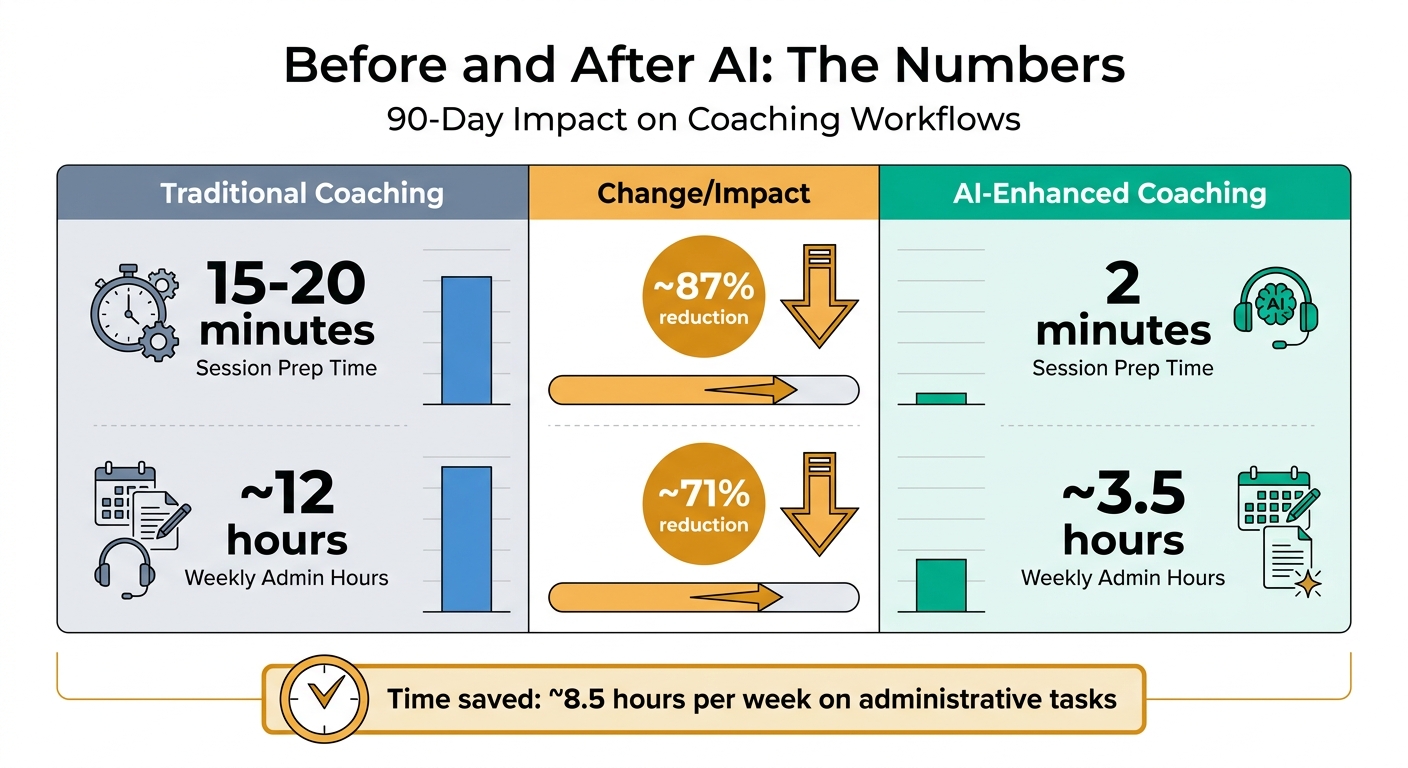
AI-Enhanced Coaching Impact: Before and After Metrics Comparison
By refining processes and improving client interactions, the impact of AI-enhanced coaching becomes clear. Feedback from clients after three months of using this approach highlighted both its strengths and areas for improvement. While the advantages stood out, suggestions for a more personal touch helped fine-tune the experience.
Client Testimonials
One recurring theme in client feedback was the system's ability to retain context and respond efficiently. For example, Sarah, a marketing director transitioning into consulting, praised the AI for remembering details without requiring her to repeat background information. She noted that this continuity improved over time, making her sessions more seamless [2][17].
Another common point was the comfort clients felt discussing sensitive topics. One client, who had previously hesitated to open up about financial struggles, shared that the AI-created environment felt like "a private space to work through money mindset issues without feeling watched" [2]. This reflects how AI can provide a judgment-free zone, allowing clients to explore challenging subjects without fear of scrutiny.
Some clients also appreciated the flexibility AI coaching offered. They could change direction mid-thought or pause to take notes during exercises without the typical social pressures of live coaching. Chris Lovejoy, who switched from a $200/month human coaching plan to an AI-driven alternative, summed it up:
"It knows me better, gives great advice and improves itself over time - all while being private, non-judgmental and saving me ~$200/month" [2].
However, not all feedback was glowing. A few clients felt that the AI-generated summaries lacked warmth, describing them as "too clinical." This echoed Jeremiah Krakowski's insight:
"The machine should organize the facts. You should own the interpretation" [1].
To address this, I began personalizing the AI's recaps by adding my own commentary before sharing them. This adjustment helped bridge the gap between efficiency and the personal touch clients valued.
Before and After AI: The Numbers
The numbers tell a compelling story about the impact of AI on coaching workflows over the first 90 days:
| Metric | Traditional Coaching | AI-Enhanced Coaching | Change |
|---|---|---|---|
| Session Prep Time | 15–20 minutes | 2 minutes | ~87% reduction [1] |
| Weekly Admin Hours | ~12 hours | ~3.5 hours | ~71% reduction |
These results align with studies showing how AI can address the "167-hour gap" between sessions by delivering timely guidance during critical moments [16]. Additionally, saving approximately 8.5 hours per week on administrative tasks mirrors reports from other coaches, who have experienced similar time savings of 8 to 12 hours weekly through automation [17].
Lessons Learned and Next Steps
Shifting to AI coaching taught me one big lesson: trust matters more than technology. At first, I doubted AI could deliver the empathy needed for coaching. But a fascinating social experiment shifted my view. In a text-based coaching trial, 81% of participants felt supported and "unstuck" after just 30 minutes [18]. This showed me that when built correctly, AI can work effectively. The real challenge was breaking through the trust barrier, which, once overcome, led to both efficiency gains and stronger client relationships.
5 Tips for Adding AI to Your Practice
1. Start with behind-the-scenes workflows.
Before introducing client-facing AI tools, use them for preparation. For example, AI can summarize past sessions and identify patterns, helping you show up more prepared. This also builds your confidence in the technology. As Jeremiah Krakowski aptly says:
"The coaching gets better because the prep gets lighter" [1].
2. Use detailed inputs for better outputs.
Vague prompts lead to generic results. Instead, create "Life Context" prompts - succinct overviews of a client’s goals, challenges, and personality traits (like Enneagram or DISC). This approach, inspired by Hiten Shah, turned my AI into a coaching assistant that aligned with my methodology [3].
3. Set up safeguards for sensitive issues.
It’s essential to establish protocols that flag mental health concerns or workplace safety issues for immediate human intervention. From the start, I designed my system to escalate these situations to me, ensuring clients received the appropriate level of support [19].
4. Keep interpretation in human hands.
AI can organize facts, but the meaning behind them is your responsibility. For instance, when clients found AI-generated session summaries too impersonal, I added my own commentary. This small adjustment preserved the personal connection clients value. As Brandon Sammut from Zapier puts it:
"With AI you can delegate the work, you cannot delegate the accountability" [19].
5. Position AI as a gateway, not a replacement.
Use AI tools to introduce clients to your methodology before they commit to premium services. This builds trust, shows value, and creates a natural progression toward deeper engagement with your practice.
These strategies not only enhance your practice but also highlight how AI is transforming professional services.
Where AI Is Taking Professional Services
AI isn’t about replacing professionals - it’s about bridging the gap between sessions [5]. Think about it: clients spend one hour a week with a coach and 167 hours on their own. AI steps in during those off-hours, providing actionable frameworks, reminders, and support.
The future lies in "Coaching-Native AI" - tools rooted in behavioral science, not generic chatbot frameworks [18]. A workplace pilot using this approach logged over 13,700 minutes of active coaching in just 12 weeks, with a 92% effectiveness rating [18]. Additionally, 76% of HR leaders are open to AI coaching, reflecting the 92% of workers who prioritize emotional and psychological well-being in their job choices [18].
The professionals who thrive will be those who use AI to extend their expertise beyond their schedule while keeping the human element intact. As Melinda Wolfe, former CHRO at Bloomberg, puts it:
"AI makes it easier not to make mistakes, and it gives you frameworks to think through problems before you act" [19].
The real question isn’t whether to adopt AI - it’s how soon you’ll start.
FAQs
What client data should I anonymize before training the AI?
When working with client data, it's essential to remove any sensitive information like personal identifiers, names, or contact details. This step ensures that no individual's identity can be revealed. Protecting privacy isn't just a best practice - it's a critical responsibility, especially when using such data for AI training.
By anonymizing data, you not only safeguard client trust but also comply with privacy regulations. Always prioritize this when handling sensitive information.
How do I keep the AI in my voice without sounding robotic?
To make sure AI reflects your personal style, start by tailoring it with your specific way of communicating. Incorporate your tone, preferred examples, and unique frameworks during the training process. For an extra touch of personality, voice synthesis tools can add emotional depth and nuance, making the AI feel less mechanical. The secret? Offer clear and detailed instructions to keep the output sounding natural and aligned with your voice.
How do I set boundaries so the AI won’t handle mental health or legal issues?
To keep AI from delving into mental health or legal matters, it's crucial to set clear boundaries and safeguards. Start by including disclaimers that clarify the AI is not a replacement for licensed professionals. Next, limit its scope so these sensitive topics are off-limits, and ensure it’s programmed to guide users toward qualified experts instead. On top of that, implement informed consent protocols and involve professional oversight to monitor its use, ensuring it operates responsibly.
Related Blog Posts

Blog title heading will go here
Blog title heading will go here