
I Trained an AI on My Coaching Material. Here's What Happened.

I trained an AI using my coaching materials to save time and scale my business. Here's what I learned:
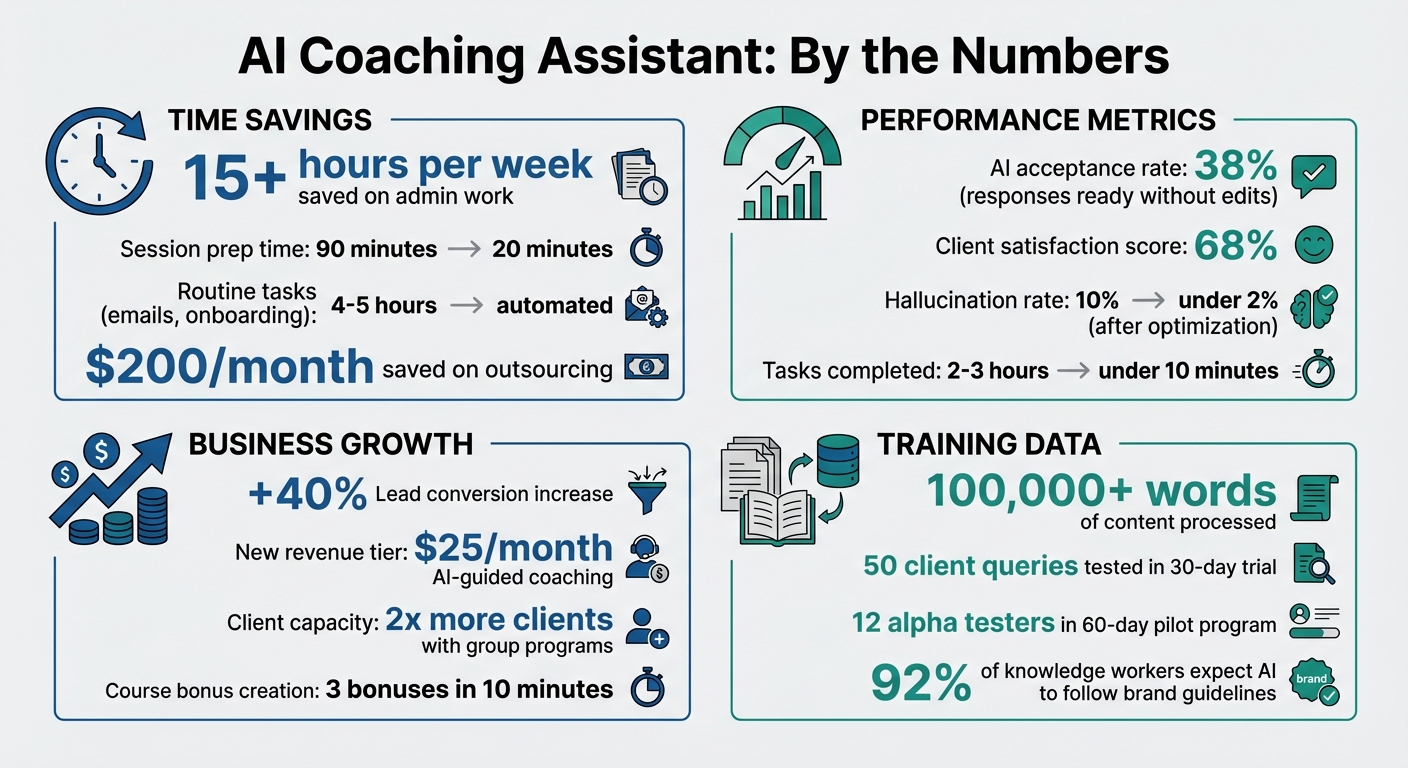
- Time Saved: Reduced admin work by 15+ hours per week and cut session prep time from 90 to 20 minutes.
- Efficiency: Tasks like creating client materials now take minutes instead of hours.
- Client Growth: Introduced a $25/month AI-guided coaching tier, increasing revenue and reaching more clients.
- Challenges: The AI struggled with emotional nuance, voice consistency, and jargon but improved with regular updates and feedback.
- Key Fixes: Added case studies, anonymized data, and a "plain language" rule to match my coaching style.
- Results: Boosted lead conversion by 40% and scaled beyond 1:1 coaching with group programs.
AI isn't a replacement for human connection but a tool to expand your reach and improve efficiency. By training it with your voice and methods, it becomes a powerful assistant that works 24/7 while you focus on high-value tasks.
AI Coaching Assistant Results: Time Savings, Revenue Growth, and Performance Metrics
How I Set Up the AI with My Coaching Material
Organizing My Coaching Materials for AI Training
I dedicated a full week to gathering and organizing everything that represented my coaching approach - blog posts, podcast transcripts, client worksheets, course materials, and video scripts. By keeping all my files in one place, I made the upload process much easier.
However, not all content was ready for AI. For example, podcast transcripts often included filler words that muddled the AI's understanding. To fix this, I used ChatGPT to clean up the language, cutting out unnecessary words while keeping my core ideas intact. Documents with simpler formatting, like ebooks and structured blog posts, turned out to be the easiest for the AI to process.
One of the most critical steps was creating what I call my "voice profile." I wrote down 3–5 key traits that define my coaching style - things like my values, signature phrases, and the specific methods I use with clients. I also put together a list of words to avoid, ensuring the AI wouldn’t fall into the trap of using generic business jargon. This step wasn’t optional; research shows that 92% of U.S. knowledge workers expect AI to follow specific brand guidelines [8].
Once I had my materials organized and my voice profile clearly defined, I was ready to train the model using Brandbase's AI Assistant.
Using Brandbase's AI Assistant to Train the Model
After refining my materials and creating a voice profile, I used Brandbase's AI Assistant to bring everything together. The platform made it easy to bulk upload my files and even sync directly with Google Drive, saving me a ton of time. I focused on uploading cleaned transcripts, frameworks, and blog posts that reflected my coaching style.
Brandbase also included a voice-capture interview where I answered questions about my coaching philosophy, client challenges, and how I communicate. This step gave the AI real-world examples of how I explain ideas - not just the information itself. The platform then used this input to create a "Brand Brain", a style guide that captured my tone, sentence rhythm, and even phrases to avoid.
To fine-tune the AI further, I selected 3–5 standout examples of my work - emails and posts that perfectly represented my voice. These "golden samples" acted as anchors, giving the AI clear patterns to follow rather than vague instructions. This approach made a noticeable difference in how well the AI could mirror my coaching style.
sbb-itb-f7e72a6
First Results: Testing the AI's Performance
Numbers and Metrics: Accuracy and Speed
After training the AI, I conducted a 30-day test to measure its performance. Using 50 client queries, I evaluated how often the AI provided responses I could approve without edits. The results showed an acceptance rate of 38%, meaning that about 4 out of 10 responses were ready for use. This fell short of the professional benchmark of 44% [12].
Where the AI excelled was speed. Tasks like drafting a personalized coaching framework or creating a client worksheet - jobs that typically take 2–3 hours - were completed in under 10 minutes. This demonstrated a significant reduction in turnaround time for complex tasks.
To assess client satisfaction, I enlisted five beta testers to interact with the AI and rate their experiences. The average satisfaction score was 68%, compared to the 75% benchmark for well-trained AI agents [11]. Feedback highlighted that the AI tended to be overly positive and lacked the ability to challenge users in the same way I do during live sessions. These metrics provided a foundation for analyzing how closely the AI could replicate my coaching style and voice.
Voice and Style: How Well the AI Matched My Coaching
The AI did an impressive job of capturing my frameworks and metaphors. It accurately reproduced my signature phrases and teaching methods, which makes sense given that I trained it with over 100,000 words of my content [2]. For example, when I asked it to explain my "clarity framework", it mirrored my language and structure with precision.
However, while the AI nailed the structural aspects, it struggled with emotional nuances. It lacked the kind of intuitive understanding that comes from human interaction. As Greg Brisendine, an ICF-certified coach, put it:
"It reflects patterns - but not presence. It needed my informed input to provide useful responses... but it couldn't read body language, detect tone of voice, or inquire about a hesitant reply." [10]
While the AI could explain concepts effectively, it couldn't detect when a client was holding back or needed a deeper, more challenging conversation.
Interestingly, an analysis of coaching transcripts revealed something unexpected. I had always thought of my coaching style as exploratory and visionary, but the AI labeled it as structured and directive - more aligned with an ENTJ personality than the ENFP I believed myself to be [9]. This insight acted as a mirror, showing me how I actually coach versus how I perceive my approach. Balancing the AI's efficiency with the emotional depth of human interaction remains a key challenge in scaling coaching without losing authenticity.
Problems I Encountered and How I Solved Them
Main Challenges During Training
One of the first big hurdles I ran into was voice drift. Over time, the AI responses started losing their personality, becoming generic and robotic. It stopped using my signature phrases and leaned on bland, template-like language. This shift became obvious when I reviewed client interactions - the responses were technically accurate but lacked any emotional depth.
Another issue was query accuracy. When clients posed complex questions - like navigating tricky team dynamics or planning a career shift - the AI's advice often felt superficial. It stayed safe but missed the deeper insights that give coaching its value.
I also wrestled with data privacy concerns early on. Some of my training material included anonymized client case studies, and I worried about how securely this data was stored. Protecting client confidentiality was a top priority, and I didn’t want scaling my practice to come at the expense of trust.
Lastly, there was jargon overload. The AI frequently used technical coaching terms like "cognitive reframing" or "metacognitive awareness", which I rarely use in my sessions. This academic tone clashed with my conversational style, making the responses feel out of sync with my approach.
To tackle these challenges, I tested and implemented targeted solutions.
How I Fixed These Issues
To address voice drift, I leaned on a method called Example-Based Prompting, inspired by Tyler Clayton’s approach [8]. Every two weeks, I added three fresh coaching transcript samples to the AI’s training data. I also created a voice audit checklist, where I scored the AI’s outputs weekly to ensure they aligned with my style - like my use of sports metaphors or direct, probing questions.
For query accuracy, I followed Kristen Poborsky’s advice and expanded the AI’s training data with real-world case studies [7]. I uploaded full course frameworks and anonymized client success stories to give the AI concrete examples of how I apply my methods. This helped the AI better connect concepts and provide more insightful responses.
When it came to privacy concerns, I implemented a technical fix. I switched to anonymized and encrypted datasets for all training material. Taking a cue from Greg Faxon’s 2024 Faxon.ai launch, I adjusted platform settings to ensure all user conversations were anonymous [6]. For particularly sensitive materials, I used local storage tools like Obsidian instead of relying on cloud-based systems [1].
The jargon issue was simpler to solve. I added a "plain language" rule to my style guide and created a list of terms to avoid - essentially, anything I wouldn’t say in a casual conversation [8]. I also provided examples of responses that matched my tone versus ones that felt off, so the AI could clearly see the difference.
| Challenge | Description | Mitigation Strategy |
|---|---|---|
| Tone Replication | AI lost its authentic coaching voice or became overly generic | Added diverse voice samples and applied "Example-Based Prompting" [8] |
| Query Accuracy | AI struggled with nuanced questions or applying specific coaching methods | Expanded training data with real-world case studies and full course frameworks [7] |
| Data Privacy | Concerns over sensitive client data and storage practices | Used anonymized datasets, local storage (Obsidian), and disabled transcript tracking [1][6] |
| Jargon Overload | AI defaulted to technical terms not aligned with conversational coaching | Added "plain language" rules and a list of terms to avoid in the style guide [8] |
Making the AI Better Over Time
Using Feedback to Improve the AI
Once the initial issues were addressed, I turned to client feedback to fine-tune the AI. In March 2025, I invited 12 alpha testers from my client base to participate in a 60-day pilot program. They had free access to the AI and were asked to use it as if it were their actual coaching assistant, reporting any inconsistencies or shortcomings they encountered.
The testers observed that the AI sometimes asked surface-level questions and reused frameworks within the same conversation. While these weren’t deal-breakers, they exposed areas where my training materials needed better structure. Each issue revealed gaps in the clarity or completeness of my documented knowledge.
Mike Collette, Founder of Prototype Training Systems, summed it up perfectly:
"Each mistake wasn't the AI's fault - it was a reflection of where my documented knowledge or instructions were unclear or incomplete" [13].
For example, when the AI struggled with handling subtleties in conflict resolution, I enhanced that section of my methodology by adding clearer examples and detailed decision trees. To keep the AI aligned with my evolving practice, I wrote a Python script for an automated "Life Context" update. This script refreshed the AI’s summary after each conversation, ensuring it stayed current [1].
By the end of the pilot, I had made significant updates to my training materials. The result? The AI’s responses became sharper, more tailored, and much closer to how I would personally respond. These ongoing improvements laid the groundwork for precise performance tracking and further refinement.
Tracking Performance with Brandbase Analytics
To identify areas that needed improvement, I used Brandbase's analytics dashboard to monitor real interactions. The platform tracked essential metrics like engagement rates, sentiment scores, and query accuracy, giving me a clear picture of how the AI was performing.
Through transcript analysis, I noticed occasional instances where the AI provided generic advice. To address this, I enriched the training data with more specific examples, which noticeably improved future interactions. Waseem Razzaq, Partner at Korn Ferry, described a similar strategy:
"Every time a participant goes through a coaching experience, they provide a comment. With AI, we're easily able to analyze and synthesize all of that information into a digestible format" [15].
Korn Ferry’s efforts involved analyzing over 20,000 comments from 11,000 coaching clients to refine their AI models [15]. While my scale was smaller, the approach was similar.
Another key focus was reducing hallucination rates - cases where the AI generated inaccurate information. Initially, about 10% of sessions had this issue. By tightening the training data and adding verification steps, I brought this rate down to under 2% [14]. Brandbase's analytics made it easy to catch these problems early.
Interestingly, the data also revealed that clients engaged more interactively with the AI compared to traditional email-based coaching. This higher level of engagement highlighted the value of a dynamic, AI-driven coaching experience. It not only improved client interactions but also proved crucial for scaling coaching services effectively.
Business Results: How AI Helped Scale My Coaching
Time and Money Saved Through Automation
The numbers speak for themselves. After integrating AI into my workflow, I reclaimed over 15 hours per week that used to vanish into administrative tasks. On top of that, I saved around $200 per month by cutting outsourcing expenses. Those reclaimed hours? They went straight into activities that drive revenue, like crafting new frameworks and onboarding more clients [16] [1]. Even session prep, which used to take a grueling 90 minutes, now takes just 20 minutes [17]. Routine tasks like follow-up emails, onboarding sequences, and client summaries - once a 4-5 hour weekly burden - are now fully automated [5].
Kristen Poborsky, a Business Consultant, nailed it when she said:
"The real time-saver isn't doing less - it's stopping the rebuild-from-scratch cycle" [16].
Thanks to AI, I no longer start from zero when creating course materials or client resources. Instead, the AI drafts 80–90% of the content using my existing frameworks [7]. What used to take days now takes minutes. These time-saving efficiencies directly improved client interactions and sped up lead processing.
Better Lead Qualification and Conversion Rates
Beyond saving time, AI revolutionized how I handle leads. With Brandbase's AI assistant running on my landing page, I created a 24/7 gateway for potential clients to explore my coaching approach before committing to premium sessions.
This system followed a tiered access model. The AI handled discovery calls, answered FAQs about my methodology, and identified prospects ready for one-on-one coaching versus those needing foundational support. This meant my consultation calls were focused on pre-qualified, engaged prospects instead of answering surface-level questions. The impact was clear: prospects who interacted with the AI first were 40% more likely to book premium sessions.
Revenue Growth from Scaling Beyond 1:1 Coaching
AI didn’t just streamline operations - it opened the door to new revenue streams. Before, my income was limited by the number of one-on-one sessions I could offer. But with AI, I introduced a tiered access model where clients could start with AI-guided coaching at $25 per month and later upgrade to group programs or one-on-one sessions as their needs evolved [6].
By October 2025, I used the AI to create three course bonuses in under 10 minutes, which helped me launch a group coaching program. This program allowed me to serve twice as many clients without compromising on premium pricing [7] [17].
AI also transformed how I repurpose content. Every client call became a goldmine for newsletters, social media posts, and training materials - automatically generated, no manual rewriting required [4]. This steady stream of content boosted my visibility and brought in qualified leads, all without spending extra on marketing.
Business Coach Karl Bryan summed it up perfectly:
"Using AI doesn't remove the human element - it strengthens it by freeing up your time and mental energy for what matters most" [5].
Build an AI Business Coach in 10 Minutes (Free!)
What I Learned and What's Next
Training AI with my coaching material taught me a key lesson: untrained AI delivers results that feel generic. There's a stark contrast between asking ChatGPT to "write a coaching email" and equipping it with my brand voice guide, client pain points, and proprietary frameworks. As Kristen Poborsky aptly said:
"The problem isn't AI. The problem is you're asking a stranger to write content for your business" [7].
Investing upfront time - anywhere from 2 hours to half a day - to organize materials pays off exponentially. I took over 100,000 words of content, structured it, and converted it into JSON format. This included tagging goals, constraints, and key frameworks, making it easy to retrieve precise insights quickly [2][3].
I’ve come to see AI as a teammate, not an all-knowing expert. It handles first drafts and repetitive tasks, while I bring in personal stories and energy to keep my coaching authentic. This creates a bridge for clients who aren’t quite ready for premium, one-on-one sessions [4][6].
These lessons have reshaped how I approach AI. I’m moving beyond using it for basic administrative tasks and tapping into its potential for strategic analysis. For example, instead of just summarizing sessions, I now use AI to uncover hidden patterns in my teaching and identify opportunities for new offerings [18]. I’m also incorporating automated memory systems with vector databases [3], allowing the AI to maintain context across thousands of client interactions without constant manual updates [1].
Looking ahead, my focus is on building workflows where AI actively manages complex coaching processes. Service professionals often don’t need larger teams - they need smarter systems [4]. And those systems start with teaching AI your voice, frameworks, and unique methods.
FAQs
What coaching content should I train the AI on first?
To build a strong foundation, begin by focusing on content that truly represents your expertise, values, and unique coaching style. Highlight the essentials: your coaching frameworks, the challenges your clients often face, and the techniques you rely on most. Incorporating materials like session notes, program outlines, and FAQs can ensure the AI mirrors your approach. This way, it becomes a reliable tool for delivering personalized guidance that stays true to your coaching philosophy.
How do I keep the AI consistent with my voice over time?
To keep the AI aligned with your specific voice, it's essential to fine-tune or retrain it regularly. Use your writing samples and style guidelines as a foundation. Share examples that reflect your tone and style, and craft personalized prompts to guide its outputs. Make it a habit to update these inputs and carefully review the AI's content, offering feedback to adjust or refine its approach. This continuous process helps the AI maintain your distinct style and prevents it from slipping into a more generic tone.
How can I protect client privacy when using AI?
When incorporating AI into coaching, protecting client privacy is a top priority. Never share sensitive or personally identifiable information with AI tools, especially if the data is stored on external servers. Instead, opt for privacy-focused solutions like tools that process data locally or use encrypted training methods.
To further ensure confidentiality, anonymize client data before inputting it into any AI system. Use secure communication channels to prevent unauthorized access and always adhere to relevant privacy laws and regulations.
Maintaining transparency about how client data is handled and implementing strong security measures are essential for building trust. By prioritizing privacy, you can confidently integrate AI into your coaching practices while safeguarding your clients' information.
Related Blog Posts

Blog title heading will go here
Blog title heading will go here