
How to Get More Coaching Clients with LinkedIn (Without Posting Every Day)
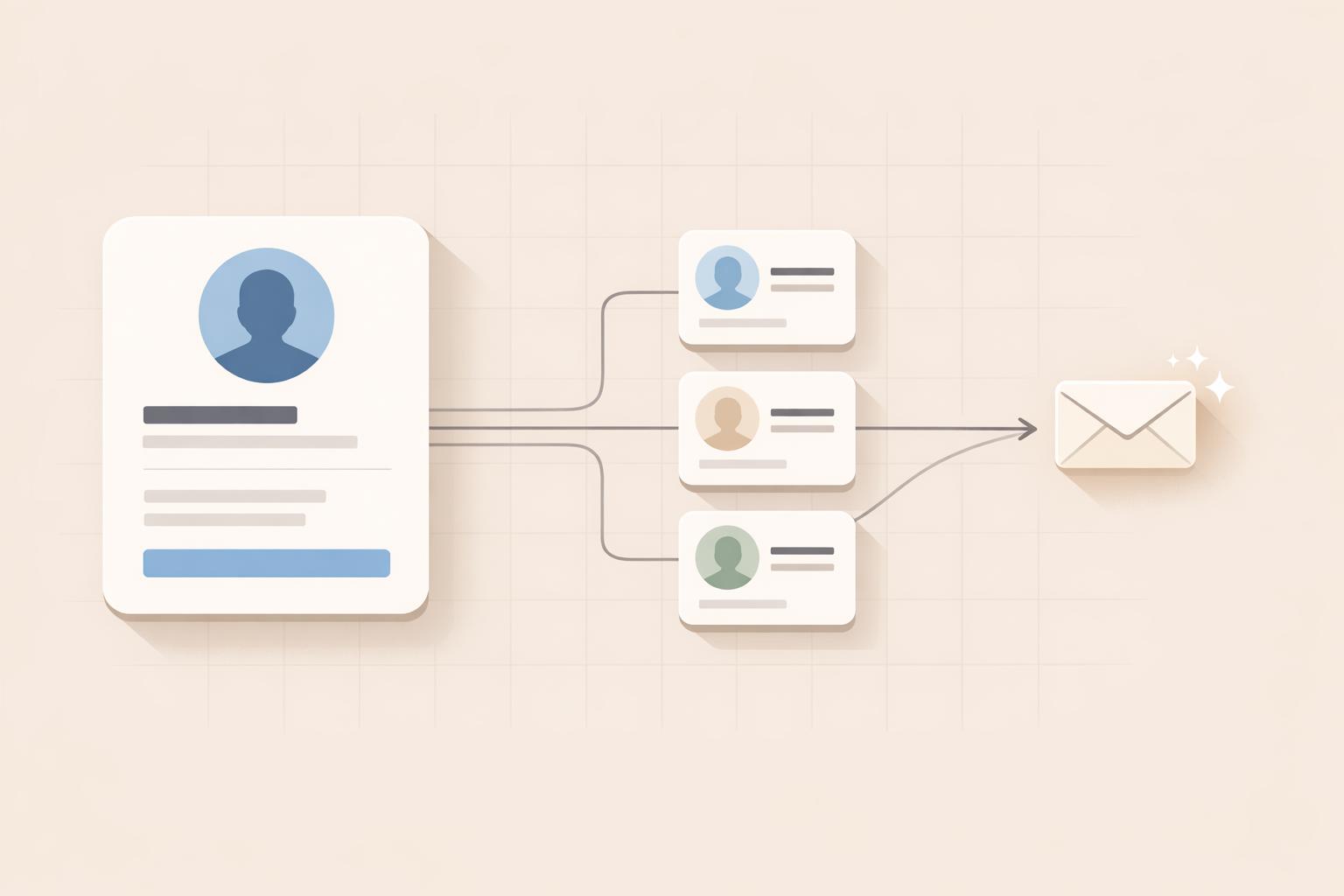
LinkedIn is a top platform for finding coaching clients, with 80% of B2B leads coming from it. But you don’t need to post every day to see results. Instead, focus on these key strategies:
- Optimize Your Profile: Turn your LinkedIn profile into a lead magnet by crafting a clear headline, showcasing measurable results, and adding strong testimonials.
- Target Ideal Clients: Use LinkedIn’s search tools and filters to find decision-makers who fit your niche. Save searches to automate lead tracking.
- Automate Outreach: Tools like Brandbase AI can help you send personalized connection requests and follow-ups without sounding generic.
- Engage Strategically: Comment on posts, join LinkedIn Groups, and build trust through meaningful interactions.
- Track Metrics: Monitor connection rates, profile views, and message replies to refine your approach.
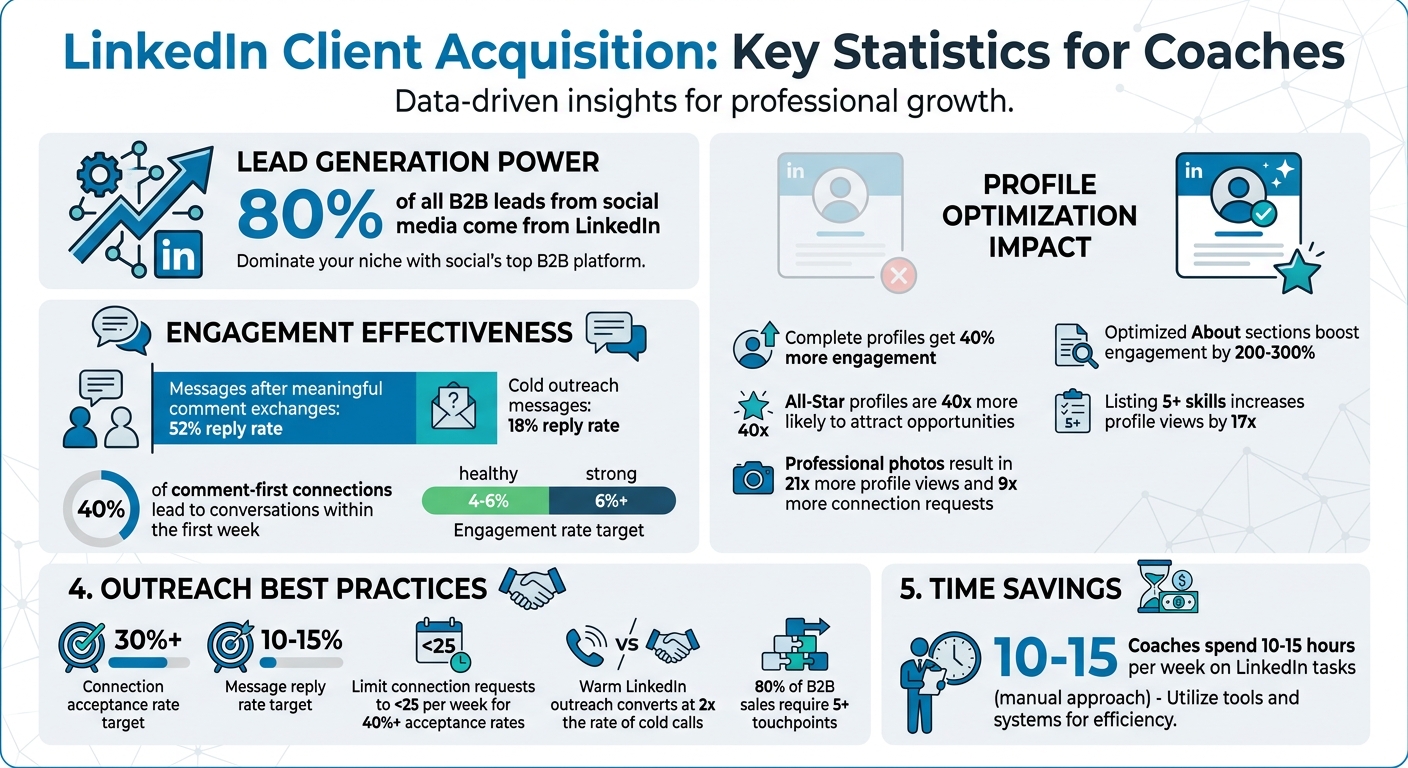
LinkedIn Client Acquisition Statistics: Key Metrics for Coaches
LinkedIn for Coaches: How to Attract Clients Without Going Viral
sbb-itb-f7e72a6
Optimize Your LinkedIn Profile to Attract Clients
Think of your LinkedIn profile as your personal sales assistant that works around the clock. Unfortunately, many coaches treat it like a resume instead of a tool to draw in clients.
The five-second test is key: anyone visiting your profile should immediately understand who you help and the problems you solve within seconds [6]. Complete profiles get 40% more engagement [8], and All-Star profiles are 40 times more likely to attract opportunities [11][13]. Fine-tuning elements like your headline and testimonials can turn profile views into client inquiries.
Write a Headline That Addresses Client Problems
Your headline is prime real estate - 220 characters to make an impression, but the first 60–70 characters are what people see first [5][6]. Generic titles like "Executive Coach" or "Marketing Professional" won’t cut it.
"Your LinkedIn headline is the single most valuable piece of real estate on your entire profile." - Carolina Posma, Author, Postiv AI [5]
A good headline follows the Problem + Solution + Authority formula. Instead of "CEO at Coaching Inc.", try something like "Helping B2B SaaS Founders Scale to $10M ARR Through Lead Gen" [6][7]. This makes your expertise and audience clear.
Whenever possible, add measurable results. Headlines such as "I help tech executives lead high-performing teams without burnout" or "Boost demo bookings by 40–80%" establish trust instantly [5][7]. Use separators like pipes (|), arrows (→), or em dashes to organize your headline cleanly [5][6].
Speak your audience’s language. If your clients talk about "drowning in admin work", don’t write "improving operational efficiency." Use their exact words to connect with them immediately [5].
Create an About Section Focused on Client Results
The first 300 characters of your About section are critical - they need to hook visitors before they click "see more." Aim for a total length of 1,500 to 2,000 characters [8][9][6]. Start with a bold statement or question that speaks directly to your client’s biggest challenge.
Structure your About section using the AIDA framework: Attention (grab their interest), Interest (build credibility), Desire (show the transformation you provide), and Action (include a clear call-to-action) [8]. Write in a conversational, first-person voice, and keep paragraphs short for easy reading on mobile [8][10].
"The best LinkedIn profiles don't sell services or credentials. They sell conversations." - Junaid Khalid, LiGo Social [10]
Bullet points work well for showcasing specific results: "Increased client revenue by 35%" or "Reduced employee turnover by 42% in 90 days" [7][6]. Optimized About sections can boost engagement by 200% to 300% [6]. End with a clear call-to-action, like "Message me with the word 'GROWTH' for a free audit", rather than something vague like "Let’s connect" [7][9][6].
Sprinkle in keywords your clients use when searching for services like yours. This helps with search visibility while keeping your tone natural [8][9].
Display Your Experience and Client Testimonials
Your Experience section shouldn’t just list job duties - it should highlight specific outcomes. Use this formula: [Action verb] + [what you did] + [measurable result] [12]. For example, instead of saying "Responsible for sales", write "Increased revenue by 20% in six months through targeted outreach campaigns" [11][12].
Profiles with professional photos get 21 times more views and 9 times more connection requests [12][13]. Add rich media like case studies, articles, or project visuals to your Experience entries to back up your claims [13].
Focus on three testimonials that highlight measurable results [13]. When requesting recommendations, guide the person by suggesting specific achievements they could mention, like "Could you highlight the 35% conversion rate increase we achieved during the Q2 campaign?" [11][12]. Writing thoughtful recommendations for others often leads to them returning the favor within a week [12].
Use the Featured section to pin three or four standout posts or case studies. Follow a "Challenge-Approach-Result" format and include visuals like charts or graphs [7]. Listing at least five skills can increase profile views by 17 times, so add up to 50 skills and prioritize the top three that align with your niche [12][13].
When these profile elements are optimized, you’ll position yourself as the go-to expert your potential clients are actively looking for.
Use LinkedIn Search to Find Your Ideal Clients
Once your profile is polished, the next step is connecting with the right people. This is where LinkedIn's search tools shine. Instead of waiting for potential clients to stumble upon your profile, you can actively seek out high-intent prospects who are likely to need your coaching services.
Did you know that 80% of all B2B leads from social media come from LinkedIn? [4] Think of LinkedIn as a professional search engine where decision-makers actively look for experts. By using its filters strategically, you can create a targeted list of prospects who match your ideal client profile.
Apply Filters to Identify the Right Prospects
Start by defining your ideal client's characteristics - think job titles, industries, and company size. LinkedIn's filters let you refine your search to match these criteria.
The seniority level filter is a must for coaches. Focus on roles like CXO, VP, Director, or Owner - people who can make decisions and have the budget to work with you [14][21]. Pair this with the function filter (e.g., Sales, Marketing, Operations) to narrow your list even further.
Want to get even more precise? Use Boolean operators to refine your search. For example, you could type:
("CEO" OR "Founder") AND "SaaS" NOT "Recruiter"
This will find SaaS executives while excluding recruiters [14][17][18]. Remember to capitalize AND, OR, and NOT for the search to work correctly.
"People who recently changed jobs are 3x more likely to purchase new solutions in their first 90 days. They're evaluating vendors, setting budgets, and building their tech stack."
– ConnectSafely.ai [14]
If you're serious about prospecting, consider investing $99/month in Sales Navigator. This tool unlocks over 50 advanced filters, including Spotlight filters that help you find prospects who recently changed jobs or posted on LinkedIn in the last 30 days [14][17][19]. These filters highlight people who are active and open to new opportunities. Additionally, targeting 2nd-degree connections can help you leverage mutual contacts for warm introductions [16][17].
For free accounts, keep in mind the limitations: 1,000 search results and 300 searches per month [14]. If you hit these caps, try narrowing your search by location. For example, instead of searching nationwide for "Sales Manager", focus on specific regions like "Sales Manager + New York."
Save Your Searches for Continuous Lead Generation
After refining your search results, take advantage of LinkedIn's ability to save searches. This feature turns LinkedIn into a low-maintenance lead generation tool. When you save a search, LinkedIn will notify you whenever new profiles match your criteria [15][17]. This means less time searching and more time connecting.
Here’s how many saved searches you can have based on your account type:
- Free accounts: 3 saved searches
- Premium accounts: 5 saved searches
- Sales Navigator Core: Up to 50 saved searches [17]
Make sure to enable alerts so you’re notified (via email or the app) the moment a new lead pops up [15][19]. Use descriptive names like "CMO SaaS West Coast" to keep your saved searches organized and easy to manage [20].
"If you're spending more than 5 minutes a day rebuilding LinkedIn searches, this feature pays for itself on day one."
– Junaid Khalid, Founder, LiGo [20]
Set a recurring reminder - say, every Monday morning - to check your saved search results [17]. This habit ensures you catch new leads early, giving you a chance to connect while they’re still evaluating options. Also, review your saved searches monthly to remove outdated ones and tweak any that need adjustments [20].
If you’re on a free plan and run out of saved search slots, there’s a workaround: copy the LinkedIn search URL and save it as a bookmark or in a document [20]. While it’s not as seamless, it still allows you to revisit your search manually without using up your saved slots.
Automate Personalized Outreach with Brandbase AI Campaigns
Once you’ve identified your target prospects, the next step is to streamline your outreach process. Did you know coaches often spend 10–15 hours a week on LinkedIn tasks? [2] Brandbase AI takes over the repetitive parts of outreach, letting you focus on what matters most while keeping interactions personal.
Here’s how it works: Brandbase AI uses a "human-in-the-loop" approach. It reviews a prospect's About section, recent posts, and work history to craft tailored icebreakers. You can then tweak these drafts before sending them out [23]. This approach allows you to scale personalized outreach without falling into the trap of using generic templates. Plus, warm LinkedIn outreach has been shown to convert at twice the rate of cold calls or cookie-cutter messages [22].
"The era of choosing between 'authentic' and 'scalable' is over. AI helps creators and coaches scale outreach by removing the robotic drudgery of prospecting."
– ScaliQ [23]
The next step? Build campaigns that are laser-focused on your niche.
Create Campaigns That Match Your Niche
Start by defining your Ideal Customer Profile (ICP). Use this formula: [Role] in [Industry] engaging with [Topic] facing [Pain Point]. For example: "Founders of SaaS companies with 10–50 employees who recently posted about burnout" [22]. This kind of precise targeting ensures your outreach feels relevant, not random.
Brandbase’s Cora AI takes it a step further by evaluating each prospect’s profile and assigning a lead score between 1 and 100. This score reflects how well they align with your niche and their recent LinkedIn activity [22]. The result? You focus on high-intent leads who are active on the platform, avoiding wasted effort on dormant profiles.
To keep things safe and effective, start small: send 5–10 connection requests per day and gradually increase to 20–30. This avoids triggering LinkedIn’s security algorithms [22].
Once your campaigns are set, it’s time to focus on what really drives results - crafting messages that speak directly to your prospects’ needs.
Craft Messages That Address Client Needs
Generic messages don’t work - they kill response rates. Instead, tap into AI tokens like {{AI_Icebreaker}} to reference a prospect’s recent post or {{Reason_For_Outreach}} to provide immediate context [22]. You can even train the AI on your past messages, posts, and writing style so it mirrors your tone, vocabulary, and cadence [23].
Take Sarah, a UGC creator, as an example. In 2026, she moved away from sending 50 generic messages (with a 2% reply rate) and adopted a targeted AI workflow. She focused on Marketing Directors at beauty brands with under 50 employees and referenced their recent product launches. The result? An 18% reply rate and three new retainer clients in just one month [22].
Another example: Mark targeted individuals who had recently updated their job title to "Manager" within the past 90 days. He sent personalized messages congratulating them and offered a "First 90 Days" checklist. This approach led to a 40% connection acceptance rate and a fully booked coaching roster in just six weeks [22].
These examples show how tailored, thoughtful messaging drives meaningful engagement. Once you’ve made that connection, it’s crucial to keep the conversation going.
Set Up Automatic Follow-Up Sequences
The follow-up is where deals are often made. Most LinkedIn replies happen after the second or third message [22]. Brandbase makes this easy with automated multi-touch sequences that feel natural and avoid coming across as spammy. For instance, you could use a sequence like this:
- Day 1: Connection request with a note
- Day 4: A value-driven message
- Day 8: A follow-up check
A standout feature of Brandbase is its "Stop-on-Reply" function. As soon as a prospect responds, the automation halts, allowing you to take over the conversation personally [23]. This ensures you never send a pre-scheduled follow-up to someone who’s already engaged with you.
When crafting follow-up messages, aim to provide value - share an article, a checklist, or another resource that aligns with their interests [22][23].
To protect your LinkedIn account, Brandbase uses randomized delays and dedicated IPs [23]. It also triggers outreach based on specific actions, like when a prospect views your profile twice in a week or comments on a poll [23]. These thoughtful touches help you stay visible and relevant without overwhelming your prospects.
Build Relationships Through Targeted Engagement
Automation might help you connect, but real trust comes from building genuine relationships. Many professionals are moving away from mass cold outreach and embracing "social selling." This approach focuses on creating trust through visible engagement before diving into any sales discussions [27]. By engaging meaningfully, you strengthen the credibility established in your profile and nurture leads generated through automation, making these strategies work together seamlessly.
Here’s a compelling stat: messages sent after meaningful comment exchanges see a 52% reply rate, compared to just 18% for cold outreach [29]. Even better, 40% of connections made through a comment-first approach lead to actual conversations within the first week [24]. These numbers show how targeted engagement can position you as a trusted expert while complementing your other outreach efforts.
Leave Helpful Comments on Prospect Posts
A great way to start is by following the 5-3-1 Rule: leave 5 thoughtful comments, react to 3 posts, and share 1 post with your insights before sending a connection request [24]. Focus on accounts with follower counts 2–10x your own - these accounts have enough reach for visibility but not so much that your comments get lost in the crowd [25].
Timing matters too. Comment within 30 minutes to 2 hours of a post going live to keep your comment visible at the top of the thread [25][29]. Avoid generic lines like "Great post!" or "So true!" - they don’t add value and might even be deprioritized by LinkedIn’s algorithm [25][26]. Instead, aim to share a quick personal story, ask a thoughtful question, or provide a resource that addresses a specific challenge mentioned in the post.
Here’s an example of how impactful this can be: a B2B consultant spent just 15 minutes a day posting 350 comments over 60 days (ending in September 2025). The results? A 220% increase in profile views, 57 inbound leads, and 11 new clients - a return on investment 4x higher than their previous posting-only strategy [29].
"A like is a whisper. A comment is a megaphone." – Gromming Blog [26]
Don’t stop at just commenting on posts - engage with other commenters too. Replying to others boosts your visibility and authority within the conversation [28]. It shows you’re there to contribute, not just to grab attention. To expand your reach further, consider joining LinkedIn Groups where these engagement tactics can shine even brighter.
Join and Contribute to Relevant LinkedIn Groups
LinkedIn Groups offer a unique advantage: posts shared within groups appear directly in members’ feeds, bypassing the algorithm that usually limits your reach to just 2–5% of your network [30][25]. This means your contributions have a much better chance of being seen by everyone in the group.
Before diving in, make sure the group you join has 1,000–50,000 members, daily activity, and actual discussions - not just spam [30]. Spend about a week observing to understand the group’s culture and common challenges [30]. Once you’re ready, follow the 80/20 Rule: dedicate 80% of your activity to offering value (answering questions, sharing insights) and only 20% to soft promotion like sharing case studies or free tools [30].
When contributing, use the P-A-V Framework: identify a Pain point, explain your Approach, and highlight the Value it delivers [3]. For instance, if someone asks about improving client retention, you could share a specific strategy you use, explain how it works, and mention a real-world result - without turning it into a sales pitch.
One executive coach put this into practice in early 2026 by spending 20 minutes daily commenting in relevant groups. Over 90 days, their follower count grew from 800 to 2,100, profile views jumped by 312%, and they secured 4 inbound discovery calls and 2 new clients by March 2026 [3].
The goal here isn’t self-promotion - it’s about becoming the go-to expert in your niche by consistently showing up and helping others [3]. When people see you solving problems publicly, they’ll naturally think of you when they need help. Combining thoughtful commenting with active group participation builds trust and visibility, laying the groundwork for meaningful client relationships.
Monitor Performance and Improve Your Approach
Measuring your efforts is the first step to improving them. Coaches who consistently attract clients on LinkedIn rely on data to refine their strategies. Simply posting content without tracking performance in 2026 is like throwing darts in the dark - it’s risky and unproductive[33].
Focus on metrics that reflect genuine interest from potential clients. Key indicators include profile views, connection acceptance rates above 30%, and message reply rates between 10–15%[33]. These metrics directly tie to your ability to secure valuable coaching clients. Nicolas Lecocq, Founder of LinkedGrow, sums it up perfectly:
"The danger of vanity metrics isn't just that they're misleading. It's that they actively prevent you from improving"[31].
Track Key Metrics in LinkedIn Analytics
Set aside 15 minutes each week to review your LinkedIn analytics. Look for trends in engagement rates, spikes in profile views, and changes in follower growth[31]. For personal profiles in 2026, an engagement rate of 4–6% is a healthy target, while rates above 6% indicate strong performance[32][33]. If your engagement falls below 4%, it’s a signal that your strategy needs fine-tuning.
Pay attention to high-intent actions like Saves and Sends. A Save is particularly valuable - it boosts your content’s algorithmic reach by 5x compared to a simple like. More importantly, it shows that your audience finds your content worth revisiting[33].
Once a month, dive deeper into your profile views. Analyze the job titles and companies of those viewing your profile. If decision-makers from your target niche are checking you out, it’s a strong indication that your messaging is hitting the mark[31][32].
These insights are essential for improving your overall campaign strategy.
Refine Your Campaigns with Brandbase Analytics
Use your weekly analytics review as a foundation, and let tools like Brandbase Analytics take your insights further. Brandbase focuses on Tier 4 business metrics - such as DMs from prospects, website clicks, and meetings booked[32]. These metrics provide a clear picture of whether your campaigns are generating real opportunities.
Brandbase's AI-driven tools can help pinpoint which messages are working. One key metric to monitor is your positive response rate - the percentage of responses from prospects that show genuine interest. If your connection acceptance rate drops below 20%, it might signal issues with your targeting or profile optimization. On the other hand, if acceptance rates are solid but reply rates are lagging, it’s time to tweak your opening messages. If both metrics are underwhelming, revisit your targeting filters or refine your profile further[34].
Use Brandbase insights to identify patterns across your campaigns. Test small adjustments - experiment with new hooks, change your follow-up timing, or refine your audience targeting. Let the data guide your decisions. These incremental, data-driven changes ensure that your outreach stays sharp, efficient, and focused on quality over quantity.
Conclusion
Combining profile optimization, targeted searches, and automated outreach creates a powerful system for attracting coaching clients on LinkedIn - without the need for constant posting. The strategies outlined here - transforming your profile into a client-focused landing page, leveraging advanced search tools to locate ideal prospects, automating personalized outreach, and strategically engaging with your niche - let you build a system that works behind the scenes while you focus on serving your clients.
LinkedIn accounts for about 80% of all B2B leads [1][3]. By limiting your connection requests to fewer than 25 per week, you can achieve acceptance rates of 40% or more - nearly double the results of high-volume approaches [34][35]. Pair this with automated follow-up sequences that manage the five or more touchpoints typically required to close 80% of B2B sales [35], and you can eliminate the manual grind without compromising results.
Brandbase’s AI-powered campaigns take this a step further by targeting your niche, crafting personalized, need-based messages, and pausing outreach automatically when prospects respond - ensuring no lead slips through the cracks [1][36]. Meanwhile, Brandbase Analytics tracks key metrics like direct messages, website clicks, and meetings booked, providing clear insights into what’s driving new opportunities. This automation complements the hands-on strategies discussed earlier, creating a balanced and effective system.
Shifting from manual outreach to automated, data-driven processes not only saves time but also ensures consistency. It’s a way to build a reliable client acquisition system that works even when you’re not actively engaged. As Akash Upadhyay, Founder of Modern Outreach, wisely notes:
"LinkedIn is not about luck. It's about doing the right things, consistently" [1].
Take the first step today. Whether it’s optimizing your LinkedIn headline, setting up a saved search, or launching a Brandbase campaign, small, consistent actions can lead to steady results and a reliable stream of clients.
FAQs
How many LinkedIn connection requests should I send per week?
There's no set rule for how many connection requests you should send each week. LinkedIn uses a flexible system that adapts based on your account's reputation and engagement levels. The key is to prioritize quality over quantity. Sending too many generic requests can hurt your Trust Score, but well-crafted, personalized outreach can boost your acceptance rates and help you expand your network in a meaningful way.
What should I say in my first message to avoid sounding salesy?
To keep your first LinkedIn message from coming across as overly sales-focused, concentrate on creating a connection and showing real interest in the person. Begin with a thoughtful, low-pressure question related to their work, recent achievements, or activity on LinkedIn. Keep the tone warm and conversational, steering clear of promoting your services upfront. This respectful approach not only values their time but also fosters a more natural and engaging interaction, paving the way for meaningful dialogue.
Which LinkedIn metrics matter most for getting coaching clients?
The most important LinkedIn metrics for drawing in coaching clients include profile views, engagement (likes, comments, shares), and connection acceptance rates. These numbers reflect how visible you are, how much authority you project, and the level of trust others have in you. By fine-tuning your profile and being intentional about your interactions, you can strengthen these indicators and connect with the right clients.
Related Blog Posts

Blog title heading will go here
Blog title heading will go here