

Why Every Coach Will Have an AI Assistant by 2027 (And How to Start Now)

AI is transforming the coaching industry, helping coaches save time, serve more clients, and improve results. By 2027, AI assistants will be a standard tool for coaches, enabling them to handle tasks like scheduling, note-taking, and personalized client support. The benefits are clear:
- Coaches using AI have seen 76% higher success rates and 78% faster deal cycles.
- AI reduces administrative work by 60%, letting coaches focus on their clients.
- Businesses using AI tools report 25% higher revenue and 33% better client retention.
If you’re a coach, adopting AI now can give you a competitive edge. Start by identifying repetitive tasks, choosing the right tools (like Calendly for scheduling or Gong.io for session insights), and integrating them into your workflow. Tools like AI-powered chatbots, transcription services, and content creators can help you scale your practice without losing the personal touch.
The coaching industry is evolving, and AI is no longer optional. By automating routine tasks, you can focus on delivering the insights and support your clients value most. Take the first step today, and you’ll be ready to thrive in the AI-driven coaching landscape of 2027.
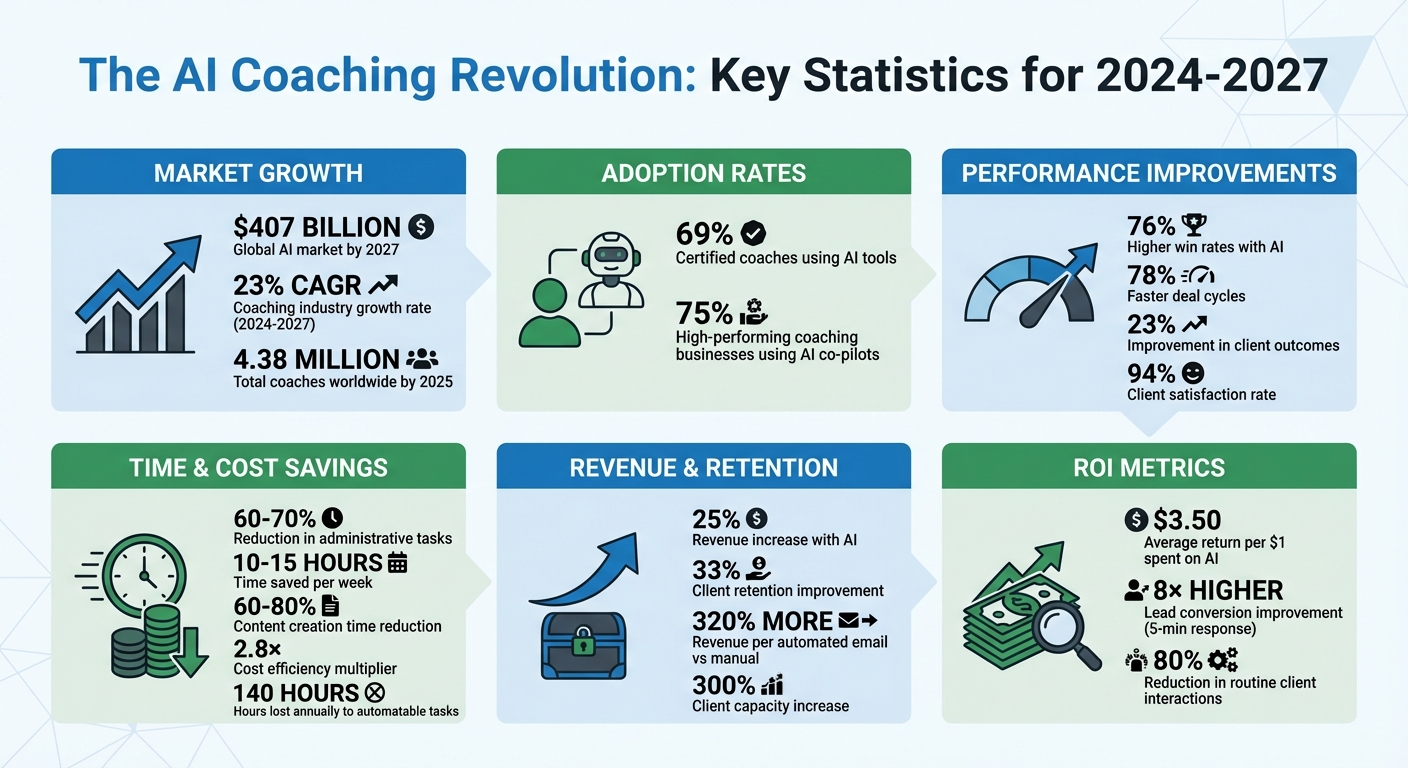
AI Coaching Statistics: ROI, Time Savings, and Performance Metrics for 2024-2027
Why Coaches Will Need AI Assistants by 2027
AI Market Growth Numbers
By 2027, the global AI market is projected to hit $407 billion, while the coaching industry is expected to grow at a 23% compound annual growth rate between 2024 and 2027 [10][9]. This rapid expansion is reshaping professional services in a big way.
Already, 69% of certified coaches are using AI tools in their practice, and 75% of high-performing coaching businesses heavily depend on AI co-pilots [9][3]. With approximately 4.38 million coaches competing worldwide by 2025 [4], those embracing AI are gaining a distinct edge.
The financial advantages are hard to ignore. AI-assisted coaching programs report 25% higher revenue and spend 70% less time on administrative tasks [4]. Practices that integrate AI have also seen a 33% boost in client retention since 2023, paired with an impressive 94% client satisfaction rate [9]. These numbers highlight how AI is separating top performers from those struggling to keep up, giving early adopters a clear time and revenue advantage.
Benefits of Adopting AI Early
The benefits of adopting AI go beyond market trends, offering real gains in efficiency and competitiveness. As Coachvox explains:
"The coaching industry is splitting into two groups: those who embrace AI tools to amplify their impact, and those who stick to traditional methods while watching their competitive advantage erode." [1]
For those already using AI, the payoff is substantial. Coaches report saving 10–15 hours per week [9] by automating tasks like scheduling, note-taking, and content creation. This time savings allows them to scale their work, shifting from one-on-one sessions to hybrid models that serve larger groups without losing the personal touch [3].
Modern clients demand more - like 24/7 availability, instant communication, and data-driven progress tracking. These expectations are tough to meet with manual processes [1]. AI tools help coaches deliver real-time sentiment analysis, personalized resources, and asynchronous support, while those clinging to older methods remain limited to traditional hours and workflows. With AI automation delivering up to 2.8× cost efficiency [9], waiting to adopt these tools could mean falling behind competitors who are already offering better service at lower costs.
sbb-itb-f7e72a6
AI Tools for Coaches: 6 Must-Haves in 2025 (You’ll Be Surprised!)
What AI Assistants Do for Coaches
AI assistants tackle three major areas that often eat into a coach's non-billable hours: client management, personalized support, and content creation. By handling these tasks, AI helps streamline workflows, improve client experiences, and expand a coach's reach.
Automating Client Management and Communication
Managing schedules, follow-ups, and repetitive questions can drain a coach's time. AI steps in by integrating scheduling tools with CRMs and email platforms, automating tasks like sending welcome kits and intake forms as soon as someone books a session [12][2]. This automation can cut onboarding time by up to 70% [2].
AI chatbots, trained in your unique coaching style, can answer FAQs and qualify leads 24/7 [1]. This means prospects can get their questions answered immediately - even outside business hours. As Coachvox.ai highlights:
"When prospects compare a coach who provides immediate insights and round-the-clock support against someone who only responds during business hours, the choice is obvious" [1].
Additionally, tools like Gong.io (starting at roughly $100 per user per month) analyze session transcripts to identify emotional cues, recurring themes, and actionable steps [13][7]. These insights help capture key moments and automatically generate follow-up tasks, improving client outcomes by 23% [13].
AI also tracks client engagement in real time. If a client’s activity drops, it triggers personalized check-ins to re-engage them [12][13]. Structured follow-ups like these triple the likelihood of clients achieving their goals, and automated email sequences have been shown to generate 320% more revenue per email compared to manual efforts [12].
AI doesn’t just save time - it also enhances the depth and quality of client interactions.
Personalizing Client Support
AI goes beyond surface-level advice by analyzing individual performance, learning preferences, and session context. It can create customized exercises, journaling prompts, and content tailored to each client [3]. Some tools even detect subtle vocal changes, helping coaches address breakthroughs or hesitations with greater precision [3][5].
Using predictive analytics, AI identifies patterns in client behavior to forecast outcomes and recommend adjustments before progress stalls [6]. Long-term tracking also provides detailed insights into behavioral changes over months or years [3].
Between sessions, AI offers continuous support through motivational nudges, goal reminders, and FAQ assistance via chat [3]. It can even turn session transcripts into personalized homework that reflects a client’s specific experiences and language [7]. This keeps clients engaged without requiring extra live sessions from the coach.
Creating Content for Your Brand
AI doesn’t just help with client-related tasks - it also transforms how coaches create and share content, making it easier to scale their message.
AI tools like Perplexity and ChatGPT analyze platforms like Reddit to understand the language and concerns of your target audience [7]. This insight speeds up content creation, with 93% of marketers reporting faster production times and coaches reducing content creation time by 60–80% [14].
A single piece of content, such as a workshop video or blog post, can be repurposed into multiple formats - social media posts, email intros, or carousel copy - using AI [1]. Video AI tools can even pinpoint "viral" moments in coaching sessions and turn them into short, engaging clips for platforms like Instagram or TikTok [7].
By training custom GPTs with your best content, testimonials, and frameworks, you can ensure AI-generated drafts align with your voice and style [4]. This approach maintains brand consistency while handling time-consuming tasks like writing blogs, email sequences, or social media updates [7]. As Alexander Gusev, Founder of Planetary Labour, puts it:
"AI for coaches is not about replacing the human connection that makes coaching valuable - it is about amplifying your reach and freeing up time for the work that matters most" [14].
How to Add AI to Your Coaching Practice
Integrating AI into your coaching practice doesn’t have to disrupt your workflow or require a major system overhaul. By taking a phased approach, you can gradually incorporate AI tools, test their effectiveness, and scale up in a way that complements your unique coaching style.
Phase 1: Identify Tasks for Automation
Start by tracking your daily tasks for three days using a time-tracking app like Toggl. Look for repetitive tasks that take over 15 minutes and occur frequently - things like scheduling, writing session summaries, creating social media posts, or sending follow-up emails. These are often the biggest time-drains.
Did you know the average coach loses 140 hours annually to tasks that could be automated? [15]. To prioritize, rate each task’s energy impact on a scale of 1 to 5. Low-energy, time-consuming tasks are perfect candidates for automation. Common examples include formatting session notes, generating invoices, responding to FAQs, and repurposing content.
As business coach Luisa Zhou puts it:
"Automation doesn't mean replacing your coaching. It means eliminating the repetitive tasks that prevent you from being fully present with your clients." [15]
Once you’ve identified these tasks, organize them into three categories: administrative tasks (like scheduling and billing), client communication (follow-ups, reminders), and content creation (social posts, newsletters). This will help you focus on the right tools in the next phase.
Phase 2: Select and Implement AI Tools
With your task list in hand, find AI tools that align with your needs. Start with just one tool that addresses your most time-consuming task. For example, if scheduling eats up hours each week, try Calendly (starting at $10/month). If session notes are a hassle, test Fathom, which offers free transcription and recording.
Stick to the "Master One" rule - focus on learning one tool at a time. A Harvard study found that consultants using AI completed 12.2% more tasks, 25.1% faster, and with over 40% better quality when they concentrated on mastering a single platform rather than juggling multiple tools [5]. Dedicate 30 days to testing the tool, noting what works, what doesn’t, and how it fits into your workflow.
For content creation, you can train AI tools to reflect your voice. Upload high-performing emails, client testimonials, or your coaching frameworks to help the tool generate drafts that sound like you. When crafting prompts, be specific: “Act as a career coach writing a LinkedIn post for mid-career professionals feeling stuck. Use a conversational tone, include a personal story, and end with a question.”
Phase 3: Integrate AI Into Your Workflow
Once you’ve mastered your first tool, connect it to your existing systems for seamless integration. Platforms like Zapier or Make can link your AI tools with your CRM (e.g., HubSpot), email system, or payment processor (e.g., Stripe). For instance:
- When a client books a session via Calendly, Zapier can add their details to your CRM, send a welcome email, and set a follow-up reminder.
- After a payment processes, the system can send onboarding materials automatically.
- Tools like Otter.ai or Fathom can transcribe sessions and extract action items right after a meeting.
To keep things manageable, start by integrating three to five key tools over 30 days. Test each connection thoroughly before going live, and document your workflows in a simple Google Doc. This makes troubleshooting easier and helps train team members as your practice grows.
Phase 4: Monitor and Refine AI Performance
Once your AI systems are up and running, track their impact. Measure metrics like hours saved on admin tasks, client response rates to automated emails, and program completion rates. A simple spreadsheet can help you compare your current workload to your initial time-tracking data.
Coaches who embrace AI automation report a 60% reduction in administrative time and a 300% increase in client capacity [2]. While your results may vary, tracking these metrics helps you see what’s working and identify areas for improvement. For example, if an AI-generated email sequence has lower open rates than manually written ones, tweak your prompts or adjust the content.
Set aside 30 minutes each month to review performance data. Look for trends in efficiency and engagement, refine your prompts, and eliminate tools that aren’t delivering results. As Brian Shelton, Marketing Director at AI/Automation-powered Marketing, puts it:
"AI doesn't replace your coaching gift - it amplifies it by handling everything that isn't coaching." [13]
This process is all about small, continuous improvements. By fine-tuning your AI systems over time, you’ll free up more hours for meaningful client interactions and build deeper relationships. AI isn’t about perfection - it’s about making your practice run smoother, one adjustment at a time.
Calculating the Return on AI Investment
Implementing AI in your workflows is just the first step - figuring out its financial impact is where the real value lies. On average, organizations see a $3.50 return for every $1 spent on AI systems [16]. To ensure you're capturing this value, it's essential to track the right metrics.
Metrics That Show AI Success
Focus on the numbers that align with your coaching practice's goals. Start with productivity metrics, which demonstrate AI's immediate impact. Measure hours saved on tasks like administrative work, the speed of content creation, and the reduction in time spent managing clients. For example, AI can accelerate the development of training courses by up to 9 times compared to traditional methods [16].
Next, consider client engagement metrics to evaluate how AI influences your coaching outcomes. Metrics like module completion rates, login frequency, and the speed at which clients acquire new skills can indicate whether AI-powered reminders and follow-ups are working effectively.
Don't overlook the financial metrics. For instance, the cost of client turnover - typically 1.5 to 2 times a client's annual investment - can highlight how AI-driven personalization boosts retention [17]. Additionally, AI can significantly impact lead conversion rates, which are 8 times higher when leads are contacted within the first 5 minutes [18].
To calculate your return, use this formula:
ROI = ((Total Savings + Total Value Created – Cost of AI Solution) / Cost of AI Solution) × 100 [17].
Keep in mind that while engagement metrics may improve quickly, retention and revenue growth often take 6–12 months to become noticeable [17].
Lower Costs and Better Scaling
AI doesn't just improve productivity and engagement - it also transforms your cost structure. By automating up to 80% of routine client interactions [19], you can serve more clients without needing to expand your team.
The financial benefits are clear. AI-driven coaching models are far less expensive than human-only approaches [20], and 96% of users report that AI delivers responses tailored to their specific goals [11].
The impact of AI can be especially striking in specialized fields. For example, Spanish soccer club Getafe CF implemented the Zone7 AI platform during the 2017–2018 season. The result? A 40% reduction in injury volume in the first season and a 66% reduction by the second season compared to pre-AI levels [21].
Dr. Amit Mohindra, Distinguished Principal Research Fellow at The Conference Board, sums it up well:
"AI isn't replacing human coaches - it's amplifying them. By automating routine follow-ups and analysis, AI frees human coaches to focus on empathy, intuition, and strategic reflection." [11]
The secret lies in dividing the workload: let AI handle repetitive, transactional tasks while you focus on transformational ones. This approach not only improves service quality but also sets the stage for scalable growth.
Conclusion
Coaches face a clear choice: embrace AI to enhance their effectiveness or risk falling behind [1]. By 2027, integrating AI into coaching practices will no longer be a luxury - it will be as basic as having a website [1][3].
The numbers speak for themselves. Teams using AI coaching tools have seen a 76% boost in win rates, a 78% reduction in deal cycles [2], and up to 25% higher revenue while cutting 70% of administrative tasks [4]. These statistics highlight why adopting AI tools is no longer optional - it's urgent.
The trend is already in motion. An impressive 75% of top coaching businesses are leveraging AI co-pilots [3], and by 2027, clients will expect instant, tailored support as a standard offering [1][3][8].
Take action now. Start by auditing your workflow to identify tasks that consume over 10 hours a month [1]. Then, experiment with a single AI tool - whether it's a note-taker, content generator, or scheduler - for a 30-day trial [1][3]. Once you've seen the results, you can expand your tech stack strategically.
"Your expertise remains vital - AI simply amplifies your impact." – Coachvox [1]
Adopting AI today ensures you can scale your business without losing the personal connection that makes coaching transformative. As the industry evolves, staying ahead means integrating AI now to shape the future of your practice.
FAQs
How do I choose the first AI tool to start with?
Start by pinpointing the tasks in your coaching practice that eat up a lot of time or feel repetitive. These might include things like keeping up with client communication, writing session notes, or creating content. Once you've identified these, look for tools that can simplify your workflow. For instance, an AI-powered note taker can streamline documentation, or a chatbot can help manage client interactions. Start with tools that are easy to use and meet your immediate needs. As you get the hang of it, you can gradually explore more advanced options to boost efficiency and handle growth more effectively.
How can I use AI without losing the personal touch in coaching?
To make the most of AI without sacrificing the personal touch, think of it as a helper rather than a replacement for human connection. Use AI for tasks like scheduling or drafting content - this can free up your time for genuine, meaningful interactions with clients. Take AI-generated insights and add your own empathy and creativity to make them feel personal and real. When used thoughtfully, AI can help you expand your reach while preserving the trust and connection that are at the heart of effective coaching.
What should I track to prove AI is worth the cost?
Track key metrics such as client engagement, response times, content creation efficiency, time saved on administrative tasks, client satisfaction, and revenue growth. These data points can provide a clear picture of how AI is positively impacting your coaching business and help demonstrate its value.
Related Blog Posts

Blog title heading will go here
Blog title heading will go here