How to Write LinkedIn Messages for Better Engagement
Your LinkedIn messages are likely being ignored because they’re generic. The solution? Personalization. Personalized LinkedIn messages can increase response rates by 50-85%, especially when you reference specific details from the recipient’s profile or activity. Here’s how you can craft messages that stand out:
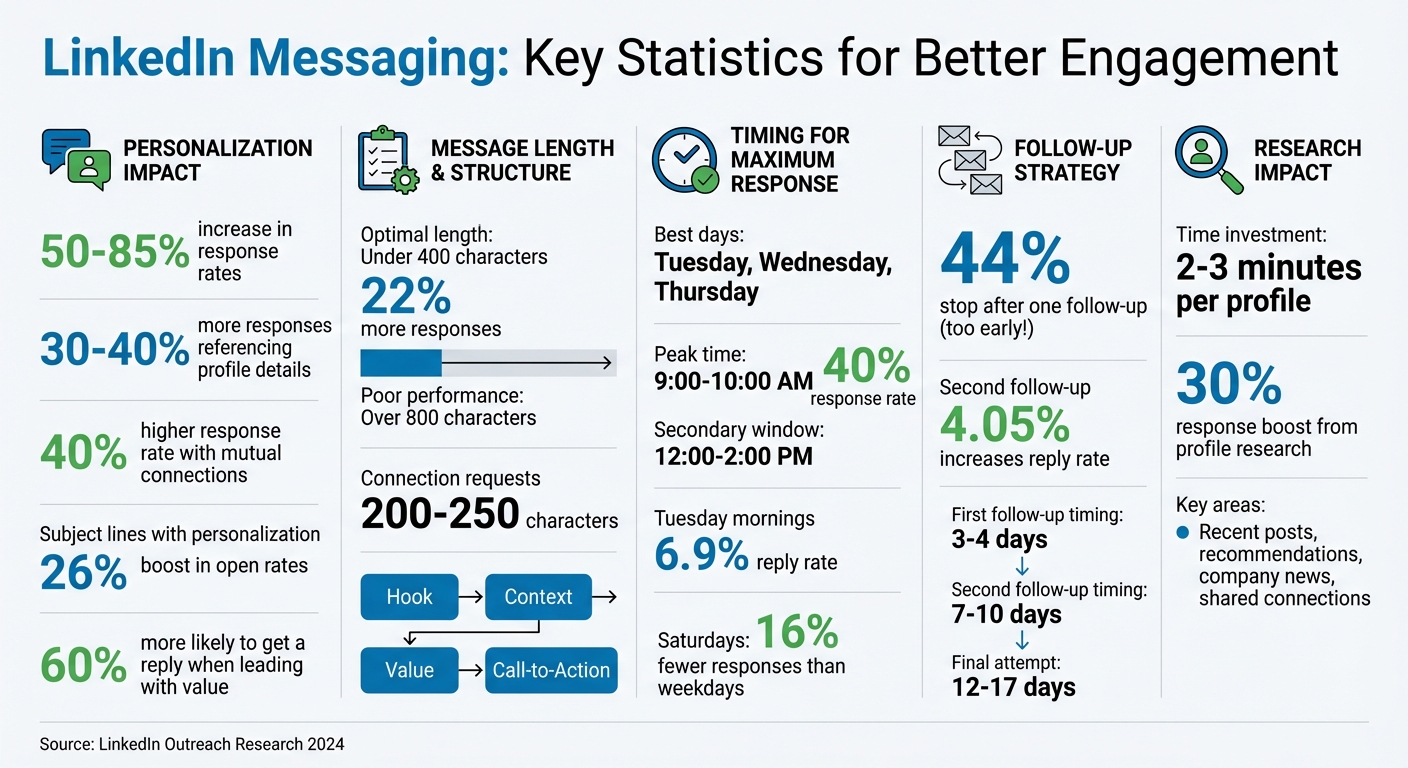
- Research before messaging: Spend 2-3 minutes reviewing their profile. Look for recent posts, promotions, or shared connections. Messages referencing this info get 30-40% more responses.
- Write concise messages: Keep them under 400 characters. Use a simple structure: Hook (personalized detail), Context (why you’re reaching out), Value (what you’re offering), and a clear Call-to-Action.
- Timing matters: Send messages during peak LinkedIn activity - Tuesday or Wednesday mornings for the best results.
- Follow up strategically: Don’t stop after one message. A second or third follow-up increases reply rates by up to 4%.
Tools like Brandbase can help scale your outreach without losing the personal touch by combining AI-driven research with human oversight. Ultimately, the goal is to build meaningful professional connections, not just chase leads.
LinkedIn Message Engagement Statistics and Best Practices
LinkedIn Messages That Get Responses // How to Write LinkedIn Messages That Actually Get Read
Research Your Recipient Before Messaging
Before you hit "send" on a LinkedIn message, take just 2–3 minutes to review the recipient's profile. This small effort can boost your response rate by 30% [1]. A thoughtful, well-researched message is far more likely to spark a meaningful conversation. Here's how to make the most of your review by focusing on key sections of their profile.
Start with their headline and About section. These areas often highlight what they value most in their professional life. For instance, if their headline says, "Helping SaaS companies scale through data-driven marketing", you’ve immediately got a clue about their focus - perfect for tailoring your message. Then, check their recent activity, like posts, comments, or articles they’ve shared. Referencing a recent post shows you’re paying attention and engaged with their work.
Don’t skip the Recommendations section either. It offers unique insights into their strengths and work style. Michael Pici, Director of Sales at HubSpot, emphasizes this point:
"Reading the 'Recommendations' section of a buyer's profile is one of the best ways to learn more about them" [3].
Review LinkedIn Profiles for Key Information
Your mission during this profile review is to find 2–3 specific details you can personalize in your message [1]. Look for recent promotions, job changes, or company milestones such as funding rounds or product launches. Timing your message around these events adds relevance. Educational background and shared interests can also create an instant connection - like discovering you attended the same college or studied similar subjects.
| Profile Detail | What to Look For | Why It Matters |
|---|---|---|
| Recent Post | Specific points made in posts or comments | 30% higher response rate [1] |
| Mutual Connection | Shared contacts | 40% higher response rate [1] |
| Recommendations | Skills and strengths highlighted by colleagues | Builds high trust and credibility [3] |
| Company News | Funding rounds or product launches | Demonstrates business relevance [1] |
| Shared Group | Discussions from mutual LinkedIn groups | Establishes common ground [1] [4] |
Once you’ve identified these personalized details, take your research a step further by focusing on shared connections and interests.
Reference Shared Connections and Interests
Bringing up a mutual connection in your message isn’t just polite - it’s powerful. Messages that reference shared connections see a 40% higher response rate [1]. Bailee Abell from Nutshell explains:
"It's often easier to strike up a conversation with a stranger if there's someone else who can vouch for you" [4].
When you mention a mutual contact, be specific. Instead of saying, "I see we both know John Smith", try something like, "We’re both connected to John Smith - I worked with him at ABC Corp in 2023, and he spoke highly of your expertise in marketing automation." This level of detail adds credibility and makes your outreach feel more genuine.
Beyond professional connections, shared interests - like participation in the same professional groups, volunteer work, or similar educational experiences - can make your message even more relatable. By highlighting these authentic connection points, you shift the tone from a cold pitch to the beginning of a meaningful professional relationship.
Armed with these insights, you’ll be ready to craft messages that resonate with your recipient’s professional story and stand out in their inbox.
How to Write Effective LinkedIn Messages
After putting in the effort to research your recipient, it’s time to craft a message that stands out. A great LinkedIn message combines a subject line that grabs attention, a concise and engaging body, and a clear call-to-action. Let’s dive into how to nail each part.
Write Subject Lines That Get Opened
The subject line is your first chance to make an impression, and it often determines whether your message gets opened. Think of it as a headline - short, direct, and intriguing. Maire O’Connor, Executive Talent Researcher at HubSpot, shares this advice:
"The best advice I ever received was to keep the subject line short and punchy. I like to put on my candidate hat and ask myself what would make me want to open a message." [5]
Subject lines that work well often highlight a clear connection, like "Following Up from Last Night's Event" or "Fellow Marketing Manager Seeking Advice." Questions can also pique curiosity, such as "Quick question about your [Topic] post" or "How do you approach [specific challenge]?"
Personalization is key - subject lines that reference something specific about the recipient, like a recent post or a shared connection, can boost open rates by 26% [1]. On the flip side, avoid vague or generic phrases like "Hello" or "I came across your profile", which might come across as impersonal or spammy.
Structure Your Message Body
Once your message is opened, it needs to deliver value quickly. The most effective LinkedIn messages follow a simple structure: Hook, Context, Value, and Call-to-Action. This approach helps keep your message concise and impactful. Research shows that LinkedIn messages under 400 characters get 22% more responses, while longer messages over 800 characters tend to underperform [5].
Start with a Hook that shows you’ve done your homework. Mention something specific about the recipient - a recent post, a promotion, or a mutual connection. For example:
"I really enjoyed your post on data-driven marketing last week - it gave me some great ideas to consider."
Next, provide Context to explain why you’re reaching out. Be clear and direct about your reason:
"I’m working on scaling SaaS marketing strategies and would love to hear how you approach it."
This keeps the message relevant while avoiding a self-centered tone.
Then, offer Value. Share something helpful, like a resource, insight, or thoughtful compliment. Messages that lead with value are 60% more likely to get a reply [1]. For example:
"I recently came across a report on scaling marketing campaigns that I think you’d find useful - let me know if you’d like me to share it."
Keep the tone conversational and avoid overly formal language. Short paragraphs (1–2 sentences) make the message easy to read. Maria Mencias, Lead Recruiter at Okta, emphasizes the importance of personalization:
"You never want someone to think they're getting spammed. A few personalized touches really help make your message feel tailored to them." [5]
Once you’ve established value and context, it’s time to guide the recipient toward the next step.
Include Clear Calls-to-Action
Every LinkedIn message should end with a clear, low-pressure call-to-action. Avoid vague requests like "Let’s connect" and instead ask specific, open-ended questions that encourage dialogue, such as:
"How, if at all, are you tackling [specific challenge] this year?" or "Is [topic] something you’re focusing on right now?"
Alternatively, propose a simple action:
"Would you be open to a 15-minute call next week to discuss this?" or "Can I send you that resource I mentioned?"
The key is to align your ask with the nature of your relationship. Cam Pezet, Senior Recruiter at Nike, advises:
"Make sure that whatever skill or accomplishment you recognize aligns with why you're reaching out. Otherwise, it may cause confusion and drive a potential candidate to not respond." [5]
Your call-to-action should feel like a natural extension of the value you’ve provided. For instance, if you’ve highlighted their expertise in a specific area, ask a related question. If you’ve mentioned a mutual connection, suggest a quick introductory call. This approach ensures your message feels thoughtful and genuine rather than transactional.
sbb-itb-f7e72a6
Scale Your LinkedIn Outreach with Brandbase

When it comes to scaling your LinkedIn outreach, the challenge lies in striking a balance between efficiency and personalization. Crafting individual messages for every prospect is time-intensive, while generic templates often feel cold and robotic. That’s where Brandbase steps in, offering a smart blend of AI-driven automation and human touch to help you connect authentically at scale.
Automate Personalized Outreach Campaigns
Brandbase leverages AI to streamline outreach while maintaining a personal touch. Its AI agents dig into LinkedIn profiles, recent activity, and company details to craft messages that feel genuinely tailored. This allows you to reach hundreds of prospects daily without sounding like a bot. Daniel Saks, CEO of Brandbase, highlights the importance of this approach:
"Effective personalization goes beyond inserting a prospect's name - it requires researching their recent activity, understanding their challenges, and crafting messages that demonstrate genuine value." [2]
To keep your outreach aligned with your voice, Brandbase starts by conducting voice interviews to capture your unique style. From there, the AI drafts messages based on triggers like a prospect’s new post, hiring updates, or company changes. These drafts are then reviewed by humans to ensure they remain on-brand and resonate with the recipient. This hybrid approach lets AI handle the heavy lifting - like research and initial drafts - while you retain control over the final message.
Brandbase also taps into GTM Intelligence to add even more depth to your outreach. By analyzing a prospect's tech stack, market position, and recent initiatives, the platform enables you to reference specific details, such as a recent earnings call or product launch. This level of detail makes your messages especially engaging for decision-makers at higher levels.
While automation can help you scale, focusing on qualified leads ensures your efforts yield meaningful connections.
Use AI to Qualify Leads
Not all leads are created equal, and spending time on low-quality prospects can drain your resources. Brandbase’s AI assistant helps you avoid this by identifying and prioritizing high-quality leads. It evaluates profile signals, role-specific needs, and behavioral triggers to recommend the best audiences and messaging strategies.
The platform also tracks prospect activity, such as profile views, content engagement, or job changes, and sends timely follow-ups based on those actions. For instance, if someone views your profile or interacts with your content, the system can automatically send a personalized message referencing that engagement.
Brandbase even supports multi-threading for enterprise accounts. This feature allows you to reach multiple stakeholders - typically 3–5 people - within the same company by tailoring messages to each individual. This strategy is particularly useful in B2B sales, where decisions often involve multiple players.
Daniel Saks captures the essence of Brandbase’s approach perfectly:
"The key lies in balancing automation with human insight to create messages that resonate with each recipient's specific situation and needs." [2]
When to Send Messages and How to Follow Up
Send Messages During Peak Activity Hours
Timing is everything when it comes to LinkedIn outreach. Research shows that sending messages between 9:00–10:00 AM on weekdays can result in response rates as high as 40% [10]. Mid-morning is a sweet spot - professionals often check LinkedIn between meetings or while enjoying their coffee. Another window to consider is lunchtime (12:00 PM to 2:00 PM), when people tend to scroll through their feeds during breaks [6][7].
In terms of days, Tuesday, Wednesday, and Thursday outperform the rest, with Tuesday mornings achieving an impressive 6.9% reply rate [4]. Mondays are less effective since inboxes are often flooded with tasks from the weekend, and Fridays see people shifting their focus toward wrapping up for the week. Messages sent on Saturdays perform even worse, receiving 16% fewer responses compared to weekday outreach [8].
If you’re contacting prospects across different time zones, adjust your schedule so your messages reach them during their local business hours. For example, aim for early morning in New York and midday in London [6].
Getting the timing right lays the groundwork for successful follow-ups.
Track Responses and Adjust Your Strategy
Following up is key to turning initial outreach into meaningful engagement. Once you've sent your message at the right time, pay attention to how recipients respond and tweak your approach accordingly.
Interestingly, nearly 44% of outreach efforts stop after just one follow-up [11], but the real magic often happens with the second or third touchpoint. In fact, a second follow-up can increase reply rates by 4.05% compared to the initial message [9]. A good rule of thumb is to wait 3–4 days after your first message to send your first follow-up, and then wait 7–10 days before trying again [9].
"LinkedIn's inbox functionality is quite basic, which makes it easy for messages to get buried. Similar to email forwarding, a follow-up message effectively brings your original message back to the top of the recipient's inbox." - Laura Hannah, Founder of Pitch121 [9]
To refine your strategy, monitor metrics like open rates, replies, and ignored messages. Adjust elements like your subject lines, tone, and calls-to-action based on these insights. If you notice someone views your profile but doesn’t respond, treat it as a sign of interest and follow up within 2–3 days with a message referencing their activity [11].
If your efforts still don’t yield a response after 12–17 days, consider sending a final "break-up" message. This last attempt, where you let them know you’ll stop reaching out, often prompts a reply from busy prospects who may have been interested but preoccupied [4].
Conclusion
Successful LinkedIn messaging hinges on thoughtful research, personalization, and strategic follow-up. Taking just 2–3 minutes to explore a prospect's profile, recent activity, or company updates can provide the insights you need to create messages that feel personal and authentic - not robotic or canned [1]. Since most connection requests lack a personal touch, even small efforts to reference specific details can make a big difference [2].
Message structure plays a key role as well. Keep your connection requests concise - around 200–250 characters - and follow a clear framework like Hook-Context-Value-CTA to ensure your message stays focused and engaging [2] [12]. Personalized messages can boost response rates by 50–85% compared to generic templates, especially when you reference something recent or relevant from the recipient's activity [1]. Timing and persistence also matter in this equation.
For the best results, send messages on Tuesday or Wednesday mornings between 10:00 AM and 12:00 PM, and always follow up at least once. Many meaningful conversations happen because of consistent follow-up [9].
To expand your personalized outreach while maintaining quality, tools like Brandbase can help. Their Pro plan offers unlimited LinkedIn lead generation campaigns, along with services like landing pages, PR placements, and SEO content. By combining AI-driven research with human oversight, they ensure your messaging remains authentic and true to your professional voice, even as you scale your efforts.
Ultimately, LinkedIn outreach should focus on building relationships, not just chasing leads. As Zivko Dodovski, CEO of DoneMaker, wisely states:
"People respond best when they feel respected as professionals, not targeted as leads" [1].
FAQs
What’s the best way to personalize LinkedIn messages?
To craft LinkedIn messages that truly resonate, focus on making them feel personal and authentic. Start by doing a little homework on the person you're reaching out to - check out their recent posts, shared connections, or any professional achievements they’ve highlighted. Mentioning something specific, like a project they’ve worked on or an article they’ve been featured in, shows you’ve taken the time to learn about them.
Keep your tone friendly yet professional. Open with a warm greeting, use their name, and clearly explain why you're reaching out. Offer something valuable, whether it’s a way you can assist them or a shared interest you’d like to discuss. Wrap up your message with an open-ended question to invite a response. Personalized and thoughtful messages stand out far more than generic ones, increasing the likelihood of building meaningful connections.
When is the best time to send LinkedIn messages for better engagement?
The ideal times to send LinkedIn messages are usually 9:00 a.m. to 11:00 a.m. or 1:00 p.m. to 2:00 p.m., based on the recipient's local time. These windows often coincide with the hours when professionals are most active and responsive during their workday.
It's best to stick to Tuesdays, Wednesdays, or Thursdays for higher engagement. Steer clear of weekends or late-night hours, as people are less likely to respond during these periods.
How does Brandbase make LinkedIn outreach more personalized?
Brandbase takes LinkedIn outreach to the next level by turning your personal voice into customized, heartfelt messages. Through detailed interviews, their team gets to know your tone, values, and story, using this insight to guide AI tools in creating outreach messages that feel natural and specifically crafted for each recipient.
What sets Brandbase apart is its use of AI-powered research to include personalized touches, like referencing a prospect’s recent accomplishments, mutual connections, or updates about their company. Paired with carefully planned multi-step outreach strategies, this method helps your messages grab attention, spark higher response rates, and foster genuine connections.
Related Blog Posts

Blog title heading will go here
Blog title heading will go here